fxDreema

    • Register
    • Login
    • Search
    • Back to the main page
    • Categories
    • Recent
    • Tags
    • Popular
    • Search

    Useful "Buffers explorer" indicator find :)

    Tutorials by Users
    5
    10
    4607
    Loading More Posts
    • Oldest to Newest
    • Newest to Oldest
    • Most Votes
    Reply
    • Reply as topic
    Log in to reply
    This topic has been deleted. Only users with topic management privileges can see it.
    • C
      CPxiom last edited by

      Found a useful indicator for fxdreema users, called Buffers explorer.
      We can see buffers for chosen indicator, in separate subwindow.

      I find it very useful, thought to share.

      Buffers explorer.mq4

      1 Reply Last reply Reply Quote 1
      • l'andorrà
        l'andorrà last edited by

        Interesting. I will take a look on it.

        (English) I will try to help everyone in these fxDreema forums. But if you want to learn how to use the platform in depth or more quickly, I can help you with my introductory fxDreema course in English at https://www.theandorraninvestor.eu.

        (Català) Miraré d’ajudar tothom en aquests fòrums d’fxDreema. Tanmateix, si vols aprendre a fer servir la plataforma amb més profunditat o més de pressa, t’hi puc ajudar amb el meu curs d’introducció a fxDeema en català a https://www.theandorraninvestor.eu/ca.

        (Español) Intentaré ayudar a todo el mundo en estos foros de fxDreema. Sin embargo, si quieres aprender a usar la plataforma en profundidad o más deprisa, te puedo ayudar con mi curso de introducción a fxDreema en español en https://www.theandorraninvestor.eu/es.

        1 Reply Last reply Reply Quote 0
        • P
          paragorundu last edited by paragorundu

          Hello @CPxiom ,

          I've checked the indicator, it is very useful. Formarly I was creating EAs to read buffer values but this is a better solution.

          Indicator also draws lines using past values which provides a good picture. That's the most I like.

          Thanks for sharing.

          Regards.

          T C 2 Replies Last reply Reply Quote 0
          • T
            trader.philipps @paragorundu last edited by

            @paragorundu yepp, just a pity that it's limited to 3 buffers.

            I like to share my knowledge, but expect the others to contribute as well.

            1 Reply Last reply Reply Quote 0
            • C
              CPxiom @paragorundu last edited by

              @paragorundu , @trader-philipps ... This indicator is just to see what buffer does what. You still have to make the EA read the buffers of the original indicator... Or maybe I misinterpret what you say.
              I usually go with one buffer at a time, where in doubt, to see the buffer I look for.

              T 1 Reply Last reply Reply Quote 0
              • T
                trader.philipps @CPxiom last edited by

                @cpxiom Yes, the intention of the indicator is to monitor 3 buffers from a named indicator and display their numeric values as a line in the indicator window!

                However, there are indicators that have their buffers not named and you need to guess what each of them mean. Further some indicators have more than 3 buffers and you need to handle the monitoring several times.
                Furthermore some buffers are only filled with a value, when a special condition is met. If it's not met, the value is empty.

                So my comment just stated that it is a pity that you can only specify 3 buffers to display. I'd wish that the indicator would auto-discover the buffers and display them.

                I like to share my knowledge, but expect the others to contribute as well.

                C 1 Reply Last reply Reply Quote 0
                • C
                  CPxiom @trader.philipps last edited by

                  @trader-philipps Yes, you're right 🙂
                  @paragorundu wrote that "Formarly I was creating EAs to read buffer values but this is a better solution" so I thought the intention was to use the buffer values from this indicator to create an EA..

                  I looked at the indicator code and it was really easy to modify. I've put here 10 buffers. If more needed, let me know. I'm not a programmer, just learning...
                  Didn't test this, but it should work. Buffers explorer.mq4

                  P 1 Reply Last reply Reply Quote 2
                  • P
                    paragorundu @CPxiom last edited by

                    @cpxiom yes you are right. But to see which buffer provides what information I was using that method 🙂

                    BTW, thanks for the increased buffer version of the indicator 😉

                    1 Reply Last reply Reply Quote 0
                    • C
                      CaesarCrypto last edited by

                      Hi everyone,

                      I'm trying to add an .ex4 indicator to my system, so I can't see the code to determine the buffers. Then I found this thread and I downloaded this buffers explorer indi but it doesn't seem to work for me.
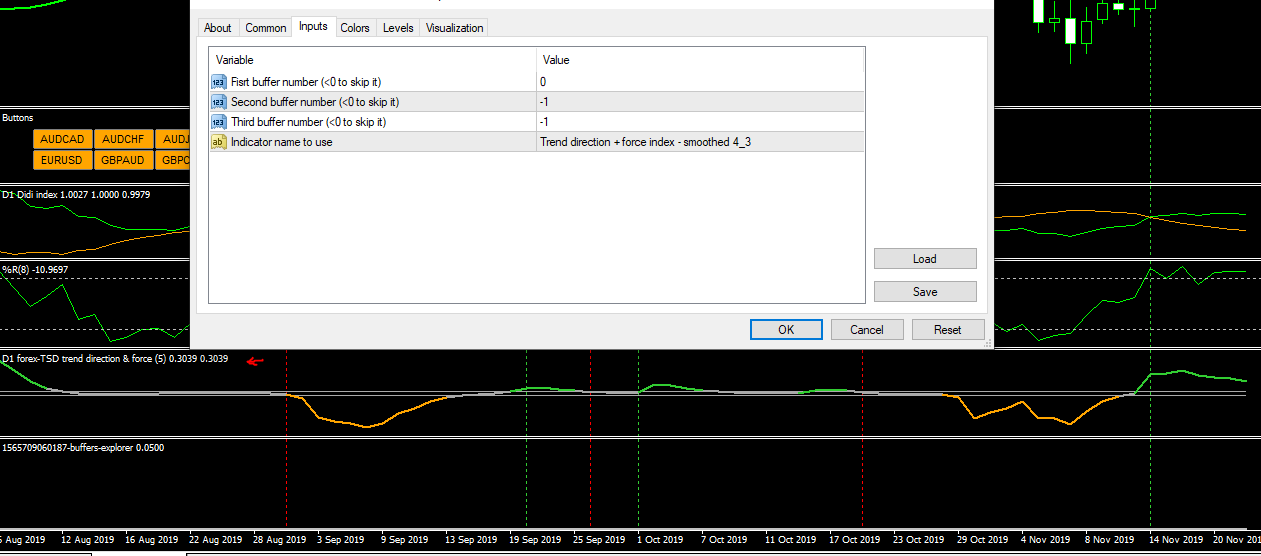
                      It open an empty indicator window nothing more as you can see in the image below.

                      These are my settings:

                      0_1574374755734_9dcda6f2-22a1-45a4-85f0-b9c6dfcf4d98-image.png

                      The indicator's filename is "Trend direction + force index - smoothed 4_3"

                      Am I doing something wrong?

                      Thanks!

                      C 1 Reply Last reply Reply Quote 0
                      • C
                        CPxiom @CaesarCrypto last edited by

                        @caesarcrypto When you load the ex4 indicator, check the colors tab.
                        Those are the displayed buffers.
                        This indicator is useful when same color is assigned to more than one buffer, and so on. It should display the buffer with gray line. If nothing is shown, it is possible that it is empty value.
                        Proceed to the next buffer. Instead of buffer 0, write 1, then 2, etc... -1 means it should not track buffer there.
                        Otherwise, everything looks ok, as how you did.

                        1 Reply Last reply Reply Quote 0
                        • 1 / 1
                        • First post
                          Last post

                        Online Users

                        P
                        B
                        S
                        S
                        T
                        F
                        I
                        S
                        S
                        G

                        22
                        Online

                        146.6k
                        Users

                        22.4k
                        Topics

                        122.6k
                        Posts

                        Powered by NodeBB Forums | Contributors