EXPORTAR VENTANA DE DATOS
-
HELLO,
It would be possible to perform an ea, which exports the data window to a csv file
What interests me is to get the data, of my indicators along with those of the candles, to be able to study it later with excel.
thank you -
I guess it should be possible, but I'm afraid I have no idea how to do it? Anyone else can give some help?
-
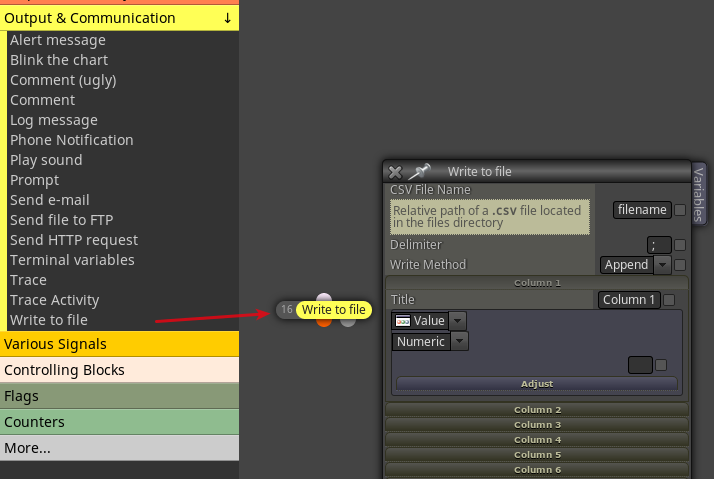
@cesardefez There is a write to file block that you may investigate. I haven't used it yet, but sounds to point in the right way.
-
I tried it once long time ago and I remember it was very disappointing. I tried to export my data to an EXCEL file and it was a mess. But hey, maybe there is a better version now...
-
@l-andorrà
Based on what I requested, I created the following list of blocks; to me it works perfectly! -
@bigape Good to know and thanks for the feedback!
-
Interesting. Could you import the resulting csv file into MS EXCEL?
-
@l-andorrà
Yes, of course. Before convert it in .txt file, then import/convert it in Excel format. -
PERFECT.
Thank you very much, it was just what I was looking for.
The only downside is that it only lets me export 10 columns.
but I suppose that in overwrite mode, I will export all the history of your candles.
If I execute 3 EAs with 10 rows exported, then it would be a matter of pasting rows in Excel, since each EA should export the same number of candles (lines) and should order them.
I will try it. -
@cesardefez
Exactly! -
Ok. Thanks for the info ;).
-
Hi.
I have tried and we have problems.
It only works in real time:
with the strategy tester I don't create the file.
live, with connection (demo or real), write me the current candle.
In short, either in the strategy tester or direct in graphics, I cannot extract historical data.
it doesn't matter if you set it in add or rewrite mode.
If you find the solution, you already commented. Thank you -
@cesardefez
It must work both in demo and in real accout, the same applies to offline / realtime condition.Have you tried searching for the generated file in the Tester / Files directory?
-
@cesardefez
@cesardefez
solved
if it works, but when using the strategy tester, save it in the folder \ Users \ Cesar \ AppData \ Roaming \ MetaQuotes \ Terminal \ (terminal folder) \ tester \ files
In my case I created two folders with the same ea,
https://fxdreema.com/shared/WpkzQWDPb
Thanks for your help.

