Average price stop-loss order for a group of trades.
-
I’ve made an EA that places four buy orders above the market, but I can’t get the EA to place a stop-loss order at the average buy price.
I need one stop-loss order at the average price whether I have two entry points , three entry points, or four entry points. Every time the market hits another buy stop I want the EA to move the stop-loss accordingly to my new average buy price.
I also need to be able to move the stop-loss for all four buy stops by moving the red stop-loss line on my chart once. I need one stop-loss order for 4 units, not four stop-loss orders for 1 unit.
Please help me figure this out. Thank you.
(I tried to upload a screenshot of my EA, but it didn't work)
-
Please go to the builder and then:
Projects --> Create a shared link --> select the link and a new browser tap will open with your project --> Copy the URL here.
That's much better than a screenshot.
-
@l-andorrà Thank you for your help. I really appreciate it!
-
It doesn't work because you are using the 'On Init' tab only. That means all oyur blocks will be executed just once and never again. I recommend you to move all of them to the 'On tick' tab.
-
I'm sorry for my delayed response. I was out of town.
But if I use the "on tick" tab then the EA will be constantly putting out buy orders. I only want four buy orders to be placed.
Is there anyway to use both the "On Init" tab and the "On tick" tab in one EA?
Thank you again for your help. This problem is really stressing me out.
-
Follow the suggestion given by @l-andorrà.
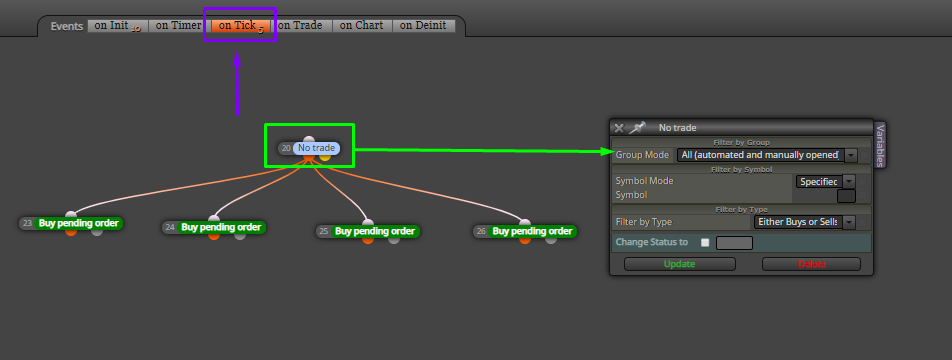
To avoid opening more trades of that you want, you have to set which trades do you want to look at with the "No position" block
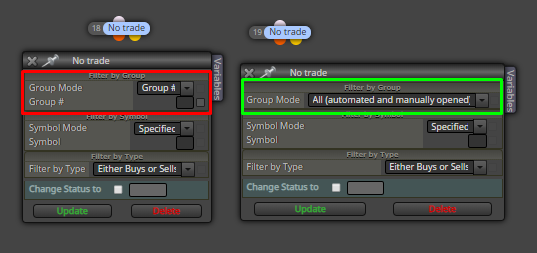
"Group Mode = Group #" looks for the the trades that match with the group number specified. If the field Group # is not filled, there is no trade to look at.
"Group Mode = All" looks for any trade that is currently running.
-
@josecortesllobat Thank you for the suggestion.
How do I use the "no trade" block to make sure I only place four buy orders?
Where do I attach the "no trade" block?
-
-
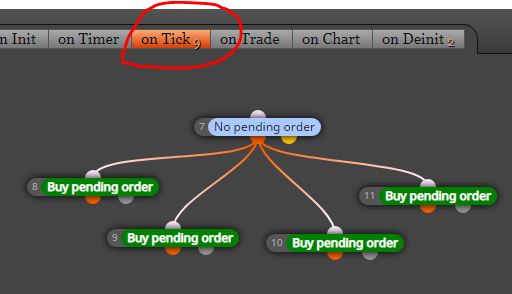
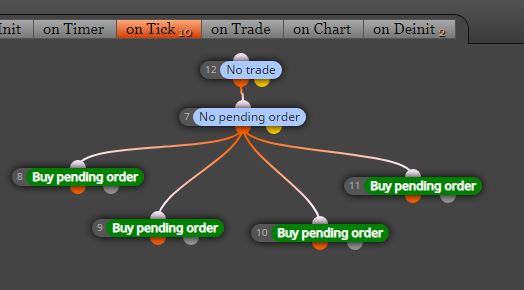
@josecortesllobat It should be added on top the "no pending orders" block
-
@ambrogio You are correct but it depends on what @Dan-2 wants to get.
From the project shared by @Dan-2,
If "No trade" is running, run true output and place 4 buy pending orders
But if it wants to look at the pending orders as well, it is required an additional block like as follows
If "No pending order" & "No trade" is running, run true output and place 4 buy pending orders
So, it depends on what needs to be met.
-
@josecortesllobat said in Average price stop-loss order for a group of trades.:
@ambrogio You are correct but it depends on what @Dan-2 wants to get.
From the project shared by @Dan-2,
If "No trade" is running, run true output and place 4 buy pending orders
Yes, but @Dan-2 complained that with "no trade" had multiple pending orders, so I suggested the "no pending orders"
If you only place "no trade" ==> "buy pending orders" (and that's what @Dan-2 did), you will have endless pending orders -
-
@josecortesllobat and @ambrogio Thank you both so much for your help! I really appreciate it!
I will try your suggestions and let you know how it goes.