create custom block
-
hello
i was just wondering if it is possible to keep the custom indicator in one file.
i am using 2 custom indicators and i would really love to keep them in one code/file (main ea code) instead of sending the indicators along with the indicators.
s is it possible to achieve this using the " create custom block" option and pasting the source code of the indicator there somehow ?
i have been thinking about this for quite some time and its driving me crazy. -
I'm not a programmer, so my opinon is not very valuable, but my intuition says that it would not be a problem initially. However, I'm sure that ultra complex indicators can be tough to 'insert' that way.
Just my cent.
(English) I will try to help everyone in these fxDreema forums. But if you want to learn how to use the platform in depth or more quickly, I can help you with my introductory fxDreema course in English at https://www.theandorraninvestor.eu.
(Català) Miraré d’ajudar tothom en aquests fòrums d’fxDreema. Tanmateix, si vols aprendre a fer servir la plataforma amb més profunditat o més de pressa, t’hi puc ajudar amb el meu curs d’introducció a fxDeema en català a https://www.theandorraninvestor.eu/ca.
(Español) Intentaré ayudar a todo el mundo en estos foros de fxDreema. Sin embargo, si quieres aprender a usar la plataforma en profundidad o más deprisa, te puedo ayudar con mi curso de introducción a fxDreema en español en https://www.theandorraninvestor.eu/es.
-
@l-andorrà yes one of the Indicstors is really complex, and if it's possible then it would save me lots of trouble, cuz there is not way to keep the strategy safe, if I want to give the ea to someone with indicators, the strategy can easily be figured out
-
I found this on the MQL forum i have never done it but it might help https://www.mql5.com/en/articles/1457 - Example from another post https://www.mql5.com/en/forum/214126
//+------------------------------------------------------------------+
//| SampleEA.mq5 |
//| Copyright 2013, MetaQuotes Software Corp. |
//| https://www.mql5.com |
//+------------------------------------------------------------------+
#resource "\Indicators\SampleIndicator.ex5"
int handle_ind;
//+------------------------------------------------------------------+
//| Expert initialization function |
//+------------------------------------------------------------------+
int OnInit()
{
//---
handle_ind=iCustom(_Symbol,_Period,"::Indicators\SampleIndicator.ex5");
if(handle_ind==INVALID_HANDLE)
{
Print("Expert: iCustom call: Error code=",GetLastError());
return(INIT_FAILED);
}
//--- ...
return(INIT_SUCCEEDED);
} -
@hadees thanks a lot
this looks helpful i am gonna have a look at it and i hope i can make any sense out of it -
@hadees apparently the example in this article is how to embed the indicator directly in to the code of the ea , which is way to confusing and difficult for a person who knows nothing about the coding , thats why i was wondering if it can be done via a custom block in fxdreema , because doing it via fxdreema seems much more easier than doing it in the code , because the source code from fxdreema ea is way too confusing if a person have no understanding of the coding
-
@zackry if you look at that post from mladen i think it is really useful. Compare the code from the examples and then just add the changes into your mql4 file from fxdreema. I think you can just add the resource at the top and then use ctrl+f , enter the name of your indicator/ icustom and then add the extra code wherever you see it listed. i will try it with one of mine and report back later.
-
@zackry I tried it out and it works if you just add this at the top of the Project mql4 file renaming it with your indicator and change ex4/ex5 if necessary. #resource "\Indicators\SampleIndicator.ex5"
int handle_ind;And then use ctrl+f (search indicator name) - update the name with this wherever it appears "::Indicators\SampleIndicator.ex5" (Change the indicator name / ex4 if it is for mt4) - Compile it and then test.
Since you will be using it as a resource you should apply constants to it or whatever so you can adjust it easily after adding this. Let me know if you get stuck and i can try do it for you.
I have no idea why but the forum is formatting the double \ into just one so make sure you are adding 2 or just copy from the example in the forum.
-
@hadees i also always wanted to do this, does this also work the same way in mt4 or i suppose a different code?
-
@fabien-s Yeah Bro i only tested on mt4 i don't have 5 . Just add the resource and then rename the indicator name and change ex5 to ex4 wherever it appears
https://www.mql5.com/en/forum/214126
Add this.. mine is under global variables no idea if it should be there but it works lol .http://icecream.me/1f6ba904ad419e3a4bcf8f906b599889
then ctrl+ f search your indicator name and change with this http://icecream.me/f59ea60efa38767ad8e68ab3db2e5f64
-
@hadees said in create custom block:
@fabien-s Yeah Bro i only tested on mt4 i don't have 5 . Just add the resource and then rename the indicator name and change ex5 to ex4 wherever it appears
https://www.mql5.com/en/forum/214126
Add this.. mine is under global variables no idea if it should be there but it works lol .http://icecream.me/1f6ba904ad419e3a4bcf8f906b599889
then ctrl+ f search your indicator name and change with this http://icecream.me/f59ea60efa38767ad8e68ab3db2e5f64
Excuse the ignorance, but in this way the indicator must be present in the indicators folder or am i wrong?
-
@ambrogio You compile it in the editor that has the indicator and then the ex4 it produces will have it embedded as a resource. You can use that without it. try it out let us know

-
@hadees ok, talk later

-
@hadees thanks bro , unfortunately its a lot information for a noob like me , but i think i am starting to understand the concept of the post you shared ,
whenever i open the mq4 file in the metaeditor , all hell break lose ,
i am gonna go through the post again and again a few more time to fully understand the idea , then i am gonna bother you again with a few questions
anyways thank you , i highly appreciate your help
cheers -
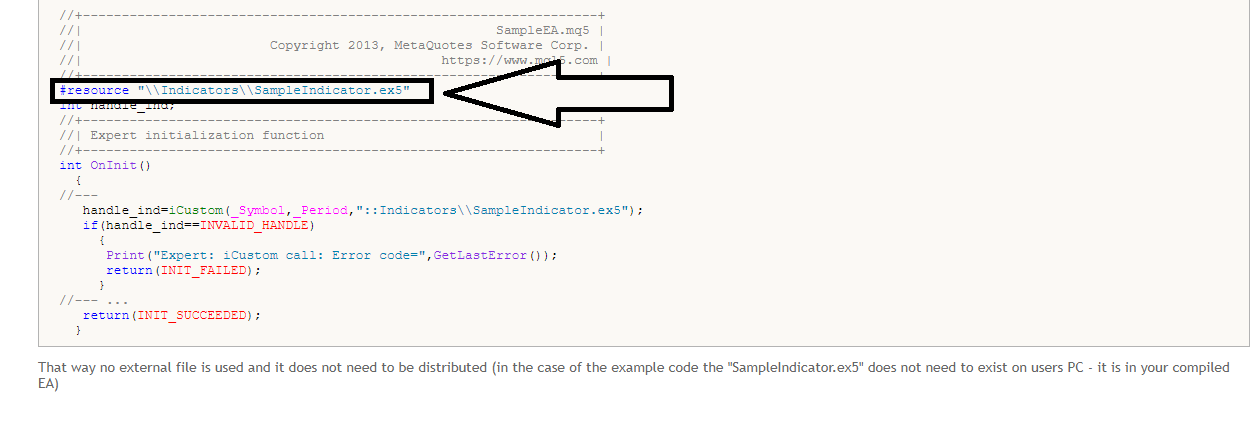
bloody hell ......i dont know how i missed this line before , by the looks of it , this line should include the whole source code in the compiled file by itself , right ? -
@zackry ok mate you will get it !. Basically you are adding the resource code to your project
 and then renaming every instance of your indicator so it uses the resource.
  https://docs.mql4.com/runtime/resources .
 -
@zackry said in create custom block:
bloody hell ......i dont know how i missed this line before , by the looks of it , this line should include the whole source code in the compiled file by itself , right ?from what I understand yes
-
@ambrogio bro, I don't know what I was smoking when I first went through the post
 I didn't noticed that line of code at all
-
@zackry said in create custom block:
@ambrogio bro, I don't know what I was smoking when I first went through the post
I didn't noticed that line of code at all Ahaahhaah

-
@hadees bro you are a life saver, this problem has been bugging me for ages, thanks again I will try it and let you guys know for sure


