Hi, Can anyone help me to creating 'pending order' based on TP of my last closed trade,please?
-
I know that this topic was already posted by ''BlueMoon'' and ''miro1360''.
I would like to set a pending order exactly at TP of my last closed trade. I tried to figure out how they have done it but I am struggling with ''variables''. I haven't got a clue what to put in variables block and where and when should I use it. I have learnt how to create EA based on indicators and some other stuff but ''variables'' are really magic for me.
Can you please help me how to do it, please?
Best regards,
Jarek -
Sure. No problem. I will help you. Do you have any initial project to begin with?
-
@l-andorrà
Hello, thank you very much for replying to me. I am currently abroad and I don't have access to my laptop. I am coming back home on 8th. I will contact you straight away OK.
Best regardsJarek
-
No problem. I'll be here then

-
Hello,
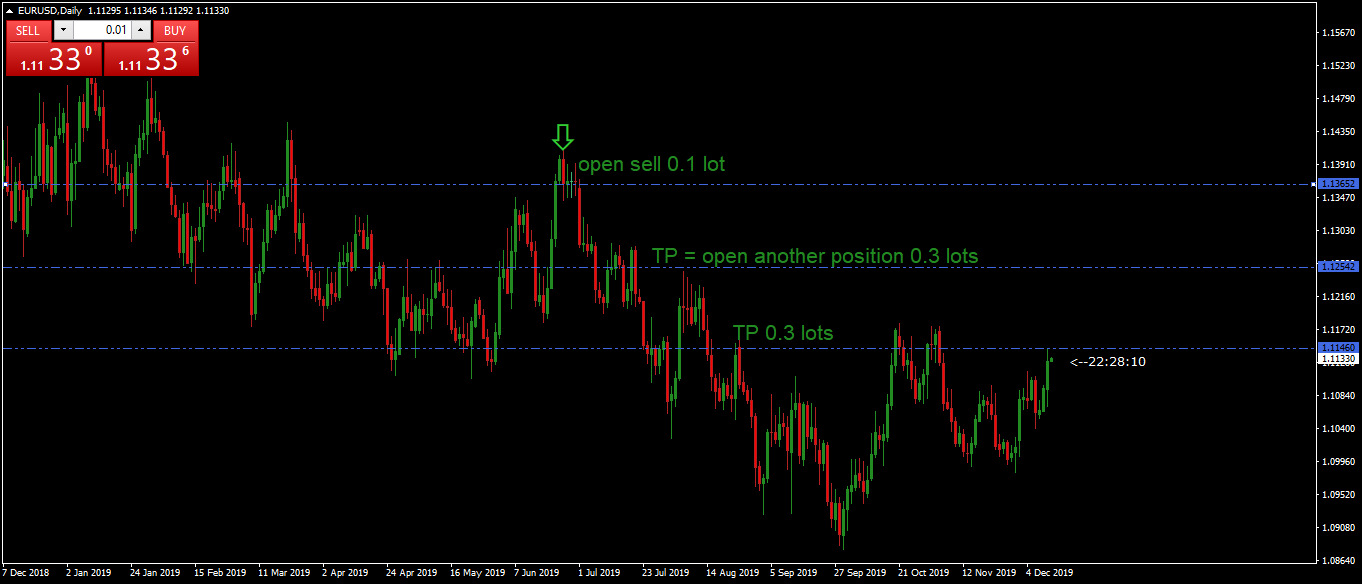
I would like an order to be triggered by e.g. cross two MA or some other indicator set up (could be anything) then if the order is closed in profit e.g. 20 pips open another position exactly at TP of that last closed order with the same direction, 20 pips profit multiplied by 3.
e.g.
1st order triggered by MA X
Sell EURUSD 1.100, 0.2 lot
TP 1.08
SL 1.12
2nd - pending order open at 1.08, 0.6 lot
TP 1.06
SL 1.10Thank you!
Jarek -
How many orders and trades will be active at the same time? One trade and one pending order only, maybe?
-
@l-andorrà
Hi,
Only one trade active and one pending order, exactly as you have mentioned. -
You can try this for buys only. You will have to duplicate ot for sells.
-
@l-andorrà
Hi,thank you but I clicked on this link and there are only 2 blocks 4,5 trade closed and buy now. I tested but this is something else.
-
Will this screen help?
-
Did you see the other blocks on the 'On Tick' tab?
-
@l-andorrà
Hi,
No, only two blocks. ''trade closed'' and ''buy now'' -
Hi, I found this.
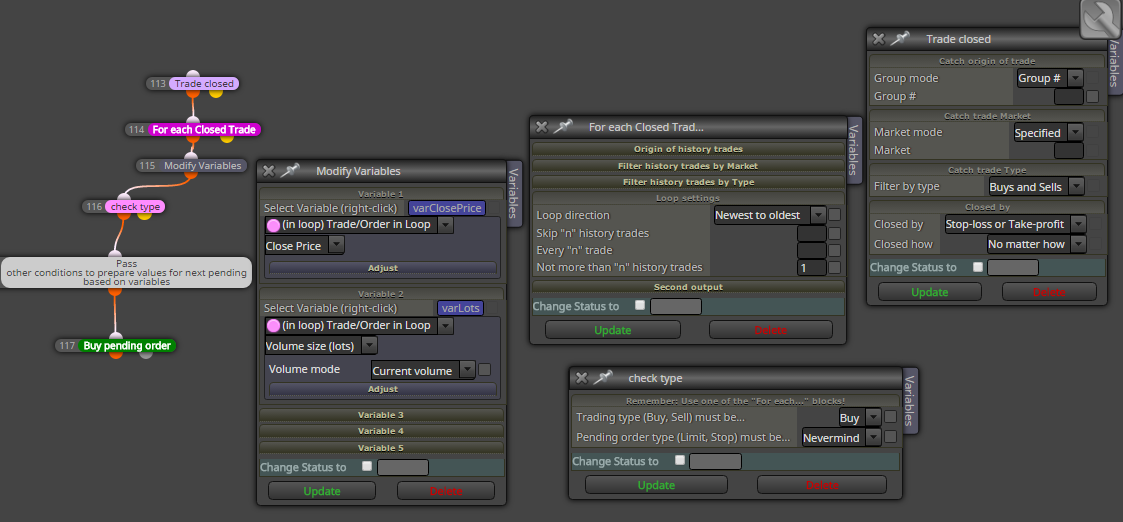
You see I can't find block ''trade closed'' and I don't know how to '' modify variables''-how to use it and block ''pass'', why do I use it, what is it for? -
Could you please look carefully at my example and chack that there are 5 blocks on it? Two of them are on the 'On trade' tab and another THREE on the 'ON TICK' tab. Could you please confirm you see them all?
-
Yes, you are right! There are three blocks 'on tick' tab. 'once per bar', 'condition', and ''buy now'
-
@l-andorrà said in Hi, Can anyone help me to creating 'pending order' based on TP of my last closed trade,please?:
You can try this for buys only. You will have to duplicate ot for sells.
Hi l'andorra, I want to ask you one question. In this on Trade event, if trade close with TP, buy a position is executed. I want to know how can we change TP level of this new BUY trade to TP level of previously closed order. (same amount in pips with closed orders TP) In take profit mode there is profit option but I did not understand how to use it
-
@rusen said in Hi, Can anyone help me to creating 'pending order' based on TP of my last closed trade,please?:
@l-andorrà said in Hi, Can anyone help me to creating 'pending order' based on TP of my last closed trade,please?:
You can try this for buys only. You will have to duplicate ot for sells.
Hi l'andorra, I want to ask you one question. In this on Trade event, if trade close with TP, buy a position is executed. I want to know how can we change TP level of this new BUY trade to TP level of previously closed order. (same amount in pips with closed orders TP) In take profit mode there is profit option but I did not understand how to use it
You need to store the price level of your previous trade into a double variable at the moment that previous trade is open. Then you can use that variable as the new TP fos the new one.
-
@l-andorrà
0_1576348157675_test.mq4Ok, I think I am halfway through. It opens another trade at the TP of the previous one but the problem is that opens more than one. Do you know how to modify to open only one?
-
Could you please share the project instead of exporting it? That way it's easier for everyone to take a look on it.
-
@l-andorrà
https://fxdreema.com/shared/aaP8PZbGd
sorry , I didn't know