fxDreema

    • Register
    • Login
    • Search
    • Back to the main page
    • Categories
    • Recent
    • Tags
    • Popular
    • Search

    TSV- Time Segmented Volume Indicator Not working

    Questions & Answers
    3
    12
    2244
    Loading More Posts
    • Oldest to Newest
    • Newest to Oldest
    • Most Votes
    Reply
    • Reply as topic
    Log in to reply
    This topic has been deleted. Only users with topic management privileges can see it.
    • E
      errinjm last edited by errinjm

      I am trying to get the Time Segmented Volume indicator to function and having trouble. As a condition I want a bullish trade to check if the TSV is greater than 0 and a bearish to check if TSV is a negative value. How would I do this? I added this as custom indicator by uploading the file.

      T 1 Reply Last reply Reply Quote 0
      • T
        trader.philipps @errinjm last edited by

        @errinjm Well, without knowing the indicator it's a bit hard to tell. Explore the buffers if available and choose the right one. You ma use the data window to explore the buffers.
        Then use a condition block.

        I like to share my knowledge, but expect the others to contribute as well.

        E 1 Reply Last reply Reply Quote 0
        • E
          errinjm @trader.philipps last edited by

          @trader-philipps Thanks for the reply. Is it required to know the buffer name specifically in the Indicator itself? or is always going to be Buffer 0 and buffer 1?

          T 1 Reply Last reply Reply Quote 0
          • T
            trader.philipps @errinjm last edited by trader.philipps

            @errinjm Well, many authors don't user the SetIndexLabel function in order to make it readable. In tat case you'd just see Buffer 0, Buffer 1 etc. on importing the indicator. If you only have the ex4 file and not the sources of the indicator, you need to set the buffers by yourself.
            If you could share it, I might take a look.

            I like to share my knowledge, but expect the others to contribute as well.

            1 Reply Last reply Reply Quote 0
            • E
              errinjm last edited by

              0_1578101768113_Time Segmented Volume.MQ4

              Here you go. Thank you very much, I appreciate the help!

              T 1 Reply Last reply Reply Quote 0
              • T
                trader.philipps @errinjm last edited by trader.philipps

                @errinjm On importing the indicator you see the buffers ..

                0_1578164469571_d7d8981c-a294-4114-8e3a-52391b5249b8-image.png

                Green is up, red is down.

                Btw., how are you going to use it? o cross?

                I like to share my knowledge, but expect the others to contribute as well.

                E 2 Replies Last reply Reply Quote 0
                • E
                  errinjm @trader.philipps last edited by

                  @trader-philipps I am using this as a confirmation indicator for volume. If the Green is above 0 then there is volume in sufficient as it shows a trade can be supported. Or that is the theory anyway. I think I may have to change the formula a bit and just verify the green is above the red instead of a numeric value. i.e. if green is greater than Zero then bullish trade, if red is below 0 then bearish trade confirmation. back to testing! 🙂

                  1 Reply Last reply Reply Quote 0
                  • E
                    errinjm @trader.philipps last edited by

                    @trader-philipps When I run a Strategy Tester the TSV does not look like it is populating the indicator.

                    0_1578170590436_b096ff03-984b-4b33-8ba0-ea0e8360ac22-image.png

                    T A 2 Replies Last reply Reply Quote 0
                    • T
                      trader.philipps @errinjm last edited by

                      @errinjm If I test the indicator itself, it works (I use tickdata suite).

                      May you share your project?

                      I like to share my knowledge, but expect the others to contribute as well.

                      1 Reply Last reply Reply Quote 0
                      • A
                        ambrogio @errinjm last edited by ambrogio

                        @errinjm Import the file .ex4 in "my indicators" instead of the .mq4 file and fill in the fields as the picture above. I tried and it works

                        E 1 Reply Last reply Reply Quote 1
                        • E
                          errinjm @ambrogio last edited by errinjm

                          @ambrogio That was it! Using the EX4 over the MQ4 file was the way to fix it. Although it does not have the Buffers, it is really about the volume indicator functioning correctly! Thank you very much! @trader-philipps Thank you also for helping out and showing support!

                          T 1 Reply Last reply Reply Quote 0
                          • T
                            trader.philipps @errinjm last edited by

                            @errinjm If you import the ex4 file, you need to create the input parameter(s) and the 2 buffers manually like that
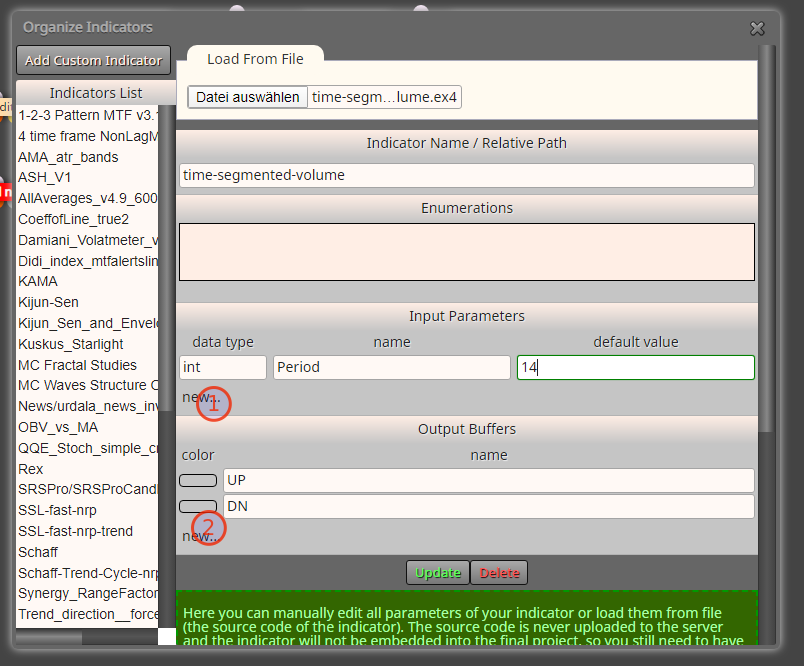
                            0_1578180696271_4c4b05ed-f49d-4bf9-8ee7-54c8ccddb310-image.png

                            I like to share my knowledge, but expect the others to contribute as well.

                            1 Reply Last reply Reply Quote 0
                            • 1 / 1
                            • First post
                              Last post

                            Online Users

                            W
                            S
                            A
                            H
                            H
                            T
                            S

                            16
                            Online

                            146.7k
                            Users

                            22.4k
                            Topics

                            122.6k
                            Posts

                            Powered by NodeBB Forums | Contributors