fxDreema

    • Register
    • Login
    • Search
    • Back to the main page
    • Categories
    • Recent
    • Tags
    • Popular
    • Search

    "Customized Indicator" I cant click the Input parameter for Optimisation

    Bug Reports
    4
    17
    3022
    Loading More Posts
    • Oldest to Newest
    • Newest to Oldest
    • Most Votes
    Reply
    • Reply as topic
    Log in to reply
    This topic has been deleted. Only users with topic management privileges can see it.
    • P
      polishinglife last edited by polishinglife

      1_1578682923663_2.PNG 0_1578682923663_1.PNG

      https://fxdreema.com/shared/vK9HafMzc
      I have a customized indicator that I am using.

      Without the (4), I can download without an issue.
      Even with (4), i can still download without an issue.

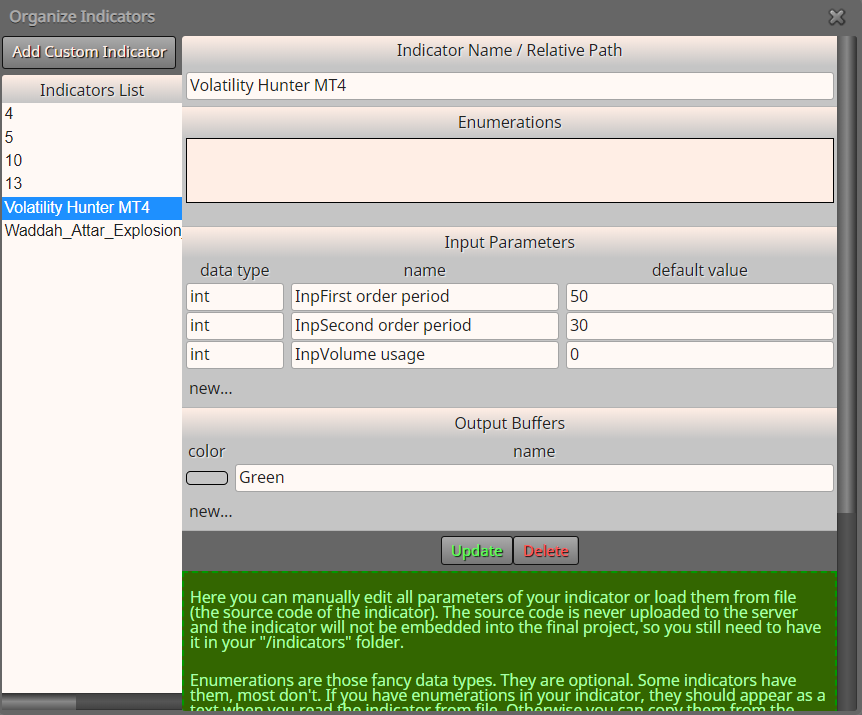
      But the issue rises when I try to download it with the 2 boxes ticked to use it as Optimisation Input
      Is there a way to fix this?

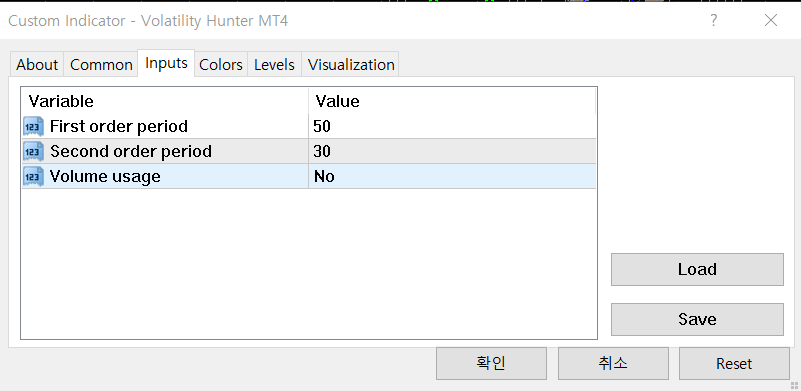
      I believe there could be an error with the indicator as well, because when I try to change the "volume usage" to another choice, It does not let me.
      I do not have the source code of this indicator.

      This is the indicator (reposted)
      0_1578765469576_Volatility Hunter MT4.ex4

      A T 2 Replies Last reply Reply Quote 0
      • l'andorrà
        l'andorrà last edited by

        That's a job for real programmers, I'm afraid. Do you have the ex4 file only?

        (English) I will try to help everyone in these fxDreema forums. But if you want to learn how to use the platform in depth or more quickly, I can help you with my introductory fxDreema course in English at https://www.theandorraninvestor.eu.

        (Català) Miraré d’ajudar tothom en aquests fòrums d’fxDreema. Tanmateix, si vols aprendre a fer servir la plataforma amb més profunditat o més de pressa, t’hi puc ajudar amb el meu curs d’introducció a fxDeema en català a https://www.theandorraninvestor.eu/ca.

        (Español) Intentaré ayudar a todo el mundo en estos foros de fxDreema. Sin embargo, si quieres aprender a usar la plataforma en profundidad o más deprisa, te puedo ayudar con mi curso de introducción a fxDreema en español en https://www.theandorraninvestor.eu/es.

        P 1 Reply Last reply Reply Quote 0
        • A
          ambrogio @polishinglife last edited by ambrogio

          @polishinglife Try creating constant and put them in their place without check off the boxes
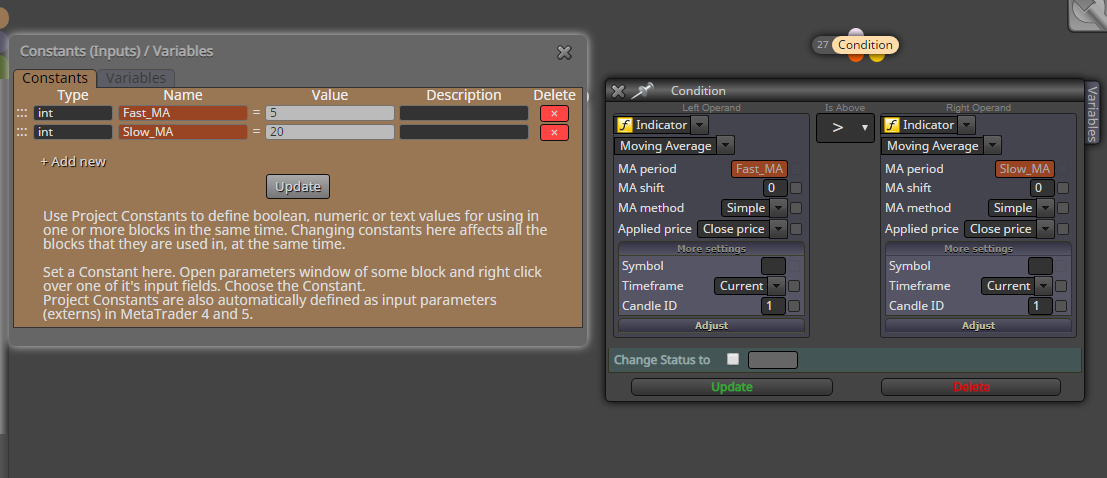
          0_1578686063314_Cattura.png

          This above like an example, i don't have your indicator

          P 1 Reply Last reply Reply Quote 0
          • T
            trader.philipps @polishinglife last edited by

            @polishinglife I can click every optimization checkbox in the provided project link. Of course that may be due to the fact that I don't have any of those indicators as well.

            Maybe you may share these indocators. Fxdreema is a bit unstable with non-roman characters in the indicator's code (even if those are only comments).

            I like to share my knowledge, but expect the others to contribute as well.

            P 1 Reply Last reply Reply Quote 0
            • P
              polishinglife @l'andorrà last edited by

              @l-andorrà unfortunately, i only have the ex4 file only at the moment

              1 Reply Last reply Reply Quote 0
              • P
                polishinglife @ambrogio last edited by polishinglife

                @ambrogio Thank you so much for the response. I have just edit in the indicator to the post, may I ask if you could show this in an example with the indicator? Im new to this and I would really appreciate your help

                A 1 Reply Last reply Reply Quote 0
                • P
                  polishinglife @trader.philipps last edited by

                  @trader-philipps I have just uploaded the indicator on the post. Could you kindly help me with it?

                  T 1 Reply Last reply Reply Quote 0
                  • T
                    trader.philipps @polishinglife last edited by trader.philipps

                    @polishinglife There's something wrong with the indicator

                    0_1578765386505_df98d739-0744-44e7-ad25-ee82aade035c-image.png

                    Did you get it from the mql5 market?

                    I like to share my knowledge, but expect the others to contribute as well.

                    P 1 Reply Last reply Reply Quote 0
                    • P
                      polishinglife @trader.philipps last edited by polishinglife

                      @trader-philipps it's from mt4 market.

                      Ive just reposted the indicator again, could you redownload from the post above?
                      The name of the indicator is called Volatility Hunter MT4

                      T 1 Reply Last reply Reply Quote 0
                      • T
                        trader.philipps @polishinglife last edited by

                        @polishinglife Still the same. If it's from mql market, I would have to download it by myself as it's bound to the account that was used to download it!

                        I like to share my knowledge, but expect the others to contribute as well.

                        P 1 Reply Last reply Reply Quote 0
                        • P
                          polishinglife @trader.philipps last edited by polishinglife

                          @trader-philipps I see! The indicator is called " Volatility Hunter"

                          T 1 Reply Last reply Reply Quote 0
                          • T
                            trader.philipps @polishinglife last edited by

                            @polishinglife I never used an indicator from the market with fxdreema. Maybe that's already the issue!?!

                            I like to share my knowledge, but expect the others to contribute as well.

                            T 1 Reply Last reply Reply Quote 0
                            • T
                              trader.philipps @trader.philipps last edited by

                              @trader-philipps Can't download it from the market either. Maybe someone else can have a try. Or contact the author if he could provide the free version out of mail market.

                              I like to share my knowledge, but expect the others to contribute as well.

                              P 1 Reply Last reply Reply Quote 0
                              • P
                                polishinglife @trader.philipps last edited by

                                @trader-philipps I see, thank you so much for putting in the input to help me though, I appreciate it. Thank you very much. God bless you

                                1 Reply Last reply Reply Quote 0
                                • A
                                  ambrogio @polishinglife last edited by

                                  @polishinglife said in "Customized Indicator" I cant click the Input parameter for Optimisation:

                                  @ambrogio Thank you so much for the response. I have just edit in the indicator to the post, may I ask if you could show this in an example with the indicator? Im new to this and I would really appreciate your help

                                  Assigning a name to the constants you need can avoid the compile problems you found. This way: create two constants in the appropriate table (and save), then with the right button enter them in your box without checking it
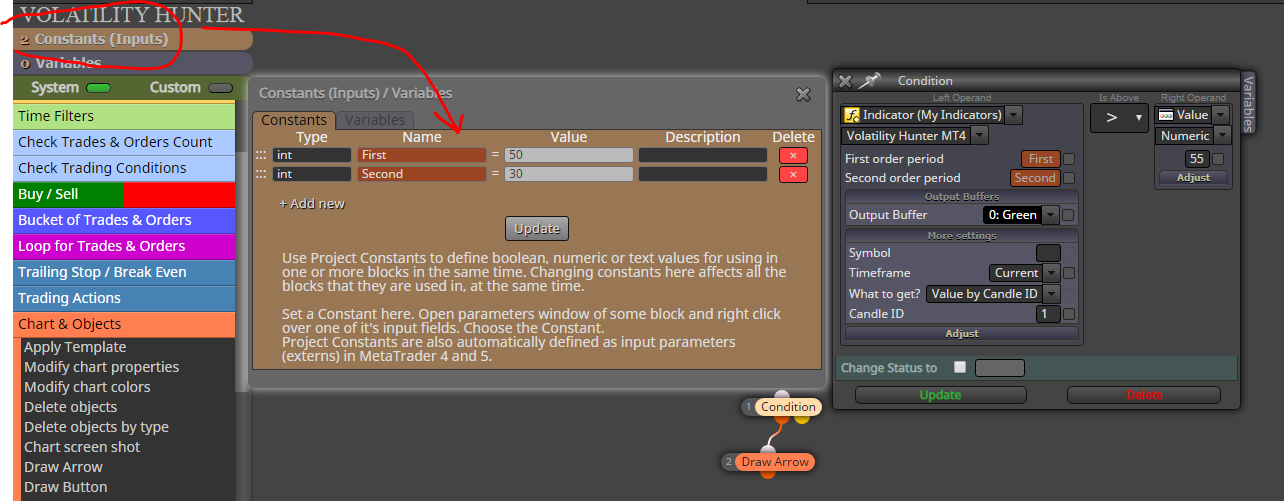
                                  0_1578779935055_Cattura.png

                                  The other problem I haven't solved is this:
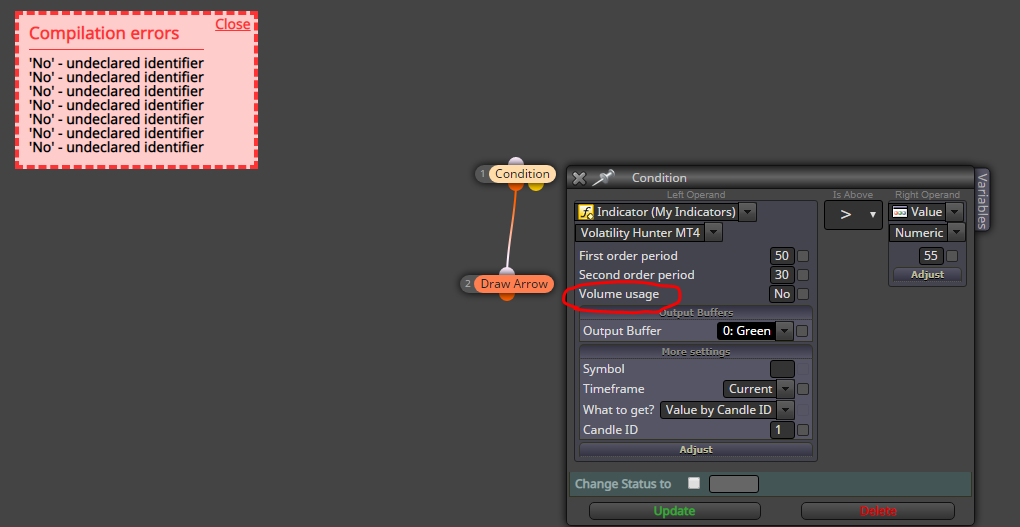
                                  0_1578780049817_3Cattura.PNG

                                  Without this input there are no problems, it may be that Trader philipps has some ideas
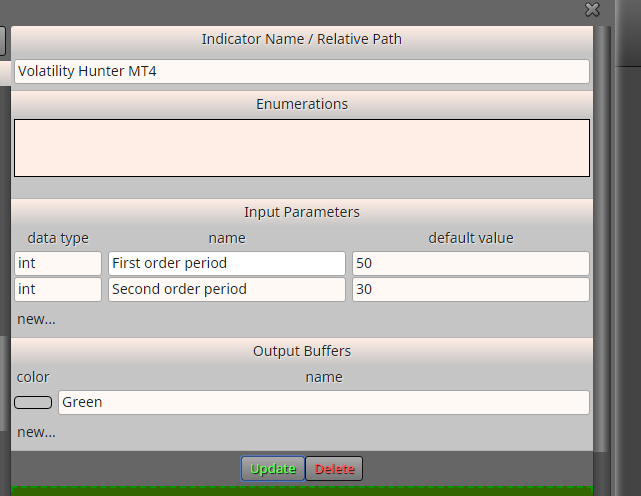
                                  0_1578780349793_5Cattura.PNG

                                  These below are the indicator settings
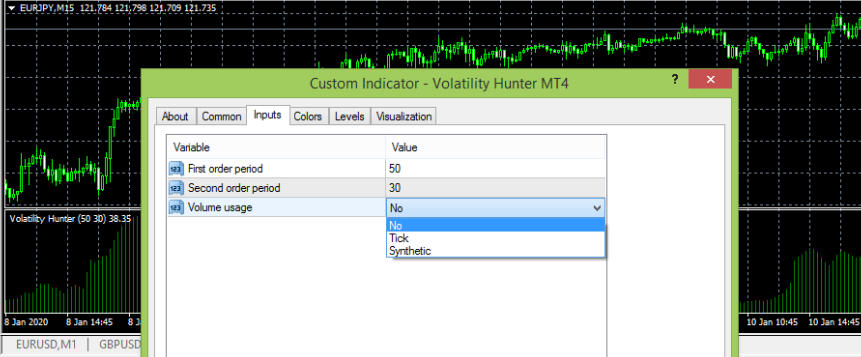
                                  0_1578780365718_3Cattura.PNG

                                  T 1 Reply Last reply Reply Quote 0
                                  • T
                                    trader.philipps @ambrogio last edited by

                                    @ambrogio Could you download and run the indi from this thread? Wondering why my MT4 terminal can't read it.

                                    I like to share my knowledge, but expect the others to contribute as well.

                                    A 1 Reply Last reply Reply Quote 0
                                    • A
                                      ambrogio @trader.philipps last edited by

                                      @trader-philipps no no, you are right, works only if you download it from the mql5 market. I was never able to make downloads from the web site, so I download them directly from the MT4 terminal (only .ex4 file)
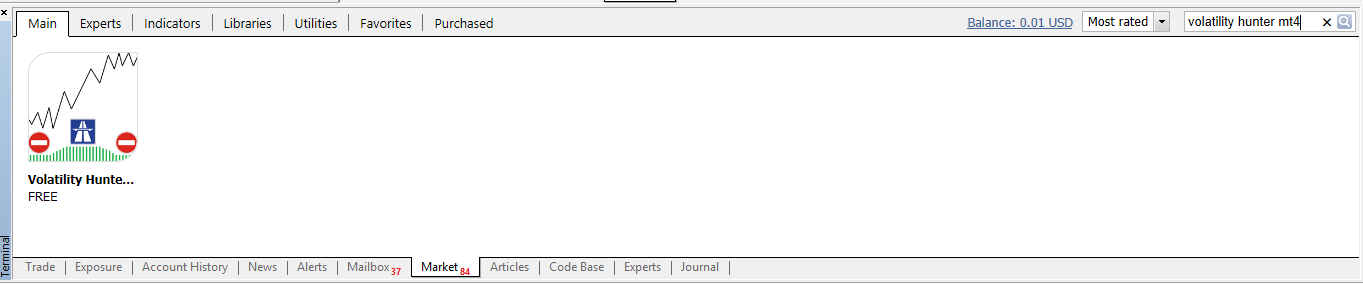
                                      0_1578790456456_Cattura.png

                                      1 Reply Last reply Reply Quote 1
                                      • 1 / 1
                                      • First post
                                        Last post

                                      Online Users

                                      A
                                      L
                                      S

                                      17
                                      Online

                                      146.7k
                                      Users

                                      22.4k
                                      Topics

                                      122.6k
                                      Posts

                                      Powered by NodeBB Forums | Contributors