The Time Filter Block does not work correctly
-
Hello @fxDreema! You all right?
It is not respecting the block in the day parameter. See below:https://fxdreema.com/shared/pxNolBuhc
In this project example, I need it to open only on days 1, 2 and 3, as described in the parameter, but it has been open several days beyond projected.
-
I recommend to create a separate tree of blocks for those defining the active time period. I mean all three time filters and the conditions below them. Then you create a boolean variable that is active only when any of the time filters is true and then changed to false afterwards. That way you can condition your launching tree with that same variable on top.
(English) I will try to help everyone in these fxDreema forums. But if you want to learn how to use the platform in depth or more quickly, I can help you with my introductory fxDreema course in English at https://www.theandorraninvestor.eu.
(Català) Miraré d’ajudar tothom en aquests fòrums d’fxDreema. Tanmateix, si vols aprendre a fer servir la plataforma amb més profunditat o més de pressa, t’hi puc ajudar amb el meu curs d’introducció a fxDeema en català a https://www.theandorraninvestor.eu/ca.
(Español) Intentaré ayudar a todo el mundo en estos foros de fxDreema. Sin embargo, si quieres aprender a usar la plataforma en profundidad o más deprisa, te puedo ayudar con mi curso de introducción a fxDreema en español en https://www.theandorraninvestor.eu/es.
-
@l-andorrà said in The Time Filter Block does not work correctly:
I recommend to create a separate tree of blocks for those defining the active time period. I mean all three time filters and the conditions below them. Then you create a boolean variable that is active only when any of the time filters is true and then changed to false afterwards. That way you can condition your launching tree with that same variable on top.
You might also work with flags.
I like to share my knowledge, but expect the others to contribute as well.
-
@l-andorrà Yes. I already do it this way, but if the Time Filter block is not working correctly, it is better to fix it.
-
@trader-philipps I still don't know how to use a flag. Any post for instructions?
-
@tcanuto Check my Tutorial EA. I use some boolean flags as well as switch ON/OFF blocks in there.
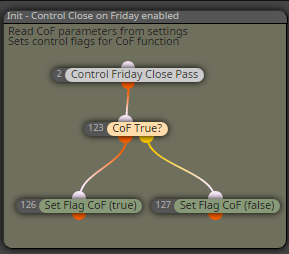
One example is the CoF feature. On the init tab I read the values from the constants and set bool flags accordingly
The on the on Tick tab I check the flag.
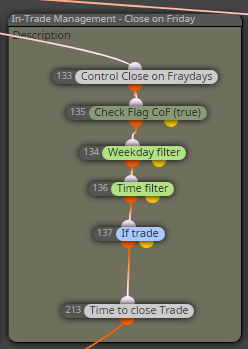
Of course this example is for generally switch on/off parts of the code by EA parameters. But it may give you an idea.
I like the bool flags. However, you might use the numeric (if more than 1 option) or string (never used) type as well.



