Weird Zero Divide Error On Dukascopy Data Indices
-
Hi'
I was developing the EA with good results so far, the FxDreema builder is just so easy to use and still flexible. However, i just got some weird error, i ever deal with Zero Divide Error coming from my custom indicator previously and it solved. But this new error is just so weird.
When i try to backtest my EA using default data provider (from my broker and not using Dukascopy's Data) it run smoothly, but when i use Dukascopy data it getting the Zero Divide Error (see the screenshoot). And what makes this weirder is this only happens when i backtest the EA on an Indices, if I backtest on currency pair (even using Dukascopy data) it runs smoothly.Anyone have thought about this error? Please help me with it.
Screenshoot :

-
@everjn17 Looks like the zero divide is in your fxdreema code. Open your mq4/mq5 file in metaeditor and check the stated line.
Maybe you could share your project or mq4/mq5 file so we might take a look.I faced that several times when money management was based on SL and there was none specified for instance.
Does it stop on first trade to open or somewhere in the middle?
-
@trader-philipps thanks for your replies,
i attach the screenshoot of the line that pointed by the error, it was line 14775.
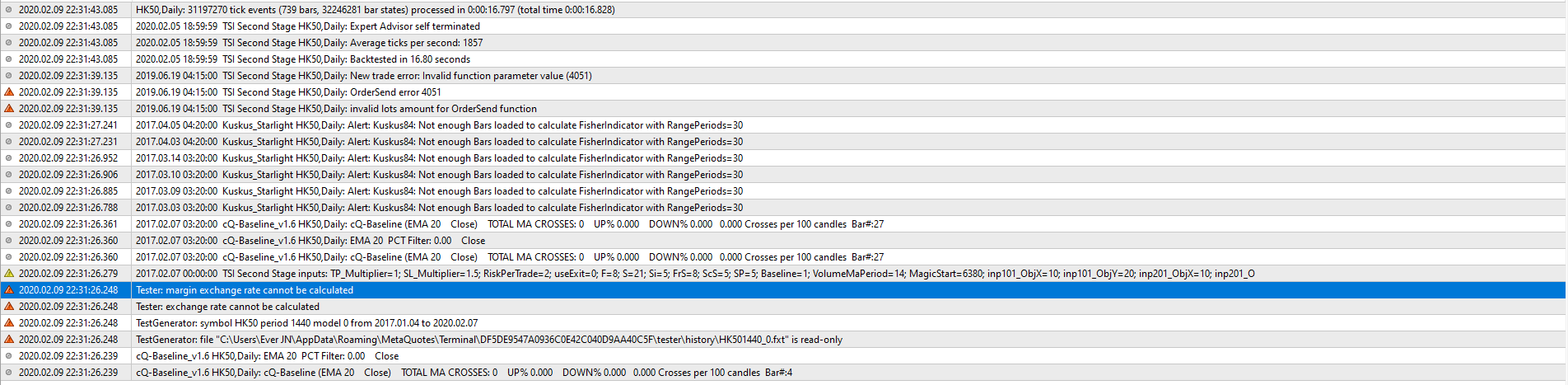
As i check on the line that getting error, i realized it was the money management section. Herei use "fixed amount of money" type and when i tried to change it into "fixed volume" i get these error (see error2 images)Code:

Error2:
-
@everjn17 Yepp, that usually happen if you don't set SL. Do you? I once had a case when I switched away from that option but somehow fxdreema still thought that option was in use somehow. In that case it helped to delete the block and create a new one with the desired option.
-
@trader-philipps i use SL but i don't have any TP since i put trailing stop at 1.5xATR profit. So, you mean try just delete this current block and create a new one with the fix lot size type?
-
@everjn17 Just delete the block and re-create it with same settings. Try this and let me know if it helped.
