How to validate and reset conditions?
-
Good morning, I am new to fxdreema, I am trying to create a robot, where, first validate some conditions (frist conditions), if they are met, I will review the following conditions (second condition), if these conditions do not occur before 6 candles, return At the first condition (frist condition), if given, we enter the market.
The problem is that it does not work, and I understand that the logic I am using is not correct. If someone can help me understand how to validate and reset conditions correctly, it would be a breakthrough for me.
I have created an example of the logic that I have used.
Thanks in advance
-
Hello,
Think of it this way: the process will only be executed if it obeys the imposed condition, otherwise there is no need to reset.
-
I understand that, but I need to understand how to reset a condition in case it is not fulfilled in x time, or candles. Thank you!
-
@traderline
You mean this:
There are 2 conditions,1st condition is active on candles 1,2,3,4,5,6
2nd condition only comes active on candle 5, and this is too late? -
@roar No, the first condition: (1) bid> tenkan-sen (example only), does not need candle condition, the signal is at the moment it occurs. When the condition (1) is fulfilled, it passes to the following condition: (2) Candle 1 must cross up, the tenkan-sen, before 6 candles, if this occurs, we enter, if the condition (2) does not occur, before 6 candles, we return to (1). That's the idea.
-
@traderline So the time between 2 condition passes must be less than 6 candles?
-
Here's an example how to create such "time windows":
https://fxdreema.com/shared/Oyixkzrod- Create a variable that increases a count on every new bar (1,2,3,4,5....)
- When 1st condition passes, reset that count back to 0
- Now 2nd condition must pass before that condition gets bigger than 6 again
-
I also recommend you to specify candle ID 1 on all operands of all condition blocks unless you strictly need so.
-
@roar Thank you for your help, is what I was looking for, and a simple way to apply what I want, a question that I don't understand, what does value mean, V1+1 "once per Bar"?
Thank you very much for your help!
-
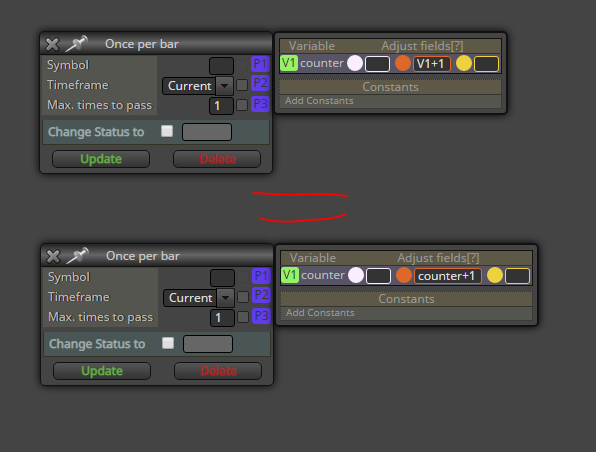
@traderline The little extra window on the right is for quickly modifying variables, without needing the actual "modify variables" block.
I increase the variable value by 1 on every new block (new value equals old value +1)The V1 is just a shortcut method to refer to some variable, I could write "counter+1" just as well.
-
I think i had the same question, please check this: https://fxdreema.com/forum/topic/8693/double-crosses-condition/4



