how to open a reverse position
-
how to open a reverse position as soon as it reaches a stop loss by increasing the lot by 50%
-
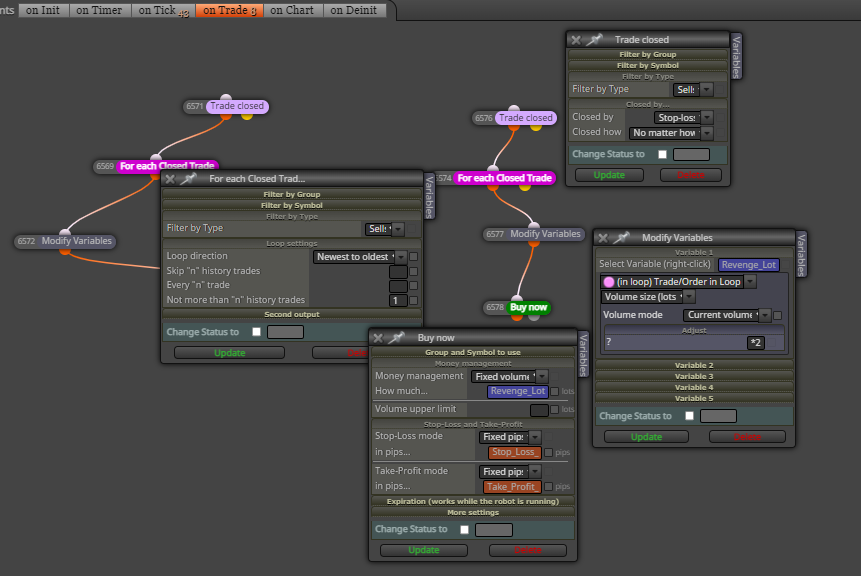
You need to create a variable initialized as 0 and then you can do this:

Please note that all blocks are on the 'On trade' tab. My example is a sell open when a buy is closed. You can do the inverse for a buy.
-
@l-andorrà sorry, to connect it for example to this how do I do it? https://fxdreema.com/shared/ctkKgTDL
-
No. My screenshot is not clear enough, sorry. You need to connect yout block 26 with the orange dot (not the yellow one) of block 25.
-
ok, I tried this way but the opposite position does not open the stoploss, what am I wrong? https://fxdreema.com/shared/iX0Ljbo8e
-
You need to disconnct blocks 4 and 26. Additionally, trailing stop blocks would better be separated and running on its own tree.
-
ok thank you
-
@l-andorrà Hi sir, if i want to stop the reverse trade and reset the lot back to initial lot after hit sl X times.. how to make it? Thanks
-
@paihdt Could you please be more specific? What do you mean by 'stop the reverse trade'?
-
@l-andorrà i open buy trade and hit stop loss, then reverse trade sell will open. and if still hit stop loss. I want stop reverse trade. meaning only 2 stop loss hit.. after 2 times hit stop loss no more reverse trade. and next entry will open after new entry setup.
-
@paihdt Easy. Simply create a variable for values 1 and 2 so that each new trade will increasu it value by 1. Once it hits two, your lot size is reinitiated.
-
@l-andorrà can you help me to add that variable? because i still cannot catch up what your idea is.
https://fxdreema.com/shared/V0Wzyi03d -
@paihdt You can remove both 'once per bar' blocks 40 and 41. They are unnecessary. Then you need a condition block below blocks 33 and 37 comparing the current value of lot size with that maximum you want. Depending on the result that same lot size variable is modified accordingly.

