Errors when backtesting
-
Hi,
So i started playing around with the tool and tried to make a simple EA..
But for some reason when i tried to backtest with it, it keeps showing this error:
2020.04.10 07:29:36.056 TestGenerator: 1276 generating errors, logged 100 first error records
2020.04.10 07:29:36.050 TestGenerator: unmatched data error (volume limit 397 at 2020.04.09 16:35 exceeded)
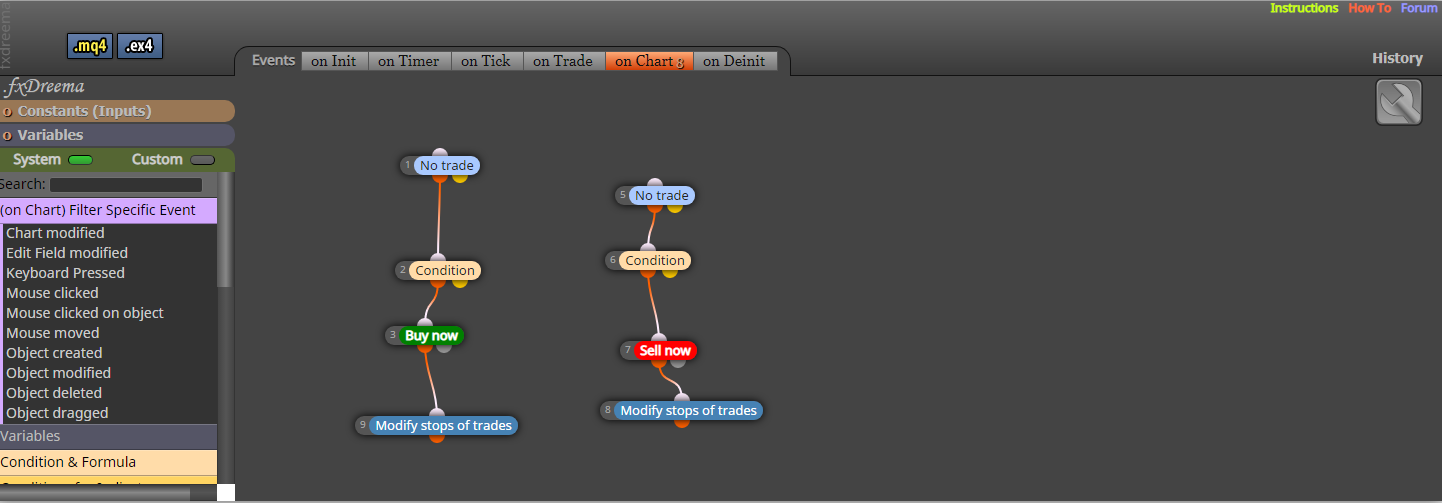
Can anyone kindly let me know what went wrong or how to fix it?
Thanks in advance!
-
Oh yeah, I was just trying to get the EA to buy when the candle crosses above the EMA line and sell when it crosses below the EMA line.
The modify stops of trades are to update the stop loss to the lows and highs of the 2 previous candles.
Was testing it on a 5 min chart. I did try to delete the whole thing and start over a few times with no success when backtesting.
Any help would be greatly appreciated.
-
@simoncfk just for try delete "modify stop" block.
if you like to share your project and i test for you
-
I recommend you to modify stops in a separate tree of blocksd. Disconnect them from its current position.
-
Thanks for the tip, i removed the trailing stop but still got the same error.
So how do i put in a trailing stop to the EA?
https://fxdreema.com/shared/eqwgw0Woe
Really appreciate your help mate
-
I disconnected them but still got the same error when backtesting..
Can you kindly have a look please?
Sorry for the noob question.
-
@simoncfk said in Errors when backtesting:
Thanks for the tip, i removed the trailing stop but still got the same error.
So how do i put in a trailing stop to the EA?
https://fxdreema.com/shared/eqwgw0Woe
Really appreciate your help mate
Change to "on tick" tab, it will ok -
As khacdiepvnc said, move all thos blocks to the 'On tick' tab first. Then use a 'Pass' block to create a third tree and connect the trailing stop block to it.


