Reset consecutive losses
-
How can i reset the "Check consecutive losses" block after an indicator reaches a specific level? If this is not possible, what can be done? Thanks
-
Any help?
-
A bit more info would be appreciated. What do you exactly need? I mean what information, not about the block itself.
-
When the stocastic indicator is overbought( or oversold) it can generate many consecutive false signals. I want to limit the consecutive trade losses of the same type (either buy or sell) to a number of 2 and stop trading until the Main Line crosses the level of 50, then it can continue to trade until there are another 2 consecutive losses of the same type,
Thanks for your help.
-
This is the block to check consecutive losing trades:
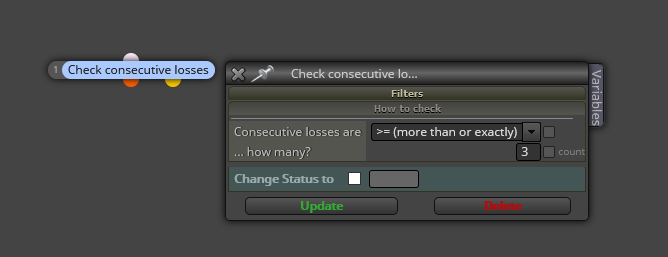
Embedding it in your project will depend on ytour current structure. Can you please share your project?
-
@l-andorrà @mdepor55 Thanks for this post. I have a similar question. Do you know how it is possible to reset the "check consecutive losses" block every day for example?
-
@jjot Why do you want to reset it? This block is telling you the maximum number of consecutive trades the EA can lose. Do you want your EA to loose more or less consecutive trades than the previous day?
-
@l-andorrà I don't understand what time the lost trades are related to. I tested it today. The EA has lost the maximum number of trades, after which I removed the EA from the chart and wanted to start it again, the EA did not open any more trades. So I'm not sure what period the lost trades relate to. Probably to the day, but I don't know for sure.
-
@jjot Can you please share your project?


