On-Off switch for Condition Block
-
Hello, is there a way to form a condition block with a switch so that it can be switched on or off via the Metatrader? For example, that you can switch off an RSI filter (condition block) in the MT5 EA settings ... It would be nice if someone could help me.
-
Why not create a button and, using the "check button state" block, set the condition block such that it only passes if the button is pressed? I use buttons on most of my EAs and find them very useful for turning functions on and off directly from within MT4. There is a good tutorial on using buttons by @miro1360 here: https://fxdreema.com/forum/topic/4184/tutorial-03-ema-cross-part-3-buttons-beginners
-
@cpbonzo Thanks for the idea. Is there a way to do this without an object in the chart? E.g. with a switch that can be set to thru / false in the EA settings?
-
I would think the easiest way to do that is create a variable and then use a condition block such that if the variable is equal to a certain value it passes, otherwise it does not.
-
Hello. I found something somewhere before.

So, go on On init (so that when the EA is loaded, it will init and load what you`re about to make): create 3 blocks.
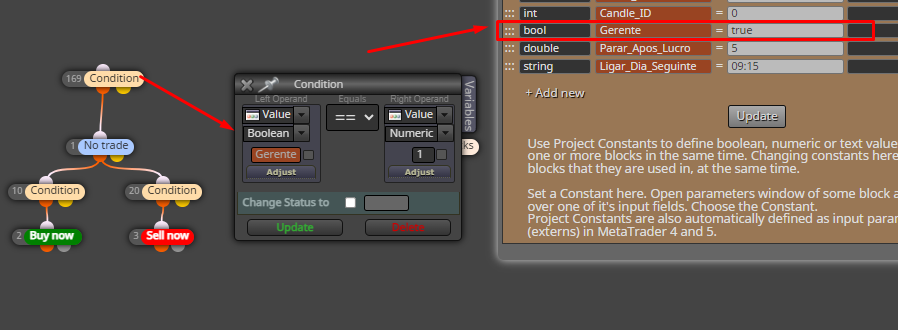
1: Condition. Left operant: Value (boolean). Create a new constant, rename it how you want, but the type (whereas default is Double), has to be "bool". Bool means that can have values True or False.
Return to your Condition block, right click on the left operand and click on your newly created boolean Constant.
The right operand is again boolean and its value has to be set to True.Link your block to another block (Turn on) and write the block number you want to turn on, if your condition is set to True. (in my case is 750). And create a Turn off block, linked in the yellow dot of the Boolean Condition, so. if It is not true, means that the function "Otherwise" will be activated, thus the yellow dot will activate the next block (Turn off).
It may seem complicated... and is not easy to grasp the first times... but go with trial and error and you will make it work.
P.s. The only the first 3 blocks should go on On Init, the rest I would put it on On tick.
-
@jjot said in On-Off switch for Condition Block:
@cpbonzo Thanks for the idea. Is there a way to do this without an object in the chart? E.g. with a switch that can be set to thru / false in the EA settings?
Try this