fxDreema

    • Register
    • Login
    • Search
    • Back to the main page
    • Categories
    • Recent
    • Tags
    • Popular
    • Search

    Comments are Scrambled in some monitors

    Bug Reports
    3
    5
    1109
    Loading More Posts
    • Oldest to Newest
    • Newest to Oldest
    • Most Votes
    Reply
    • Reply as topic
    Log in to reply
    This topic has been deleted. Only users with topic management privileges can see it.
    • Q
      QuantEngineer last edited by

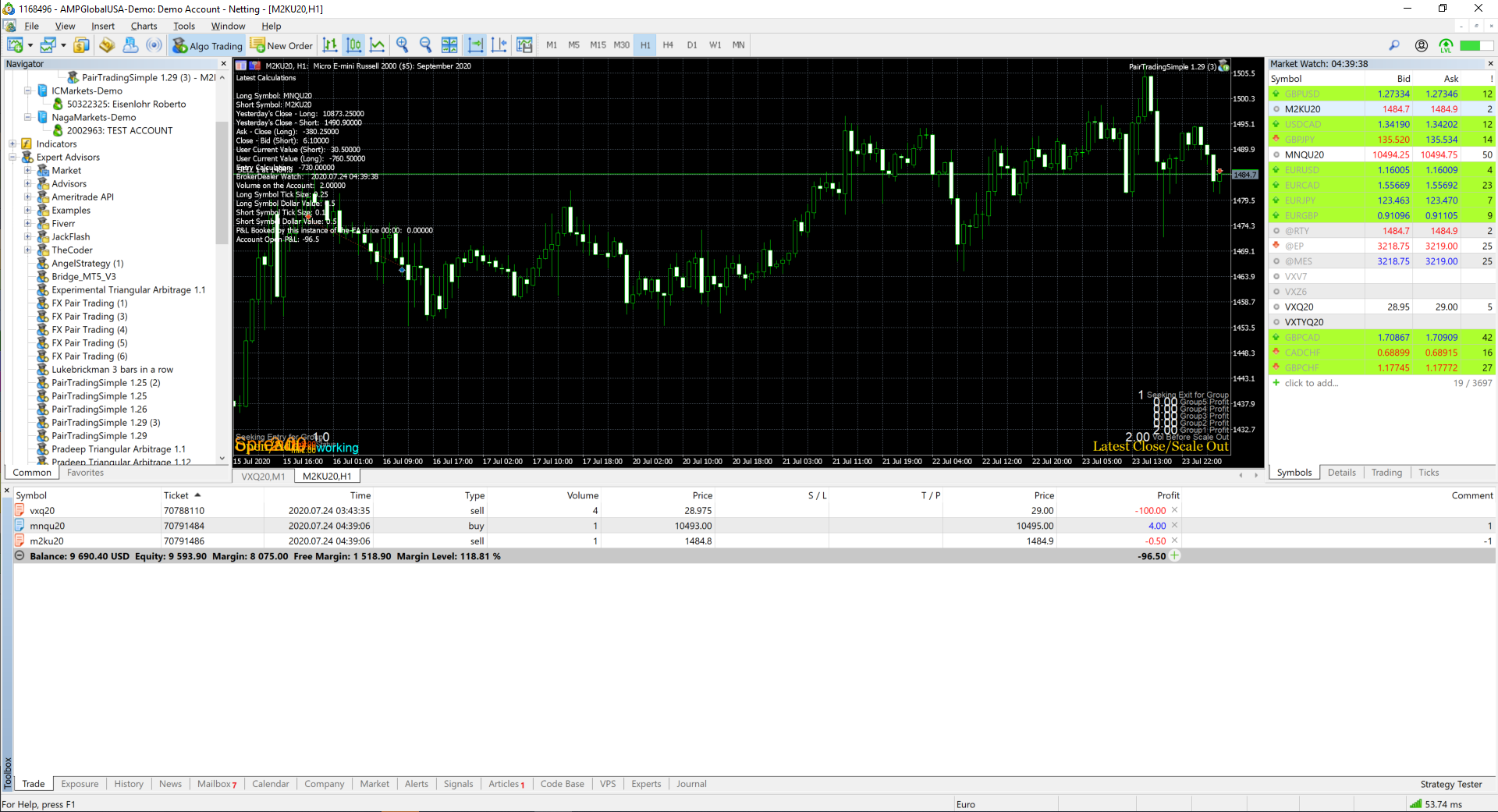
      Letters from Spread display, as well as comments displays are all scrambled, with wrong spacing calculations on my tablet monitor and on my secondary monitor. Only the "Ugly Comment" displays correctly, but still, hard to read for some reason...

      I am using a Microsoft Surface Pro.

      Is there a way to fix this display issue ?
      0_1595565825802_ef943906-78bf-4ee9-b682-73300eaa6b2f-image.png

      Quant Engineer
      www.abfs.tech

      l'andorrà 1 Reply Last reply Reply Quote 0
      • l'andorrà
        l'andorrà @QuantEngineer last edited by

        @floridabrazil Can you please share your EA.

        (English) I will try to help everyone in these fxDreema forums. But if you want to learn how to use the platform in depth or more quickly, I can help you with my introductory fxDreema course in English at https://www.theandorraninvestor.eu.

        (Català) Miraré d’ajudar tothom en aquests fòrums d’fxDreema. Tanmateix, si vols aprendre a fer servir la plataforma amb més profunditat o més de pressa, t’hi puc ajudar amb el meu curs d’introducció a fxDeema en català a https://www.theandorraninvestor.eu/ca.

        (Español) Intentaré ayudar a todo el mundo en estos foros de fxDreema. Sin embargo, si quieres aprender a usar la plataforma en profundidad o más deprisa, te puedo ayudar con mi curso de introducción a fxDreema en español en https://www.theandorraninvestor.eu/es.

        1 Reply Last reply Reply Quote 0
        • Zackry
          Zackry last edited by Zackry

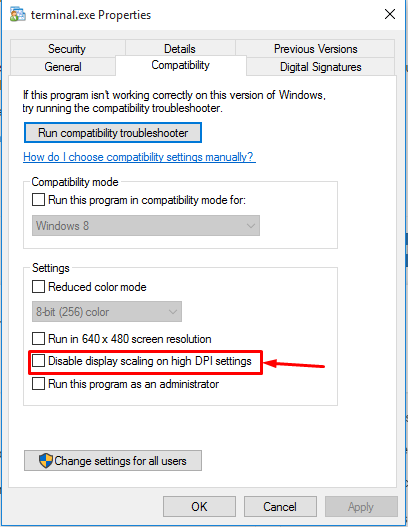
          @floridabrazil this is probably due to the screen resolution

          open the mt4 properties ( make sure you arent opening the properties of the shortcut )

          then head on to the compatibility tab and then turn on (tick mark) the option shown in the below screenshot
          0_1595695755045_Screenshot_3.png

          Q 1 Reply Last reply Reply Quote 0
          • Q
            QuantEngineer @Zackry last edited by

            @zackry I will try this ! Thanks for replying !

            Quant Engineer
            www.abfs.tech

            1 Reply Last reply Reply Quote 0
            • Q
              QuantEngineer last edited by

              I have tried it, did not resolve... Me and my customers are having scrambled images on the Comments...

              Any other idea on how to resolve ?

              Quant Engineer
              www.abfs.tech

              1 Reply Last reply Reply Quote 0
              • 1 / 1
              • First post
                Last post

              Online Users

              D
              S
              G

              14
              Online

              146.7k
              Users

              22.4k
              Topics

              122.6k
              Posts

              Powered by NodeBB Forums | Contributors

