My Custom EA's Won't Load into MT4
-
On MT4, in strategy tester, when I select my custom EA which I've placed in the Experts file, nothing happens. I click "Expert Properties" and nothing happens. I click "Start" and nothing happens. If I click journal, I get the following errors. Any help would be much appreciated!
2020.09.03 15:53:55.699 Tester: cannot load Experts\Test 1
2020.09.03 15:53:55.699 cannot open file 'C:\Users\bpinon\AppData\Roaming\MetaQuotes\Terminal\6BCF14A3917E5BC71FD48812B8ED0586\MQL4\Experts\Test 1.ex4' [2] -
It's also worth noting that I've tried downloading and using the sample EA's on the fxdreema site and those work fine with MT4.
-
Here's another observation I just made. When I place the fxdreema (mql4 file) sample ea into my MT4 experts folder, it creates a second corresponding ex4 file within the folder. My own custom ea mql4 files I've placed there have NOT done this. I also noticed that when I click the ".ex4" button within fxdreema to download an ex4 file, I get a "compilation errors" message with a long list of errors. Here are just the first few:
'Length' - semicolon expected
'Method' - semicolon expected
'level' - semicolon expected
'level' - semicolon expected
'Length' - semicolon expected
'Method' - semicolon expected -
Here's the link to my project: https://fxdreema.com/shared/yl0yNg6rd
-
@bpinon You are connecting this block to itself:

Never do that. Simply remove that selconnecting link.
-
@bpinon your custom indicator code is broken.
The names of the variables have spaces in them, which makes mql4 think that the name ends and the last part is something else (but mql4 expects a ; after the name). You could solve by putting underscores to each variable name, but thats a lot of work
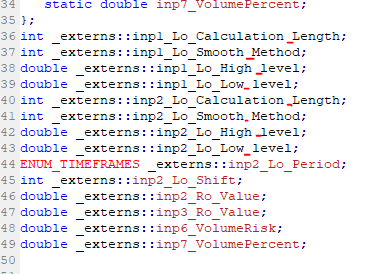
-
@l-andorrà @roar Thank you both for the help!!!!

