fxDreema

    • Register
    • Login
    • Search
    • Back to the main page
    • Categories
    • Recent
    • Tags
    • Popular
    • Search

    Price pullback + pending order system

    Questions & Answers
    3
    7
    1112
    Loading More Posts
    • Oldest to Newest
    • Newest to Oldest
    • Most Votes
    Reply
    • Reply as topic
    Log in to reply
    This topic has been deleted. Only users with topic management privileges can see it.
    • F
      FM2020 last edited by

      Hello guys, I am trying to achieve the following.
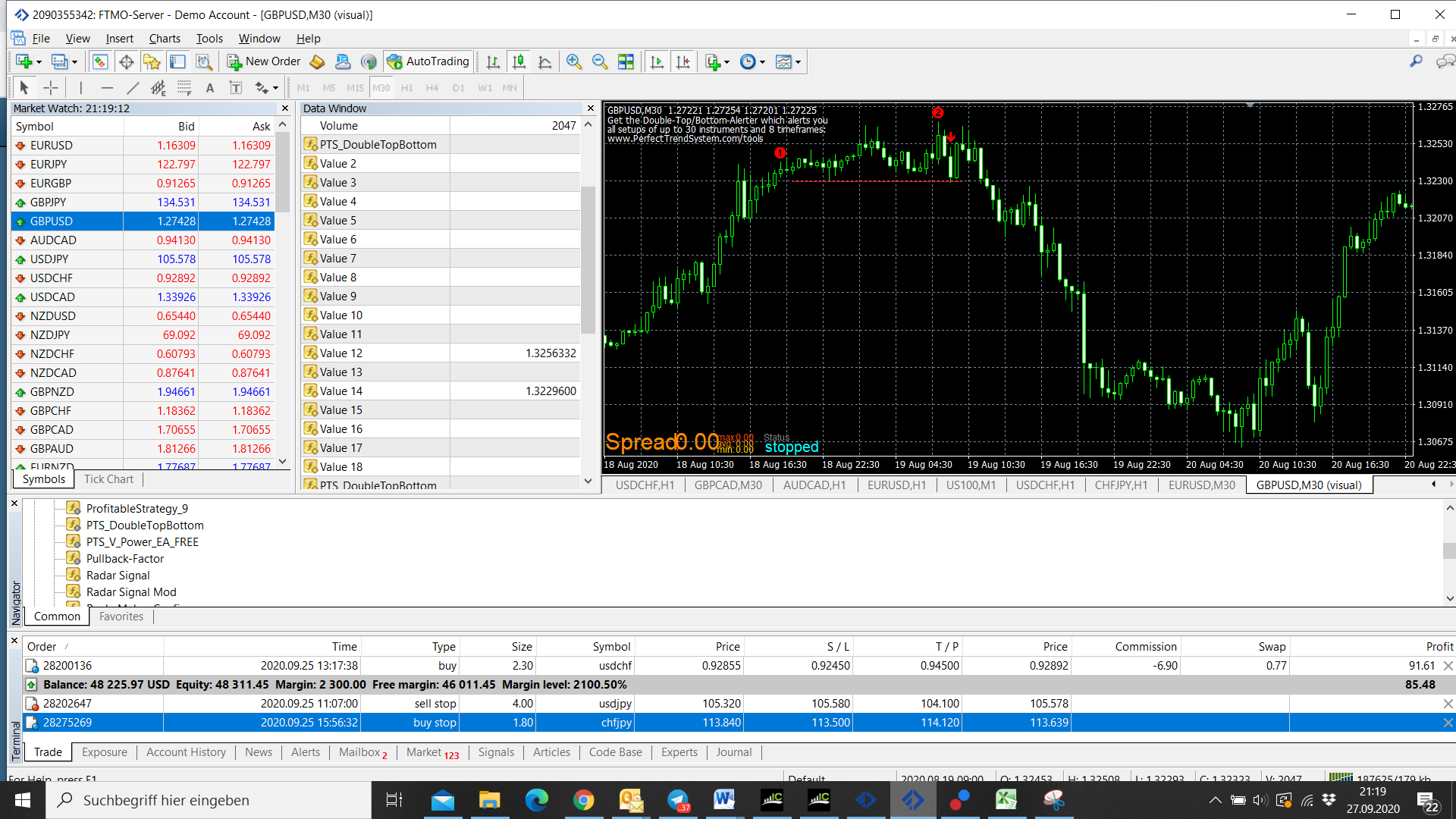
      I have an indicator which indicates when a double top or double bottom forms (not repainting). When this happens, I want to wait for a pullback to the middle of the structure (see screenshot point 1), to place a pending order (i.e. for double top, place a sell stop at the signal line, see point 2 in screenshot).
      The custom indicator is correctly imported as I use it successfully for another system. I tried to do this project, but no orders are placed and no order triggered: https://fxdreema.com/shared/Df2d9HnDd

      My approach:

      1. First group of blocks: When the red candle forms (uniquely identified by value 12 and value 14 of the custom indicator being visible), I store the 4 relevant points in 4 variables via formula and modify variables blocks (entry point at red signal line, SL at upper line, TP (= 1:1 RR), pullback trigger line which is in the middle between the SL line and the signal line).
      2. The second group of blocks checks at every tick if the price exceeds the pullback trigger line. In case this happens, a pending order is set with the parameters calculated in the first block.

      Do you have any idea why the current logic / blocks don't yield the expected results?

      Example:
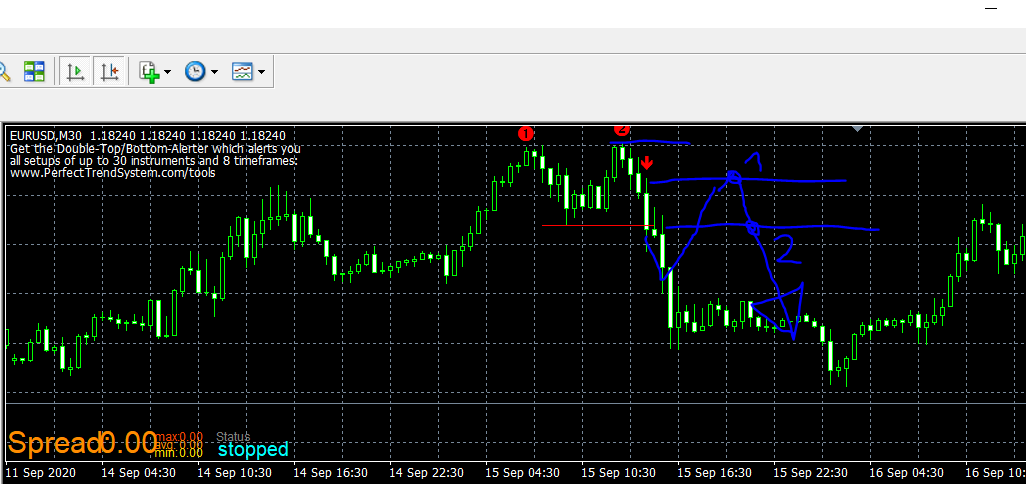
      0_1601165737283_b6a6e524-2c37-418c-ab05-d0a91e9446c0-image.png

      l'andorrà 1 Reply Last reply Reply Quote 0
      • l'andorrà
        l'andorrà @FM2020 last edited by

        @fm2020 Apparetly the logic is correct but I have no idea if this custom indicator's burffers are correctly identified by fxDreema. Can you please upload a screenshot showing you 'My custom indicator' window for it?. Especially for its buffers.

        (English) I will try to help everyone in these fxDreema forums. But if you want to learn how to use the platform in depth or more quickly, I can help you with my introductory fxDreema course in English at https://www.theandorraninvestor.eu.

        (Català) Miraré d’ajudar tothom en aquests fòrums d’fxDreema. Tanmateix, si vols aprendre a fer servir la plataforma amb més profunditat o més de pressa, t’hi puc ajudar amb el meu curs d’introducció a fxDeema en català a https://www.theandorraninvestor.eu/ca.

        (Español) Intentaré ayudar a todo el mundo en estos foros de fxDreema. Sin embargo, si quieres aprender a usar la plataforma en profundidad o más deprisa, te puedo ayudar con mi curso de introducción a fxDreema en español en https://www.theandorraninvestor.eu/es.

        1 Reply Last reply Reply Quote 0
        • F
          FM2020 last edited by FM2020

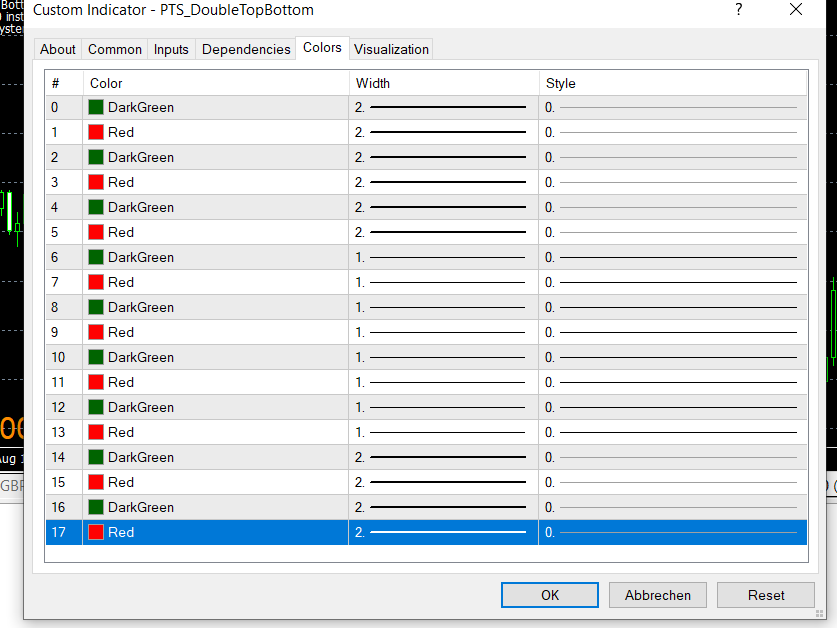
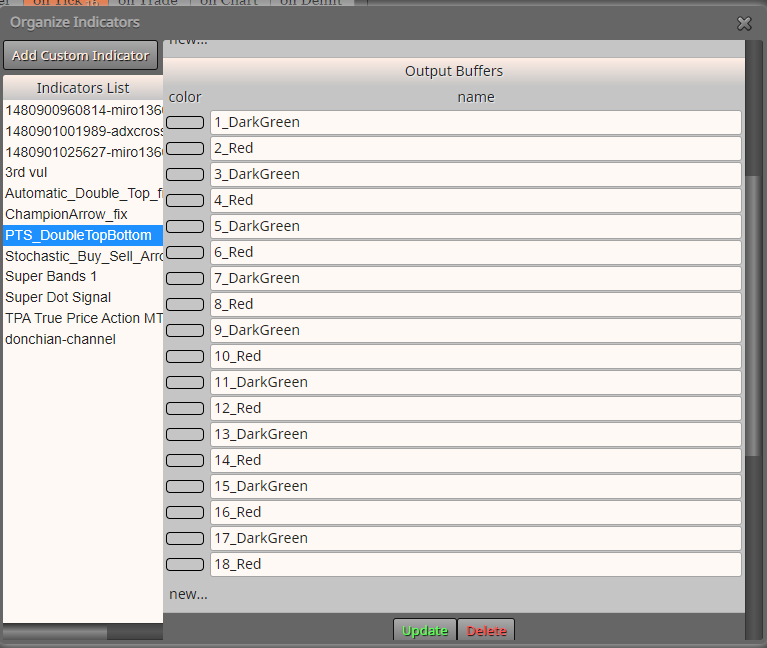
          Screenshot from the chart window:
          0_1601234420711_c69b501f-0daf-44b5-8045-43a8879b8fb6-image.png

          0_1601234547406_7c06f4f2-e8c4-4f91-acd3-0e3179aaf0dd-image.png

          0_1601234652370_00d15e99-fad1-4464-9e7c-8790a0a608dc-image.png

          l'andorrà 1 Reply Last reply Reply Quote 0
          • l'andorrà
            l'andorrà @FM2020 last edited by

            @fm2020 Ok. That is the problem. None of these colours is identified by fxDReema. This is why the EA doesn't work. You will have to create the manually. At least those you need, not all of them necessarily. In these tutorials you will find out how:

            https://fxdreema.com/forum/topic/4208/tutorial-06-my-indicators-in-fxdreema
            https://fxdreema.com/forum/topic/9105/tutorial-working-with-ex4-ex5-indicator-file

            (English) I will try to help everyone in these fxDreema forums. But if you want to learn how to use the platform in depth or more quickly, I can help you with my introductory fxDreema course in English at https://www.theandorraninvestor.eu.

            (Català) Miraré d’ajudar tothom en aquests fòrums d’fxDreema. Tanmateix, si vols aprendre a fer servir la plataforma amb més profunditat o més de pressa, t’hi puc ajudar amb el meu curs d’introducció a fxDeema en català a https://www.theandorraninvestor.eu/ca.

            (Español) Intentaré ayudar a todo el mundo en estos foros de fxDreema. Sin embargo, si quieres aprender a usar la plataforma en profundidad o más deprisa, te puedo ayudar con mi curso de introducción a fxDreema en español en https://www.theandorraninvestor.eu/es.

            1 Reply Last reply Reply Quote 0
            • F
              FM2020 last edited by

              Ok, thanks, I had to create a new block for each candle, which was a lot of work but seems to achieve what I wanted.

              But I have a new problem:
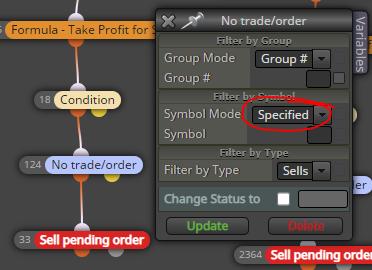
              As the algo reads through 28 FX pairs, I put at the top of each block the "Set Current Market for Next Blocks" block, with a constant consisting of all FX pairs (so I dont have to attach to 28 pairs x2 (as I look at 30M and 1H). What happens now is that if it finds a signal on 1 pair, it will place a trade for this pair. But because I have the "No trade/order" block at the end of each block, it will not place orders for a 2nd, 3rd etc. pair if a new signal is found? How can I restrict the "No trade/order" block to apply only to 1 pair and one direction (i.e. there should be only 1 sell in EUR/USD and 1 buy in EUR/USD, and the same for anyother pair, just not 2x or more a buy or sell in any pair).

              The project:
              https://fxdreema.com/shared/0NeK0t4gb

              Thanks!

              roar 1 Reply Last reply Reply Quote 0
              • roar
                roar @FM2020 last edited by

                @fm2020 use this setting:
                0_1601982315501_d8509ad6-ac4e-468a-85cb-e2ac0eb07c28-image.png

                Also, you can cut 90% of your project by using a loop. Create a variable for the candle ID, increase it by 1 in each loop iteration.

                Need small help? Tag me in your post
                Need big help? https://www.fiverr.com/big_algo/automate-your-winning-strategy-in-mql4-or-mql5

                1 Reply Last reply Reply Quote 0
                • F
                  FM2020 last edited by

                  Great, thanks! Still testing but this has solved the issue I think.

                  1 Reply Last reply Reply Quote 0
                  • 1 / 1
                  • First post
                    Last post

                  Online Users

                  K
                  B
                  U
                  R

                  24
                  Online

                  146.7k
                  Users

                  22.4k
                  Topics

                  122.6k
                  Posts

                  Powered by NodeBB Forums | Contributors