Question about how Active trades are managed
-
If I have an EA running on a pair, and it opens trades, but other pairs also open trades and my EA is set to move trailing stops and stuff:
Is it only going to move it for trades it opened on that specific pair, or is it going to move them for ALL trades, even ones originated from other trade windows?
-
@cdwilder1 the trailing will going move partially for each order.
-
Thanks for the reply.
Is it for every order on every pair? Or just for ones on pairs that the EA executed on?
Like, if I have it on AUDCAD and EURUSD and I have trades on both of those pairs, will the EA on the AUDCAD start trying to manage my trades that were issued on EURUSD also? Or does the EA know how to filter that? Does this have to be specified, is what I'm asking.
I'll have this EA running on 28 pairs and I'm concerned it'll start managing other trades from other pairs since it's the same account.
-
@cdwilder1 You can soecify within the EA blocks if you want the trailing stop to be applicable to all trades from all symbols or just the one teh EA is active on now.
-
@l-andorrà said in Question about how Active trades are managed:
t the one teh
Thanks for the reply, @l-andorrà
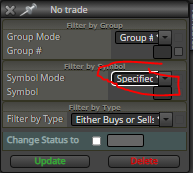
So, if I leave the symbol mode like this, but don't type anything in the Symbol slot, it'll only affect trades that the EA placed itself for that specific pair?
If I have to type something in the symbol slot, that would mean I'd need a separate EA file for every single pair, wouldn't it?
My main thing is if I have 28 instances going, and two EAs get a signal, I want them to both be able to take it. Not only one just because of the "no trade" thing. Same thing with trailing stops and whatnot. I only want the EA to do it for trades that it opened itself on that specific pair.
-
@cdwilder1 That's correct, this is how it works. Do you mean you have 28 open charts at the same time and 2 EAs are running on all of them? I guess you mean 14 charts with one EA and the other 14 with the second one. Right?
-
@l-andorrà said in Question about how Active trades are managed:
s you mean 14 charts with one EA and the oth
Sorry if I'm being confusing, @l-andorrà
28 charts, 1 EA each, but all the same trading account, of course. Like stated, mainly worried that the EA on a EURUSD chart will affect the operation of the EA on an GBPUSD chart, for example. I don't want them to interact with one another at all.
-
@cdwilder1 To avoid that simply choose this option in your 'close trades' block:
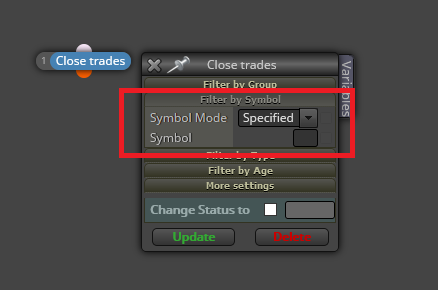
This will close only those trades opn in the current chart, not affecting the others.
-
Awesome! Thanks for the reply! That's exactly what I wanted and I was just concerned I was going to have to make some crazy loops or make EAs specifically for every pair. Thank you so much for your time and clarification!
-
@cdwilder1 You're welcome.