How i can switched between blocks
-
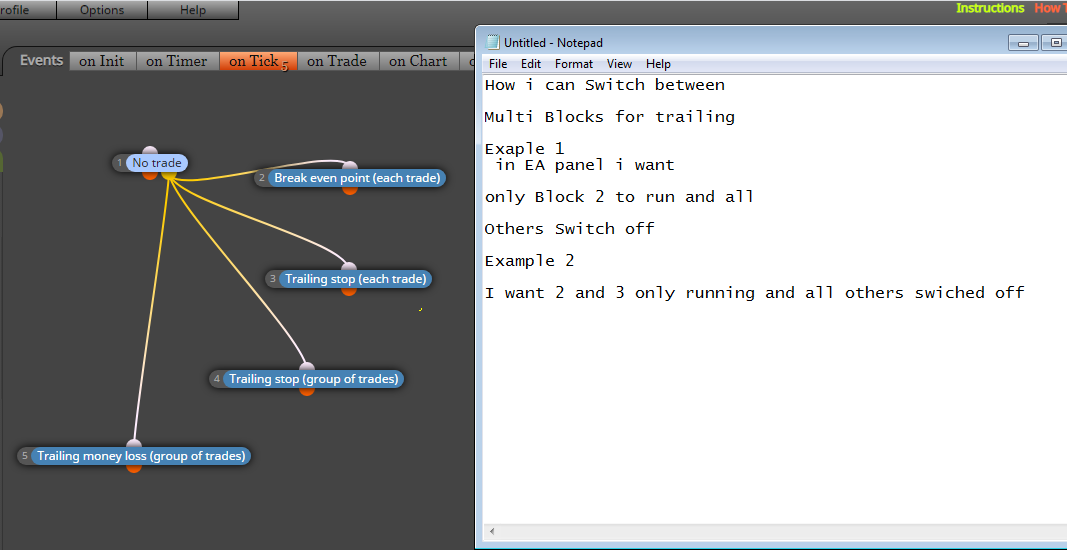
How i can Switch between
Multi Blocks for trailing
Exaple 1
in EA panel i wantonly Block 2 to run and all
Others Switch off
Example 2
I want 2 and 3 only running and all others swiched off
https://fxdreema.com/forum/category/2/Working-with-fxDreema
-
@ramisignals Do you mean switching while the EA is running (ie, not withdrawing it from chart) or switching every time you are using (ie removing it before switching)?
-
I meant i want to select which one i can used and running but i should have all in panel
-
No
I mean switch off all and running what i want fro 5 blocks
-
@ramisignals What about having all of them available but inactive until you select one of them?
-
@l-andorra
That is same what i want
-
@ramisignals Then all those blocks should be initially set as 'Off' like this:
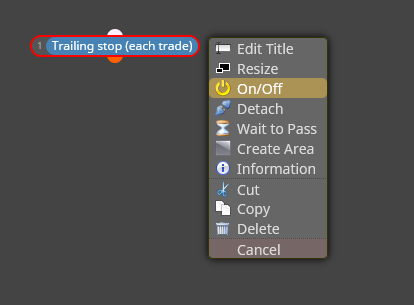
Then you need to use a 'Turn on' block like this and you specify the number of the block you want to activate. In this example this is block 1:
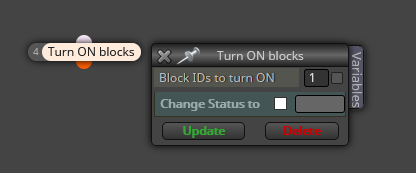
You can connect that block immediately below a condition block in wich you specify a Constant to be true, for example.
-
Thanks but could please tell me how it should connect it
i will be appreciate if you can share project -
@ramisignals Here you have it:
-
Thanks A lot
-
@ramisignals You're welcome.



