object on chart
-
an ea has two parts , one is to draw line and second is to see when the candle closes above or below a specific set of lines
in draw line block when we use (A: yes B:yes)
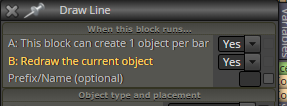
and then set the prefix/name to "x" for one block and "y" for other block
the lines that are generated are automatically named x1 , x2 , x3 x4, x5, x6.... and y1 y2 y3 y4 y5 y6 ........now if i want to select the lines that starts with name "x" how do i do that ?
-
https://www.mql5.com/en/docs/strings/stringfind
You could use the string search function to filter strings with "x".
Or use substr function, get the first letter of the name, and make condition: substr(name, 1,1) == "x"
https://www.mql5.com/en/docs/strings/stringsubstrA redneck like me would just use a unique color for x and y, though

-
Aand you can also simply use the name filtering in the loop block:
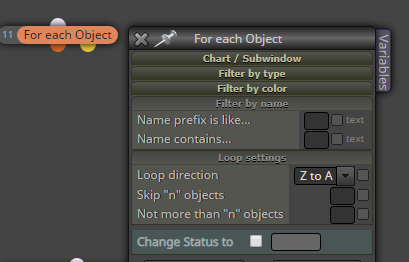
As you can see, I'm just guessing here lol
-
thanks roar gonna try all of em
-
@zackry were you able to come to a solution on this?
-
@len-1 yep i did it the way roar suggested , by selecting objects via color
-
@zackry Thanks for your reply. Do you know how to get the chart sub-window to be drawn on. I folllowed the directions and I cannot get to draw on it...
-
@Zackry , Just wondering if you could take a look at the project link I posted and tell me why my chart isn't showing up on a real time chart.. Thanks
-
@len-1 do you have a subwindow opened on the chart ? because as far as i am aware the EA can not open the subwindow (maybe there is a way but i am not aware of it) so if you want the ea to draw on a subwindow then you will need to have to open the subwindow manually and then attach the EA to the chart
-
@zackry for all my other indicators the subwindows pop up. I don't know why it doesnt with this one. I have tried to open a sub window in a template (so the template would always have that exact window) and no, the details doesn't appear there. This is a great suggestion Zack. I will try it. Thank you!

