EA that Trades from Indicator Arrows and trendlines
-
Re: EA that Trades from Indicator Arrows
This may have come up many times before and I am new to fxdreema so any help will be much appreciated, I have replied to the old post as it seemed to have a guide that is now unavailable.
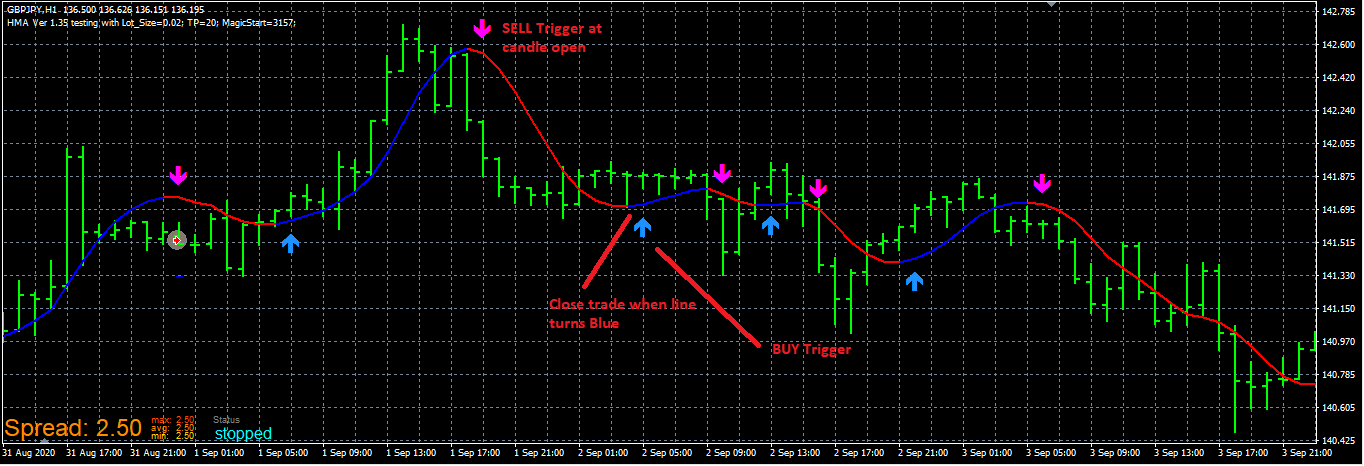
I have a HMA indicator with 4 colours (different buffer number also) which ideally I would like to first execute a trade, either buy or sell depending arrow (as this is my direction for confirmation) and then close the trade when the trendline colour changes, thus waiting for the next arrow which would normally be the opposite to execute the next trade and so on...I have noticed that the arrows have codes and names within the indicator (uparrowCode and downarrowCode, 233 and 234 respectively) which could be used somehow?
I believe the logic for the trading is sound however my understanding of the execution coding in fxdreema is not amazing.
I have attached my hma indicator for anyone who might want to look at this and provide some feedback.
1_1604460547116_hull-moving-average-arrows.mq4 0_1604460547114_hull-moving-average-arrows.ex4 .
And an example Picture.
Thank you in advance! -
Hi @bl4ckp3n9u1n-0 ,
Buffer 5 provides numeric value 1 for up trend (arrow UP) and numeric value -1 for down trend (arrow DOWN).
You can set your conditions regarding to this information.
Regards.
-
Thank you for the feedback.
Next question. When yuo say "Buffer 5" I am unable to find this as I only have buffers 0 to 4 listed.
Is there somewhere else that I need to look at to find this for my condition?
-
You are welcome @bl4ckp3n9u1n-0 ,
Since there are missing buffers, you need to add buffer 5 manually. Go to "My Indicators" find your indicator and add buffer to "Output Buffers" field.
If your last buffer is 4 you can write 'Buffer 5' and click update button.
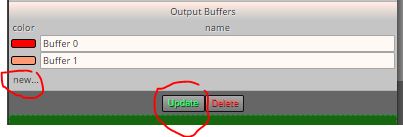
Tip: If you see Buffer 3 as last identifiled buffer, and need to add Buffer 5, you need to add Buffer 4 eighther. No missing buffers allowed because name is not important, rows are counted. First row starts with 0.
By the way, if you can mention my nickname in your post, I will be notified. I can miss your reply without mention.
Regards.
-
@paragorundu Understand now and thank you. I don't actually use social media so I am not used to "mentions".
-
@bl4ckp3n9u1n-0 I hope you get good results

Take care.
Regards. -
@paragorundu This is just a hobby but good to learn. Results for other EA's I have already return nice numbers. Thanks again for the help.
-
@bl4ckp3n9u1n-0 thanks for sharing the results of your EAs. Good to see some encouraging results

Regards.