Panel and button problems. (Solved)
-
Good afternoon! Help! I'm with this panel and it gives me many errors that I don't know why; also I don't know how to enter the Money Management data, I have created a variable but I cannot find the block to enter it.
Thanks a lot.These are the variables:
https://www.yogile.com/f2u13970ces#21tAnd this is the EA of the panel:
https://fxdreema.com/shared/hfqYS3jib -
@xyon126 I'm not sure using so many blocks on th 'on timer' tab is a good aidea. Wht do you need to activate them at specific periods of time?
(English) I will try to help everyone in these fxDreema forums. But if you want to learn how to use the platform in depth or more quickly, I can help you with my introductory fxDreema course in English at https://www.theandorraninvestor.eu.
(Català) Miraré d’ajudar tothom en aquests fòrums d’fxDreema. Tanmateix, si vols aprendre a fer servir la plataforma amb més profunditat o més de pressa, t’hi puc ajudar amb el meu curs d’introducció a fxDeema en català a https://www.theandorraninvestor.eu/ca.
(Español) Intentaré ayudar a todo el mundo en estos foros de fxDreema. Sin embargo, si quieres aprender a usar la plataforma en profundidad o más deprisa, te puedo ayudar con mi curso de introducción a fxDreema en español en https://www.theandorraninvestor.eu/es.
-
@l-andorrà Hola, según "miro1360" en el tutorial que colgo para realizar un panel multitarea, si no lo entendi mal, al colocarlo todo en "On Timer" la respuesta y calculo del EA era muchisimo mas rapida ya que se ejecutaba con tiempo real y no por cada TICK si se colgaban esos bloques en "on Tick"; de hecho he realizado la prueba con este EA o Panel de las dos maneras y la apertura de las operaciones era con "on Timer" practicamente inmediatas, mientras que en "on Tick" tardaba un par o tres segundos en realizar o abrir las operaciones y desde luego en una temporalidad baja M1, M5 incluso M15 te supone de uno a 5 pips de diferencia.
Referente al panel en cuestion:
- sabes donde tengo los errores y como solucionarlos?
- como o que bloque o bloques necesito para poder desde el boton "btnSetPC" introducir un valor y que se ingrese en la casilla del SELL o BUY del Money Management, ahora tiene una variable que se llama "newPC" pero no encuentro el bloque o la manera de entrar desde fuera el valor necesario como en he realizado en el boton "btnSetSL" que si me funciona.
-
Which type of panel you are trying to do is like this
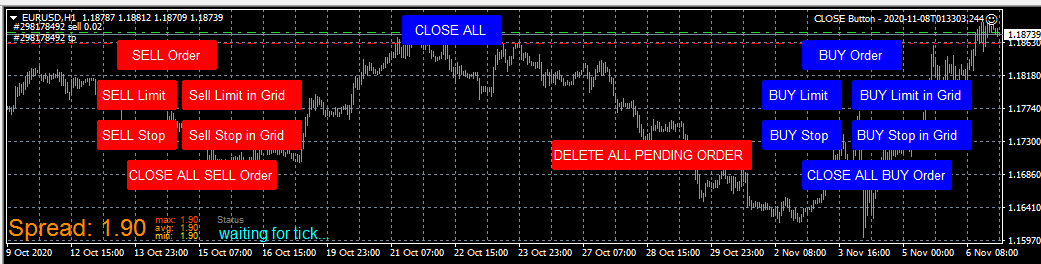
-
@ramisignals Something similar, but yes.
This is the Panel (it gives me errors)
https://fxdreema.com/shared/hfqYS3jib
and these are the variables.
https://www.yogile.com/f2u13970ces#21t
Here is an initial version so you can see my idea.
https://fxdreema.com/shared/coXjh1mdd
But two buttons are missing to be able to put the amount of pips of SL and amount of% for the Money Management,similar to this panel:
https://fxdreema.com/shared/xwgyYY1Vb
The variables are like the previous ones except that they are like this:
newTP = 0 and
newSL = 0 -
Please upload MQL5 File
-
@ramisignals This is the Panel I want to obtain, now it is without variables and the input buttons (% Balance and SL khaki and cyan) do not work.
https://fxdreema.com/shared/GAS67mzge
This is the Panel but already with variables and it is the one that gives me an error and I think it is missing blocks. The variables are:
newPC = 1;
newSL = 18;
setPC = 100.5https://fxdreema.com/shared/vg3L9R32b
The photo on the left is the errors and the right the panel in operation
-
-
@ramisignals This code is for Money Management that when asking for a percentage "% Balnce" fxDreema asks you for the percentages, for example 1% you have to put 101, that's why I add 100 and that is what makes you put 1% of your Balance. Sorry for my English.
-
i understood you but this not function you can used in MQL5 codes are you doing coding before
-
@ramisignals No
-
Hola, lograste solucionar tu panel?


