Break even all operations + total pips
-
I can't create a Breakeven on the TP, let me explain.
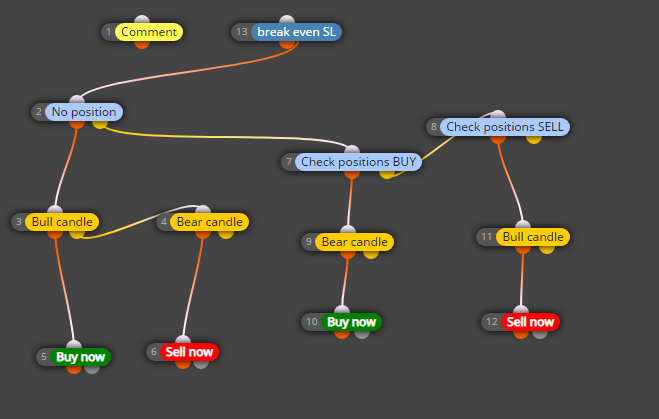
When blocks 10 and 12 begin to open opposite positions with fibonacci, a total TP is automatically created (break even all operations + total pips set).I can't create a Breakeven on the TP, let me explain.
When blocks 10 and 12 begin to open opposite positions with fibonacci, a total TP is automatically created (break even all operations + total pips set)Can anyone help me?
-
@alex222 Hello Alex, I think you are thinking about it wrong, if you can hang the EA better than a photo to see the inside of the blocks. I suppose that when you say TP it refers to Take Profit and on the other hand as a general rule or so I have always generated it, some expert to correct me, the Breackeven block usually goes either separately or hanging from the SELL or BUY but never the rest of the Block from Breackeven, because I understand that after block 2 you want one of the four options of SELL and BUY to open. Sorry for my English, if it helps you, also look at any post and you will see the structures for placing blocks, which is what I do.
-
see the link
I'm puzzling, help
-
@alex222 Your block distribution is wrong.
- Disconnect blocks 1 and 2. No block should be connected above block 2.
- Block 13 should be connected below block 14.
- Block 1 should be connected independently below a 'Pass' block to form a new block tree.
Why are blocks 14 and 15 off?
-
block 1, I see it later
block 13 is a breakeven on the SL and it works
Block 14 and 15 was a small capital protectionnow what I can't is create a breakeven on the TP (take Profit), that is, he has to put the TP of all the open operations (for example buy) using a Breakeven + total pips.
example the price goes down
module 10 opens countertrend buy positions and does not insert the SL, but creates a TP at breakeven + pips, of all open buy operations.
The same thing will have to do for a sell moduleI've been clear
-
@alex222 Regarding if you have been clear, excuse me but not much, you should slowly and in writing what you need, what you want to do and what you want to obtain, as Andorrá has told you and I already mentioned it, the block structure was completely wrong but with what What are you talking about now I think that for what you want to do and once we really understand what your idea and need is, I think it will be essential for you to create variables, etc. Send us your idea not so summarized, do it thinking that many like me are not English and you should explain it as simple and clear as possible to help you. For example, I am Spanish and my English is painful.
-
Thanks for the answer, I have already made the Andorrà corrections and expert works well.
What I can't:
Insert a breakeven (to opposite orders) from the second order onwards.
I'll post a sample photo
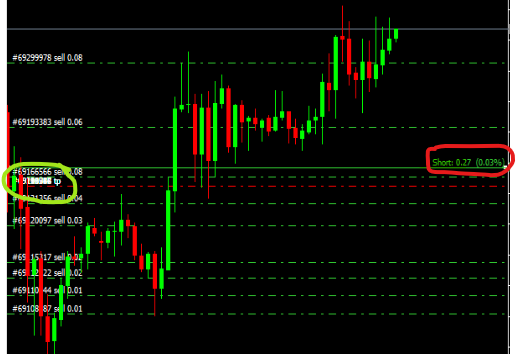
There are a number of sell orders
The circle drawn in red is the breakeven of all these operations
The circle drawn in green is the take profit of all open sell operations (breakeven - 5pips)So every time a new sell trade is opened, all take profits move
Have I been understood now?
-
@alex222 Hi Alex, when you say they move, do you mean the level that you have marked in red? If so, what you should do is a variable where and an input button to indicate where you want that level to be, if you do not know that level you should enter a block to modify the variable that will be modified when it receives internally those data, etc. but here we already enter a field that escapes my knowledge, maybe Andorrá or roar can help you better, unless with the idea and you know how to program you can do it yourself.
By the way, how did you enter the photo directly? I have not found the way. Could you inform me and pass me the Link of that website?
-
Hi XYON,
All Take Profits must be moved, green circle.
The main data is Breakeven (red circle)
Breakeven - 6pips (profit) (green circle)This is my idea:
calculate a breakeven price of all sell trades (each candle), then use this price in the "MODIFY STOPS OF POSITIONS" module to change the TAKE PROFIT.The same thing for all BUY operations.
it may be an idea?
-
@alex222 Then you shpuld create groups. You can always provide different management conditions for different trade groups:
https://fxdreema.com/instructions/builder/groups-and-magic-numbers