Gridding system
-
Greetings,
I need to create an EA, in this case, we will call the EA that I want to create "New EA"
-
The "New EA" is what I will be creating, the "Old EA" is what is running 24/7 on multiple pairs (more specifically EUR/USD & EUR/JPY, on a M1 chart). The "New EA" in this case will be placed on EUR/USD & EUR/JPY chart separately. The job of the "New EA" is to place ONLY 1 pending order for every position opened by the "Old EA" related to a specific currency. The pending order shall be placed when the market has moved in the opposite direction by X amount whereby X is an adjustable input.
-
When the "Old EA" opens a position, the "New EA" will open a pending order accordingly (if "Old EA" placed a sell position, then the "New EA" will place a sell limit position and vice versa for a buy position)
-
The "New EA" must have adjustable lot size inputs
-
In terms of when should the “New EA” close positions, it should close pending order simply when the “Old EA” closes it's opened positions. The same goes when the pending order becomes an actual order. When the pending order becomes an actual order, then simply close the actual position/order when the opened position placed by the "Old EA" closes.
*Kindly note that when I place the "New EA" on a specific currency, it should only work with opened positions placed by the "Old EA" related to that specific currency.
I understand that this is a lot to take in, and I will be very glad to
explain anything that seems to be unclear.- I do not have a project started yet because I do not know how to start.
Thank you so much for your cooperation
-
-
@ramimoujaes Ok. If I undersand it correctly both new and od EA will be running on the same NT4 platform. Correct? If so I don't think it should be very difficult. Just one more question. Will there be any other EAs running the the MT4 at the same time (no matter in that or any other symbols).
-
Greetings @l-andorrà,
It is MT5 platform.
Question:
"Will there be any other EAs running the the MT4 at the same time (no matter in that or any other symbols)."Answer:
NoYour earliest response is much appreciated.
Sincerely
-
@ramimoujaes Ok. So you need both old and new EAs or the new one only?
-
Greetings @l-andorrà,
no Just the New EA, I already have the old EA running -
@ramimoujaes Ok. There are two way to do it. The first one is by using terminal variables and I'm afraid I have no idea how to use them. Maybe someone els can help in the forums. The second one is by identifying the ticket number of the trades opened by the old EA. Was that old EA created with fxDReema?
-
Greetings,
The "Old EA" was purchased from mql5 market, and unfortunately, I do not have the source code.
Sincerely
-
@ramimoujaes Then I'm afraid I don't know how to do it. You will need a way to communicate one EA with the other one via terminal variables. I hope someone else can help.
-
@ramimoujaes Hi! You can assign at your EA the same magic number of the EA you have purchased, i already tryed something similar. This way your EA can recognize the orders of the MQL5 EA.
-
-
@ramimoujaes All EA's have the magic number to recognize their trades, so put in your new EA the same magic number as the old EA. Below is an example
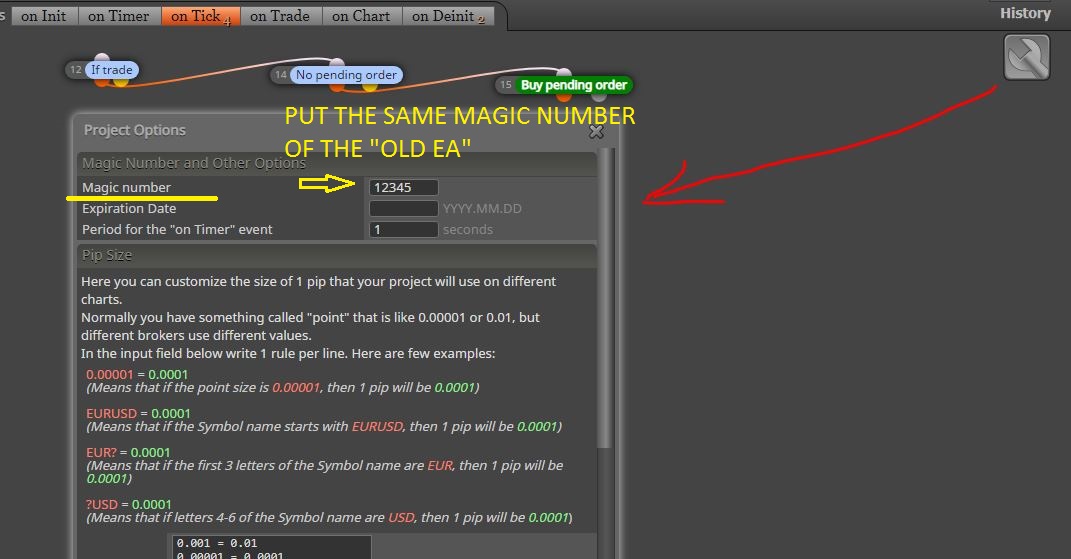
Load the new EA on any chart, if the old EA for example opens a buy order on EURUSD, the new EA recognizes it and places a pending order.
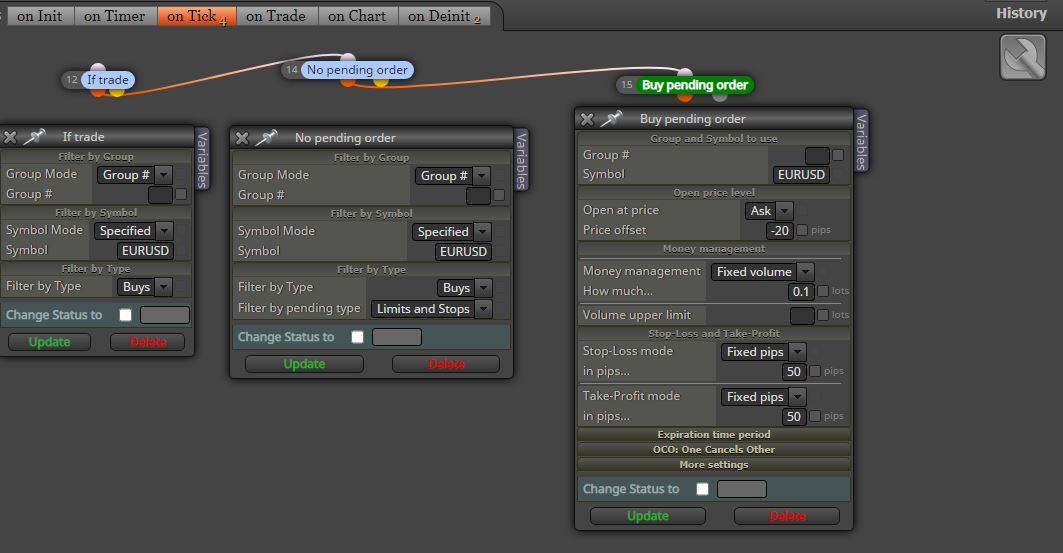
-
-
@ramimoujaes what i show you in the screenshot above is an example of your new EA, it's not right?
-
@ambrogio But if both EAs share the same magic number, the new EA will think a trade opened by the old EA will be was opened by it. This would duplicate the number of trades instead of just replicateing them in the way he specified.
-
@l-andorrà Yes of course, it must recognize the current trade, once recognized the thing the new EA must do is only place a pending order. This is the request of @ramimoujaes
-
Greetings @ambrogio ,
I am so sorry, I think I may have misunderstood. Are you saying the above image is how to create the New EA?
Sincerely
-
@ramimoujaes yes

-
Greetings @ambrogio ,
Thank you for your response. I just have two small questions:
- Based on the image above, the "New EA" will open only one single pending order, correct?
- In the image above, if I did not specify EUR/USD, will it then work on all currencies?
Shared Project:
https://fxdreema.com/shared/sdp0Q2itb
Sincerely
-
@ramimoujaes said in Gridding system:
Greetings @ambrogio ,
Thank you for your response. I just have two small questions:
- Based on the image above, the "New EA" will open only one single pending order, correct?
- In the image above, if I did not specify EUR/USD, will it then work on all currencies?
Shared Project:
https://fxdreema.com/shared/sdp0Q2itb
Sincerely
- Yes, one pending order only. If the pending order will be triggered another pending order will be opened
- If you do not specify the market, the new EA will only check the symbol on which it is attached (it's not what you need)
-
Greetings @ambrogio ,
Thank you so much for your earliest response.
I have an adjustment question in relation to your answers.
- What if I only want 1 pending order for every position opened by the "Old EA". How do we do that. See, previously, you said that if the pending order created by the "New EA" became an actual order then another pending order will be created by the "New EA". I do not want that. I only want one pending order for every position opened by the "Old EA" .
- Regarding closing the position, as we spoke earlier, when the “Old EA” opens a position, then the “New EA” will immediately open a pending order. If the position opened by the “Old EA” went straight to T/P, and the pending order did not become an actual order, then simply close the pending order. How do we do that?
Your cooperation is highly appreciated
Sincerely


