fxDreema

    • Register
    • Login
    • Search
    • Back to the main page
    • Categories
    • Recent
    • Tags
    • Popular
    • Search

    Texto sobre linea

    Questions & Answers
    3
    12
    1146
    Loading More Posts
    • Oldest to Newest
    • Newest to Oldest
    • Most Votes
    Reply
    • Reply as topic
    Log in to reply
    This topic has been deleted. Only users with topic management privileges can see it.
    • L
      Leka 0 last edited by

      Me gustaría saber como colocarle un texto que sea visible a una línea horizontal,
      agradecería bastante la ayuda.

      https://fxdreema.com/shared/aKUJIohUb

      l'andorrà 1 Reply Last reply Reply Quote 0
      • l'andorrà
        l'andorrà @Leka 0 last edited by

        @leka-0 ¿Te refieres a cambiarle el nombre al objeto o a que se visualice un texto próximo a dicho objeto?

        (English) I will try to help everyone in these fxDreema forums. But if you want to learn how to use the platform in depth or more quickly, I can help you with my introductory fxDreema course in English at https://www.theandorraninvestor.eu.

        (Català) Miraré d’ajudar tothom en aquests fòrums d’fxDreema. Tanmateix, si vols aprendre a fer servir la plataforma amb més profunditat o més de pressa, t’hi puc ajudar amb el meu curs d’introducció a fxDeema en català a https://www.theandorraninvestor.eu/ca.

        (Español) Intentaré ayudar a todo el mundo en estos foros de fxDreema. Sin embargo, si quieres aprender a usar la plataforma en profundidad o más deprisa, te puedo ayudar con mi curso de introducción a fxDreema en español en https://www.theandorraninvestor.eu/es.

        L 1 Reply Last reply Reply Quote 0
        • L
          Leka 0 @l'andorrà last edited by

          @l-andorrà que se visualice un texto proximo a dicho objeto...

          l'andorrà 1 Reply Last reply Reply Quote 0
          • l'andorrà
            l'andorrà @Leka 0 last edited by

            @leka-0 Pues me temo que la única forma que conozco es dibujando los dos objectos por separado y colocarlos en coordenadas próximas. Si existe otra forma en fxDreema, la desconozco.

            (English) I will try to help everyone in these fxDreema forums. But if you want to learn how to use the platform in depth or more quickly, I can help you with my introductory fxDreema course in English at https://www.theandorraninvestor.eu.

            (Català) Miraré d’ajudar tothom en aquests fòrums d’fxDreema. Tanmateix, si vols aprendre a fer servir la plataforma amb més profunditat o més de pressa, t’hi puc ajudar amb el meu curs d’introducció a fxDeema en català a https://www.theandorraninvestor.eu/ca.

            (Español) Intentaré ayudar a todo el mundo en estos foros de fxDreema. Sin embargo, si quieres aprender a usar la plataforma en profundidad o más deprisa, te puedo ayudar con mi curso de introducción a fxDreema en español en https://www.theandorraninvestor.eu/es.

            L 1 Reply Last reply Reply Quote 0
            • L
              Leka 0 @l'andorrà last edited by

              @l-andorrà me podrías mostrar como se hace en fxdreema te lo agradecería bastante.

              l'andorrà 1 Reply Last reply Reply Quote 0
              • l'andorrà
                l'andorrà @Leka 0 last edited by

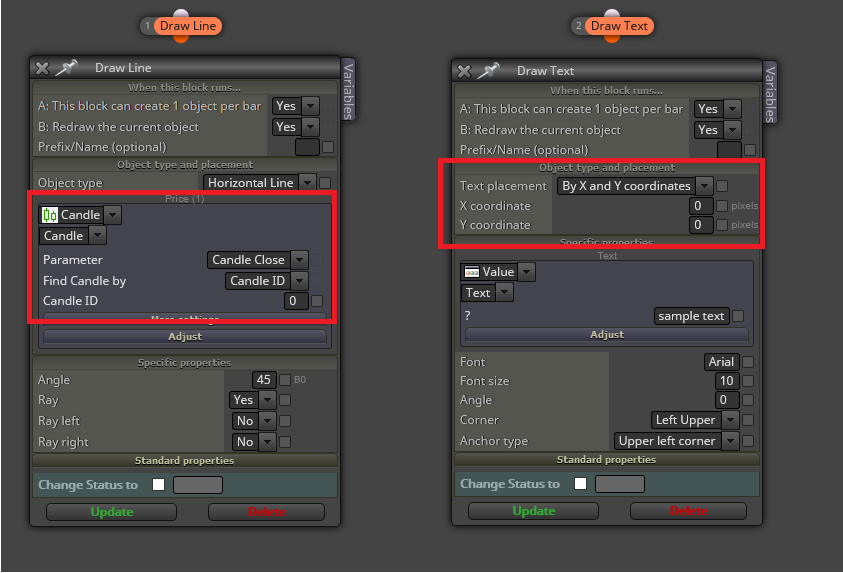
                @leka-0 Debes empezar usando estos dos bloques, uno para cada objeto:
                0_1612365180109_01.png

                Los rectángulos en rojo marcan los parámetros en los que podrá ubicar ambos objetos. En el caso de la derecha, se usan coordenadas de píxeles. Puede probar diversas combinaciones para aprender como se ubica. En el caso de la línea horizontal, puedes ubicarla vinculada a una barra (la opción por defecto), o a un precio determinado, dependiendo de lo que busques.

                (English) I will try to help everyone in these fxDreema forums. But if you want to learn how to use the platform in depth or more quickly, I can help you with my introductory fxDreema course in English at https://www.theandorraninvestor.eu.

                (Català) Miraré d’ajudar tothom en aquests fòrums d’fxDreema. Tanmateix, si vols aprendre a fer servir la plataforma amb més profunditat o més de pressa, t’hi puc ajudar amb el meu curs d’introducció a fxDeema en català a https://www.theandorraninvestor.eu/ca.

                (Español) Intentaré ayudar a todo el mundo en estos foros de fxDreema. Sin embargo, si quieres aprender a usar la plataforma en profundidad o más deprisa, te puedo ayudar con mi curso de introducción a fxDreema en español en https://www.theandorraninvestor.eu/es.

                L 1 Reply Last reply Reply Quote 0
                • L
                  Leka 0 @l'andorrà last edited by Leka 0

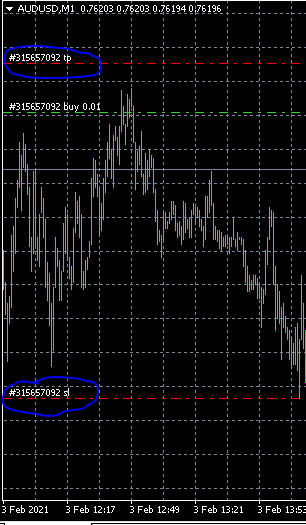
                  @l-andorrà De la manera en que me lo estas explicando, cuando yo modifique la línea manualmente el texto también seguirá a la línea, es lo que quiero, algo así como los niveles de stop que tiene MetaTrader por defecto 0_1612385233488_Captura.PNG
                  l'andorrà 1 Reply Last reply Reply Quote 0
                  • l'andorrà
                    l'andorrà @Leka 0 last edited by

                    @leka-0 Eso es mucho más complicado, porque lo que pides es vincular un objeto a otro. La verdad es que no te podría dar una respuesta ahora mismo. Creo (no puedo asegurarlo) que no se puede hacer con fxDreema de forma directa. Sospecho que habría que usar las opciones de la pestaña 'on Chart' para ello. Lo cierto es que me supera. Te recomiendo que abras otro hilo en inglés y pidas ayuda a roar o a miro. Ellos dominan la parte gráfica mucho mejor que yo.

                    (English) I will try to help everyone in these fxDreema forums. But if you want to learn how to use the platform in depth or more quickly, I can help you with my introductory fxDreema course in English at https://www.theandorraninvestor.eu.

                    (Català) Miraré d’ajudar tothom en aquests fòrums d’fxDreema. Tanmateix, si vols aprendre a fer servir la plataforma amb més profunditat o més de pressa, t’hi puc ajudar amb el meu curs d’introducció a fxDeema en català a https://www.theandorraninvestor.eu/ca.

                    (Español) Intentaré ayudar a todo el mundo en estos foros de fxDreema. Sin embargo, si quieres aprender a usar la plataforma en profundidad o más deprisa, te puedo ayudar con mi curso de introducción a fxDreema en español en https://www.theandorraninvestor.eu/es.

                    1 Reply Last reply Reply Quote 0
                    • XYON126
                      XYON126 last edited by

                      @Leka-0 Hello @Leka-0 ! What you must do is in the "Draw Line" Horizontal block where it says "Prefix / Name (Optional)" put the text you want and when you draw the line you get that text, if you want to modify it in the CHART already it's a theme with variables and buttons at least that's how I got it.

                      L 1 Reply Last reply Reply Quote 0
                      • L
                        Leka 0 @XYON126 last edited by

                        @xyon126 Yes, but I want this text to be visible without having to place the mouse over it ...

                        XYON126 1 Reply Last reply Reply Quote 0
                        • XYON126
                          XYON126 @Leka 0 last edited by

                          @leka-0 Hello @Leka-0 ! For the text to be visible it must be in the description box but I don't know if there is a block that allows it, I'm sorry I can't help you.

                          L 1 Reply Last reply Reply Quote 0
                          • L
                            Leka 0 @XYON126 last edited by

                            @xyon126 @l-andorrà I'm afraid not, thank you anyway

                            1 Reply Last reply Reply Quote 0
                            • 1 / 1
                            • First post
                              Last post

                            Online Users

                            Q
                            C
                            T
                            S
                            A
                            M
                            R
                            G
                            G
                            Y
                            C
                            S

                            45
                            Online

                            146.7k
                            Users

                            22.4k
                            Topics

                            122.6k
                            Posts

                            Powered by NodeBB Forums | Contributors