Find price where candle crosses a custom indicator (.mq4)
-
From reading the forums, when price crosses the inbuilt indicators, we can use X<, or X> or like. I have uploaded an indicator using a *.mq4 file. I would like to know if there is a work around to get where price crosses the indicator. I can understand when we just use a .ex4, for appearances/colour change of a buffer. But thought using a .mq4 file it should act like the inbuilt indicators.
shared link: shared/hDo9V7Mvc.
I have read the MQL4 document, but it is like reading Latin to add code, for me (icustom etc)0_1612241240043_smTMA_v3.1a.mq4.Many thanks
-
@sli1-0 said in Find price where candle crosses a custom indicator (.mq4):
shared/hDo9V7Mvc
The problem is that none of the buffers is correctly identified by fxDreema. You shlud see the colours of all buffers in your blocks and that is not the case. I strongly recommend you to read the following tutorials:
https://fxdreema.com/forum/topic/4208/tutorial-06-my-indicators-in-fxdreema
https://fxdreema.com/forum/topic/9105/tutorial-working-with-ex4-ex5-indicator-file -
Thank you for the response,
I have followed the tutorials and found from the Data Window that my buffers correspond to my colours in the custom indicator.

For testing I created the following using "modify variables" and comments, which should match the Data Window (in my opinion). I set the inputs so I could change the candle ID to 1 or 0 for testing, The comment values are not matching the Data Window.
here is the link to my project: https://fxdreema.com/shared/fNaCRQqKb
the interesting part is that not all the inputs are not showing on the EA as when reviewed to the indicator
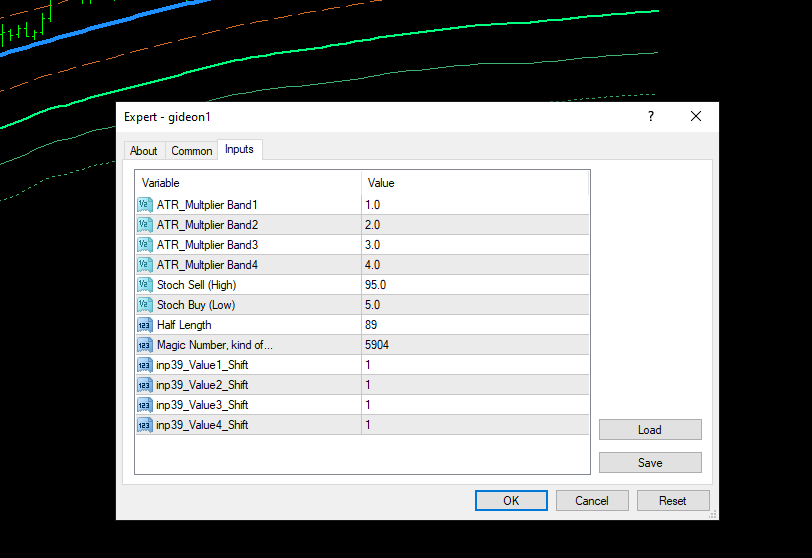
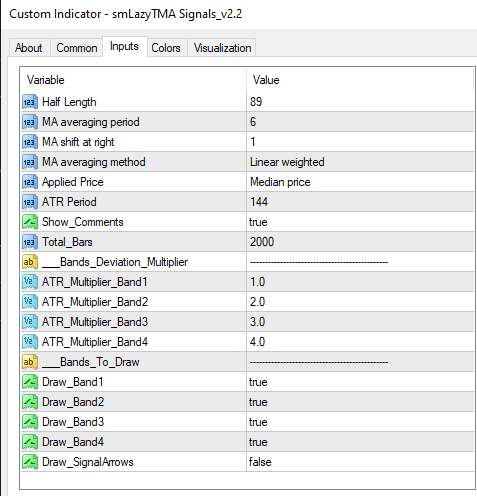
indicator file
0_1612352763696_smLazyTMA Signals_v2.2.mq4 -
@sli1-0 Certainly fxDreema correctly identified the buffers. That is good news. However, if values are different probably means the indicator is repainting. This is a common issue for may indicatora plotting lines on the chart. You should try to confirm there is no repainting before looking for a new indicator.
-
how do you confirm there is no repainting?
Can I ask is my testing EA setup right, to get info.?or
Is it possible to extract the calculations, from the MQL4 code and put it into a Custom MQL block. ? -
@sli1-0 The most efficient (and annoying) way to do it is using a 1M chart and apply the indicator on it. Just look at how it behaves for as long as you can. Then you will see if lines are changed as new candles are created or if they are fixed on the char no matter what. The second option is what you need.
