fxDreema

    • Register
    • Login
    • Search
    • Back to the main page
    • Categories
    • Recent
    • Tags
    • Popular
    • Search

    My condition is going opposite direction

    Questions & Answers
    2
    22
    1829
    Loading More Posts
    • Oldest to Newest
    • Newest to Oldest
    • Most Votes
    Reply
    • Reply as topic
    Log in to reply
    This topic has been deleted. Only users with topic management privileges can see it.
    • G
      gozey last edited by

      I really need help please, I upload my indicator which is an arrow signal and gave a condition, but am still getting the opposite signal, I need an illustration on how to set a block from no trade to close trade on how to set a tree block, please, this is really killing me.

      Q 1 Reply Last reply Reply Quote 0
      • Q
        q8carpenter @gozey last edited by q8carpenter

        @gozey Hello,

        The set up may change depending on your precise requirements and first thing you need to do is make sure that your indicator buffers are set correctly when you upload the indicator to fxdreema and know which buffer is for what signal. You also need to have the indicator in the right folder in MT4 or 5 . Other than that, the screenshot below shows some simple strategies from open to close where your indicator is placed in the condition blocks. Usually buffers are number values so an example of a condition would be (your indicator buffer 1 is not equal to 0)

        If you wanted to open trades based on the objects on the chart, then that is a different story.
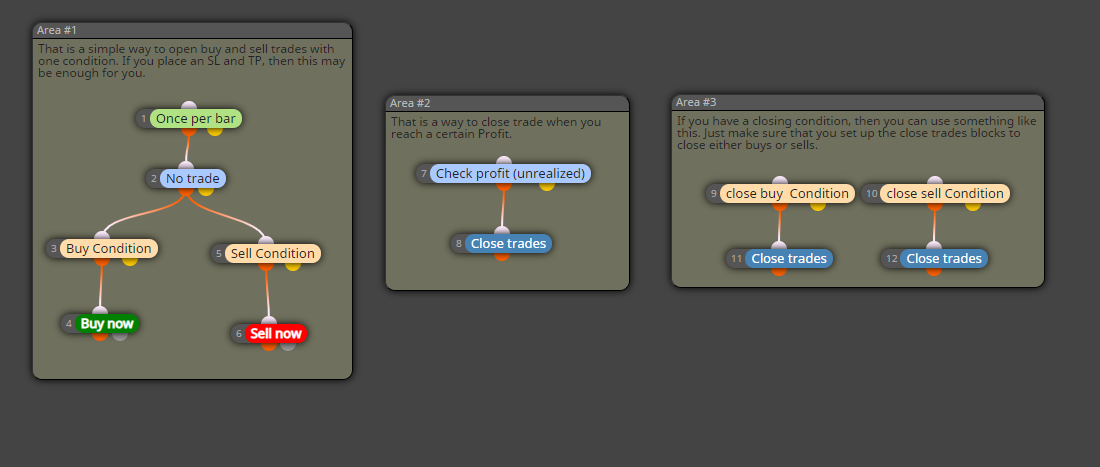
        0_1623901414943_simple strategy.png

        G 1 Reply Last reply Reply Quote 0
        • G
          gozey @q8carpenter last edited by

          @q8carpenter
          I will like to open trades base on the object on the chart, secondly the buffer value is 0, am using just one indicator object on the chart.

          Q 1 Reply Last reply Reply Quote 0
          • Q
            q8carpenter @gozey last edited by

            @gozey
            Then try something like this. you can get the name of the object by double clicking on it on the chart.

            0_1623910478285_object name.png

            G 2 Replies Last reply Reply Quote 0
            • G
              gozey @q8carpenter last edited by

              @q8carpenter
              OK, please can you illustrate this blocks from no trades, please so I don't make mistakes.

              1 Reply Last reply Reply Quote 0
              • G
                gozey @q8carpenter last edited by

                @q8carpenter
                is not working

                Q 1 Reply Last reply Reply Quote 0
                • Q
                  q8carpenter @gozey last edited by

                  @gozey a no trade block can be added before the buy now block.

                  I was wondering if you are able to share the indicator here, as each indicator with fxdreema works a bit differently.

                  G 2 Replies Last reply Reply Quote 0
                  • G
                    gozey @q8carpenter last edited by

                    @q8carpenter
                    https://fxdreema.com/shared/baPQV12wb
                    this is the indicator. 0_1623944685676_FOREEX SNIPER KILLER Entry Alert.ex4

                    1 Reply Last reply Reply Quote 0
                    • G
                      gozey @q8carpenter last edited by

                      @q8carpenter
                      you can also try this also
                      0_1623948340202_DJ SPA.ex4 and this
                      0_1623948374105_DJX6 V10.1.1 LOCK.ex4

                      Q 1 Reply Last reply Reply Quote 0
                      • Q
                        q8carpenter @gozey last edited by

                        @gozey ok I see now. I will write you steps the fastest simplest way to get this specific indicator working. (Foreex Sniper Killer)

                        1. Be sure that it is placed directly in the Indicators folder of MQL4 and not within another folder.
                        2. Copy the Exact name of the indicator. It is very important that the name is exactly written.
                        3. follow the screenshot below.
                        4. I used candle ID 1 as I thought you want the trade to open as soon as the candle closes.
                        5. I have figured that buffer 0 if not = to 0 that would be a signal for a sell and buffer 1 for buy. This is not the same for all indicators and I only checked this one.
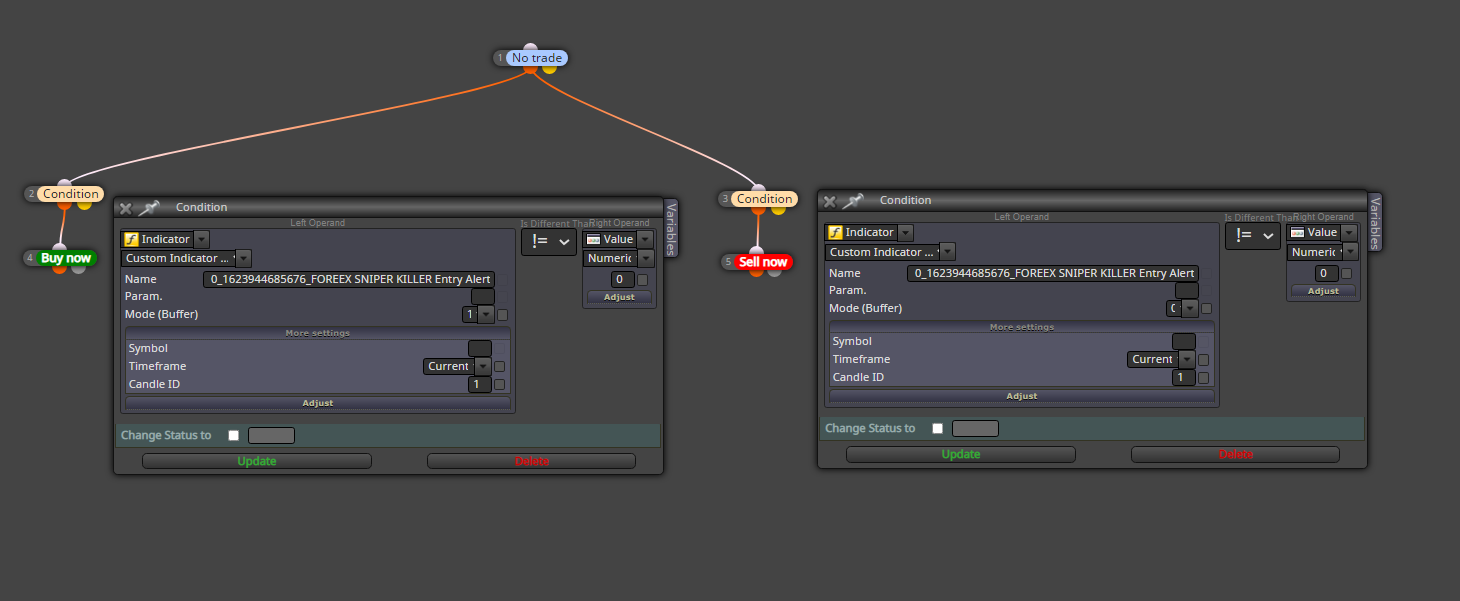
                        0_1623951903848_foreex.png

                        G 1 Reply Last reply Reply Quote 0
                        • G
                          gozey @q8carpenter last edited by

                          @q8carpenter
                          not working
                          https://fxdreema.com/shared/3Kxlu4WH

                          Q 1 Reply Last reply Reply Quote 0
                          • Q
                            q8carpenter @gozey last edited by q8carpenter

                            @gozey

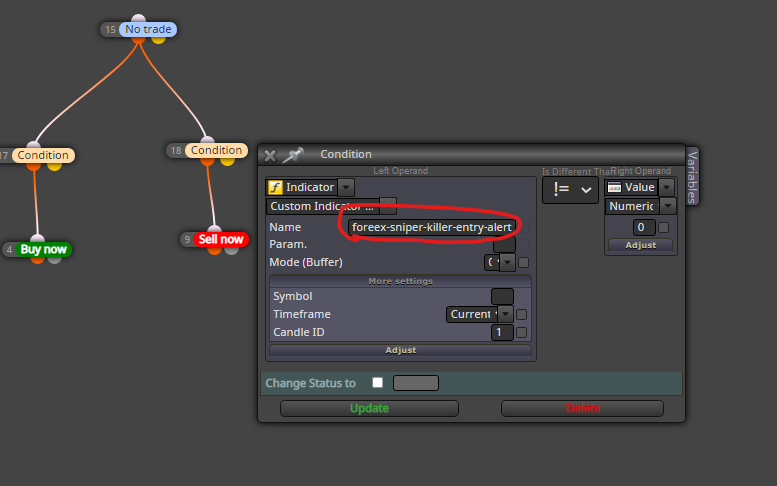
                            It is working with me. I downloaded your shared link except that I had to change the name of the indicator to match the exact name that is in my indicators folder. As you can also see in the screenshots, the file is directly in the indicators folder. The screenshot attached also shows a visual backtest where it works.
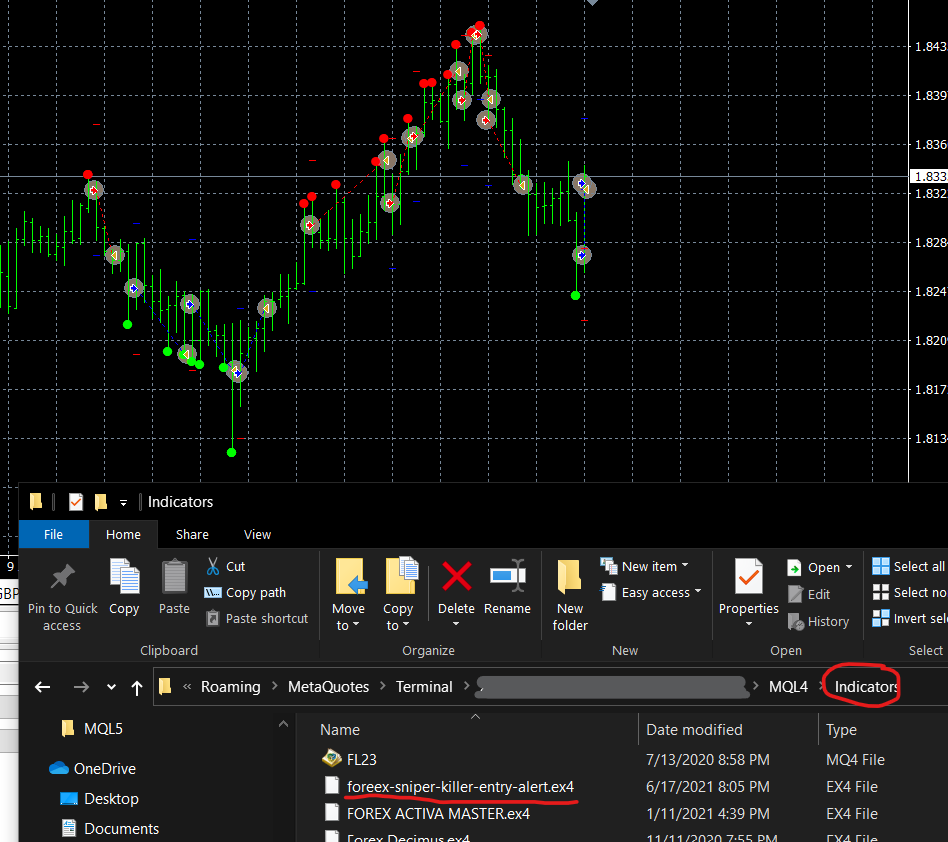
                            0_1623961906726_foreex working.png
                            0_1623961915632_foreex works 2.png

                            G 1 Reply Last reply Reply Quote 0
                            • G
                              gozey @q8carpenter last edited by

                              @q8carpenter
                              am sorry to border at this time it only take trades on one particular 0_1624004709247_tester.JPG value
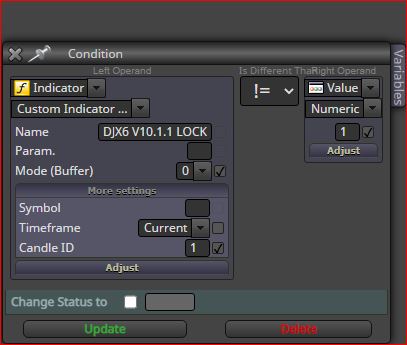
                              in either buy or sell, if i place the same value on the buy and sell and test it takes both trades buy and sell at the same time.

                              Q 2 Replies Last reply Reply Quote 0
                              • Q
                                q8carpenter @gozey last edited by

                                @gozey The way it worked with me was:
                                Buffer 1 != 0 >>>> Buy Signal
                                Buffer 0 != 0 >>>> Sell Signal

                                That is with the foreex indicator. this image you have of another indicator that I didn't test to be honest. give me a few minutes to check it out for you

                                1 Reply Last reply Reply Quote 0
                                • Q
                                  q8carpenter @gozey last edited by

                                  @gozey

                                  Buffer 4 != 0 >>>> Buy Signal
                                  Buffer 5 != 0 >>>> Sell Signal

                                  Try that for the DJX6 LOCK Indicator

                                  G 1 Reply Last reply Reply Quote 0
                                  • G
                                    gozey @q8carpenter last edited by

                                    @q8carpenter
                                    is not working from my end here
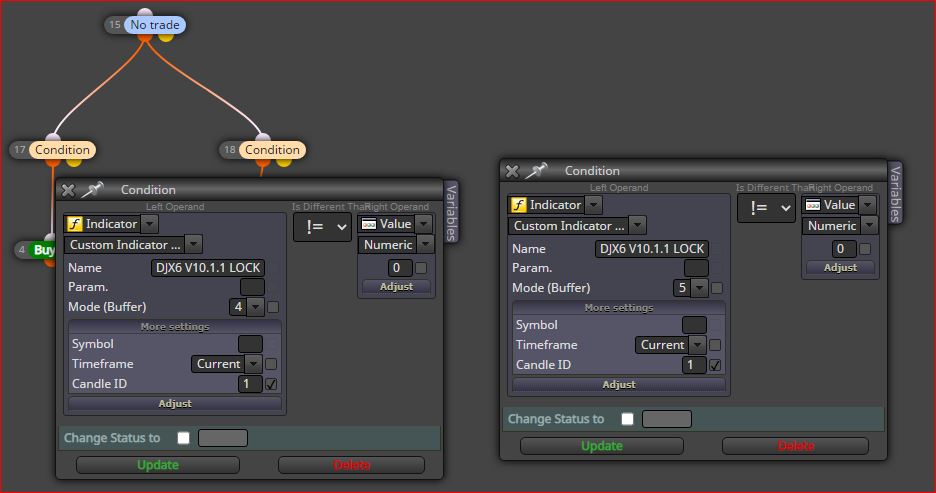
                                    0_1624008723294_test.JPG

                                    Q 1 Reply Last reply Reply Quote 0
                                    • Q
                                      q8carpenter @gozey last edited by

                                      @gozey None of the two indicators is working? can you open the journals tab and see if there were any errors showing up?

                                      G 1 Reply Last reply Reply Quote 0
                                      • G
                                        gozey @q8carpenter last edited by

                                        @q8carpenter
                                        on my mt4, you mean

                                        Q 1 Reply Last reply Reply Quote 0
                                        • Q
                                          q8carpenter @gozey last edited by

                                          @gozey yes in MT4 strategy tester. Do a backtest and see what shows up

                                          G 1 Reply Last reply Reply Quote 0
                                          • G
                                            gozey @q8carpenter last edited by

                                            @q8carpenter
                                            yes i did no

                                            Q 1 Reply Last reply Reply Quote 0
                                            • 1
                                            • 2
                                            • 1 / 2
                                            • First post
                                              Last post

                                            Online Users

                                            V
                                            O
                                            J
                                            B

                                            25
                                            Online

                                            146.7k
                                            Users

                                            22.4k
                                            Topics

                                            122.6k
                                            Posts

                                            Powered by NodeBB Forums | Contributors