Help needed to troubleshoot optimization results in mt4
-
Am trying to export my backtested optimization results to an excel spreadsheet but the results table is showing only one pass with all the results . Other tables show results after each trade like in a normal backtest . How can that be achieved in the optimization results table ?
-
@od what was the optimization parameter you had used?
Know that there are cunning manipulative idiots who only looked for themselves. Who will come to seek what you know and the moment they learn a little they claim to be a master and think they know what they are talking about.
The perfect example is in this platform named Tipsy Wisdom. From someone who didn't know what constant variable or back testing, rather a letteral noob when it came to algo trading, spent 2 months learning from ME for FREE OF CHARGE and is now self proclaimed teacher with a discord group who will take your money to build EAs claiming it will give you a Edge 🤣
When his arragonce is beyond tolerant and decided to discard any and all work spent teaching the idiot, he decides to write a sympathy signature claiming the poor sad innocent guy was burnt and played for a fool WHEN HE SHOULD BE THANKFUL IN MAKING PROGRESS WITH ALGORITHM TRADING. 🤷
-
@vonmunchy
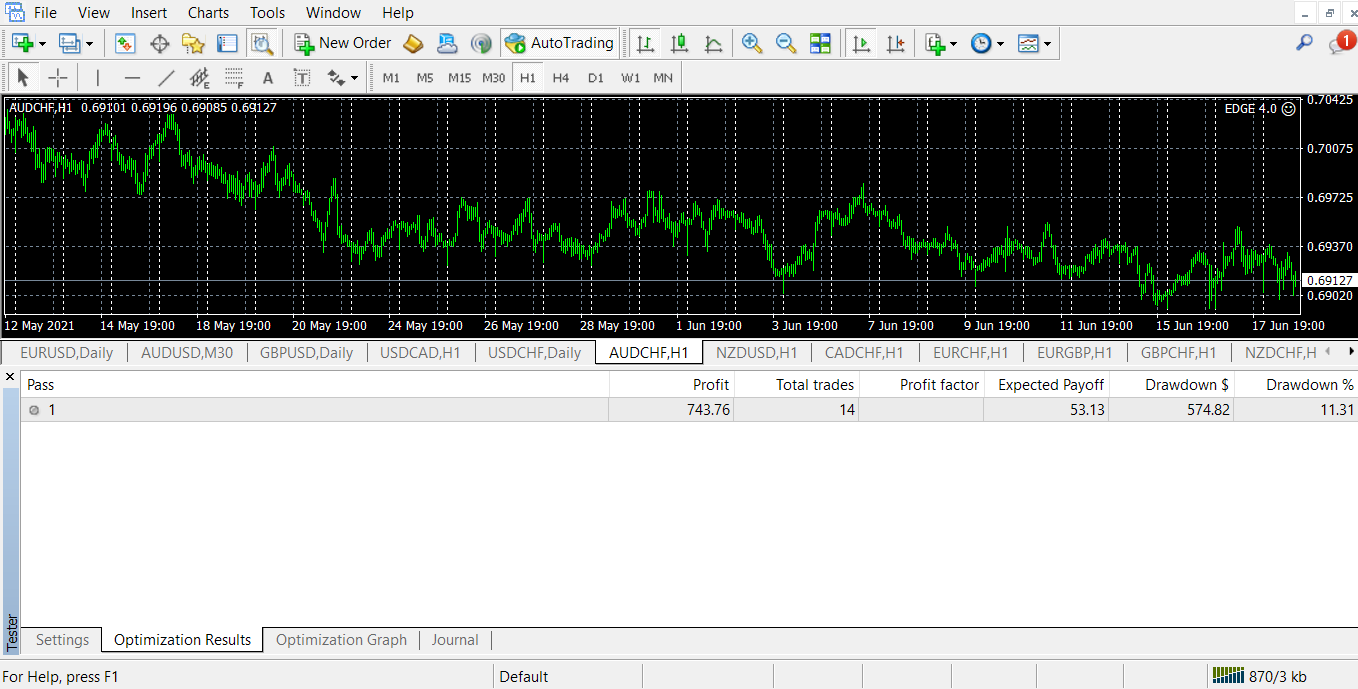 I did not select any box in the expert properties but the results look like above
 -
@od hard to say much without the project link.
Check from settings what you choose as optimization pameters. Example, balance max, min dd, custom max.
Know that there are cunning manipulative idiots who only looked for themselves. Who will come to seek what you know and the moment they learn a little they claim to be a master and think they know what they are talking about.
The perfect example is in this platform named Tipsy Wisdom. From someone who didn't know what constant variable or back testing, rather a letteral noob when it came to algo trading, spent 2 months learning from ME for FREE OF CHARGE and is now self proclaimed teacher with a discord group who will take your money to build EAs claiming it will give you a Edge 🤣
When his arragonce is beyond tolerant and decided to discard any and all work spent teaching the idiot, he decides to write a sympathy signature claiming the poor sad innocent guy was burnt and played for a fool WHEN HE SHOULD BE THANKFUL IN MAKING PROGRESS WITH ALGORITHM TRADING. 🤷
-
@vonmunchyhttps://fxdreema.com/shared/jEJF7wU5b
-
@od said in Help needed to troubleshoot optimization results in mt4:
You need inputs to optimize first.
https://fxdreema.com/instructions/builder/constants-and-variables
Know that there are cunning manipulative idiots who only looked for themselves. Who will come to seek what you know and the moment they learn a little they claim to be a master and think they know what they are talking about.
The perfect example is in this platform named Tipsy Wisdom. From someone who didn't know what constant variable or back testing, rather a letteral noob when it came to algo trading, spent 2 months learning from ME for FREE OF CHARGE and is now self proclaimed teacher with a discord group who will take your money to build EAs claiming it will give you a Edge 🤣
When his arragonce is beyond tolerant and decided to discard any and all work spent teaching the idiot, he decides to write a sympathy signature claiming the poor sad innocent guy was burnt and played for a fool WHEN HE SHOULD BE THANKFUL IN MAKING PROGRESS WITH ALGORITHM TRADING. 🤷
-
@vonmunchy I've read the instructions on how to create constants and variables but I really do not understand the importance to create them , please inform me on that . Anyways I've tried to create a constant on TP and LOTSIZE but the results at the table are still in one pass . Check below
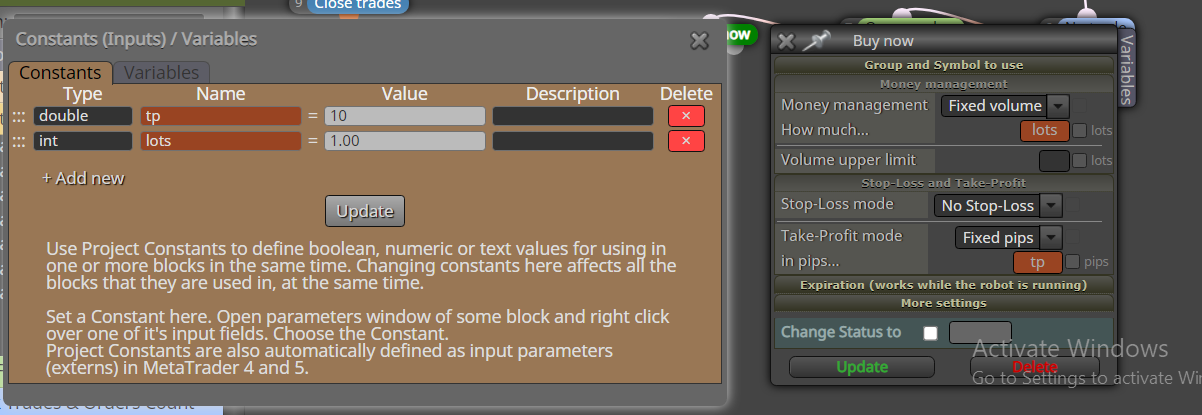
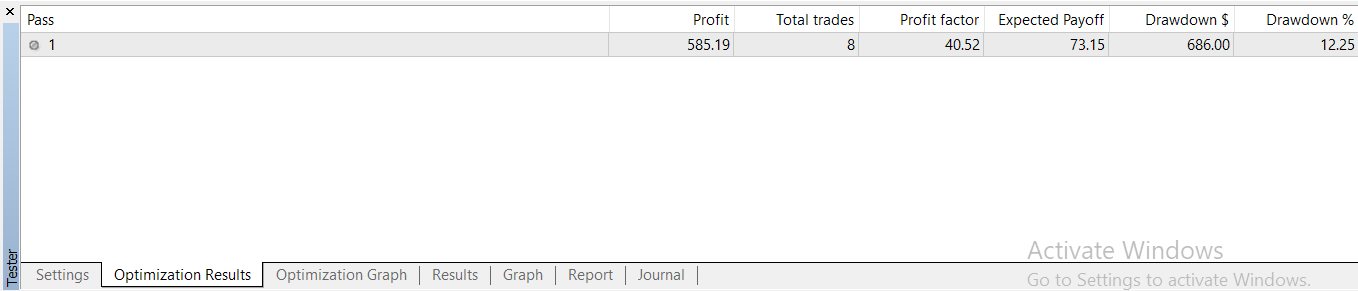 I want the results of each trade just one by one in the same format as in the table so that I can copy it to a spreadsheet . https://fxdreema.com/shared/icMAWtuxc
 -
@od seriously im not trying to be rude. But to create EAs you dont just jump right into a platform and hoping its a matter of spending a couple of mins and suddenly you have the solution for everything.
If someone was asking help on building a specific logic or how certain blocks works than yes, anyone who has any experience here will definitely help out.
When people don't know anything about trading, the platforms or in this case what optimization is about what, most people will ignore subjects like this because its your job to understand the basic which is freely available for anyone with a simple google search.
If you don't understand the importance inputs that means you don't know what optimization is about is about and i suggest you look up youtube videos. There are plenty of basic fxdreema videos there that covers all most all the basics and alternatively you read mq4 documentation on the tester.
https://www.metatrader4.com/en/trading-platform/help/overview/strategy_tester
Know that there are cunning manipulative idiots who only looked for themselves. Who will come to seek what you know and the moment they learn a little they claim to be a master and think they know what they are talking about.
The perfect example is in this platform named Tipsy Wisdom. From someone who didn't know what constant variable or back testing, rather a letteral noob when it came to algo trading, spent 2 months learning from ME for FREE OF CHARGE and is now self proclaimed teacher with a discord group who will take your money to build EAs claiming it will give you a Edge 🤣
When his arragonce is beyond tolerant and decided to discard any and all work spent teaching the idiot, he decides to write a sympathy signature claiming the poor sad innocent guy was burnt and played for a fool WHEN HE SHOULD BE THANKFUL IN MAKING PROGRESS WITH ALGORITHM TRADING. 🤷
-
@vonmunchy No offence taken am learning . Thanks for the link .
-
@od said in Help needed to troubleshoot optimization results in mt4:https://www.youtube.com/watch?v=sMOvzn4Ns7g&list=PL45455D7DF09EAB08&index=3
-
@od What do you exactly need from the video?
(English) I will try to help everyone in these fxDreema forums. But if you want to learn how to use the platform in depth or more quickly, I can help you with my introductory fxDreema course in English at https://www.theandorraninvestor.eu.
(Català) Miraré d’ajudar tothom en aquests fòrums d’fxDreema. Tanmateix, si vols aprendre a fer servir la plataforma amb més profunditat o més de pressa, t’hi puc ajudar amb el meu curs d’introducció a fxDeema en català a https://www.theandorraninvestor.eu/ca.
(Español) Intentaré ayudar a todo el mundo en estos foros de fxDreema. Sin embargo, si quieres aprender a usar la plataforma en profundidad o más deprisa, te puedo ayudar con mi curso de introducción a fxDreema en español en https://www.theandorraninvestor.eu/es.
-
agreed with above....MQL is a coding language. Dreema is just an interface to be able to simplify coding but it doesnt mean you shouldn't still understand the basics to the language. To be honest, it would probably help you a lot because to know what you can do with the code itself instead of having to rely on blocks, it will save you tons of time on building and testing in the future when you do find that edge you're looking for especially. Finding an "edge" isn't the hardest part of this journey.
I too didn't understand what a variable or constant was until a few weeks ago.
-
@l-andorrà Someone could have stumbled on this post and be left hanging just some insight .
-
@jsauter86 For sure it is a time saver , am learning to optimize timeframes with the custom MQL block . I could have created different bots with different timeframes and same strategy ,but with the knowledge on constants and variables it becomes possible with only one bot
-
@od I mostly agree with jsauter86.


