fxDreema

    • Register
    • Login
    • Search
    • Back to the main page
    • Categories
    • Recent
    • Tags
    • Popular
    • Search

    number of open transactions

    Questions & Answers
    3
    11
    863
    Loading More Posts
    • Oldest to Newest
    • Newest to Oldest
    • Most Votes
    Reply
    • Reply as topic
    Log in to reply
    This topic has been deleted. Only users with topic management privileges can see it.
    • L
      LadyDolares last edited by

      hello ...
      open trade should be max.5buy 5 sell.
      but the trade continues to open. 6. opens trade
      It closes with 0.1 loss. how can i run this correctly?
      https://fxdreema.com/shared/nsmjTi2Db
      please help me

      Q 1 Reply Last reply Reply Quote 0
      • Q
        q8carpenter @LadyDolares last edited by

        @ladydolares Hello,

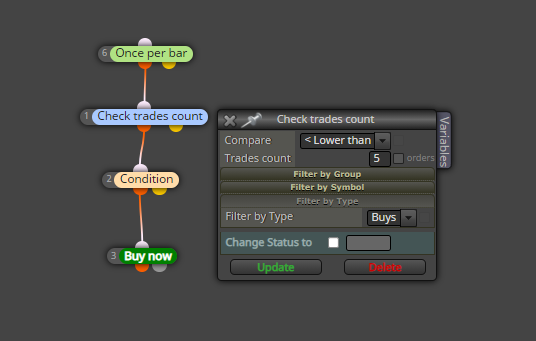
        Here you have a way where the EA will only open 5 trades max for buy

        0_1625826989310_open less 5.png

        L 1 Reply Last reply Reply Quote 0
        • L
          LadyDolares @q8carpenter last edited by

          @q8carpenter hello again,
          The number of open trades should be 5 buy 5 sell .
          The robot will not open trades unless open trades are closed.
          but the robot didn't work as you showed.

          Q 1 Reply Last reply Reply Quote 0
          • Q
            q8carpenter @LadyDolares last edited by

            @ladydolares

            the example I gave was only for buy trades. duplicate it for sell trades and it should work with 5 buys and 5 sells.

            The thing is that with this way, the trade will open with the condition you set. Did you want a trade to open as soon as the trade closes regardless of the condition?

            L 1 Reply Last reply Reply Quote 0
            • L
              LadyDolares @q8carpenter last edited by

              @q8carpenter yes, there can be a maximum of 5 buy 5 sell trades regardless of the condition. If 1 trade is closed, 1 more trade can be opened again.

              Q 1 Reply Last reply Reply Quote 0
              • Q
                q8carpenter @LadyDolares last edited by

                @ladydolares

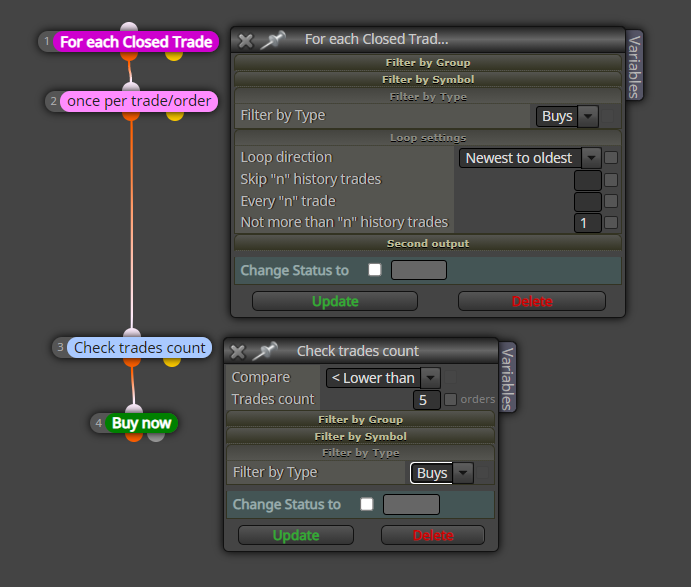
                The following will open a trade whenever a trade closes with a 5 trade limit for buy.

                0_1625861286882_5 trades.png

                L 1 Reply Last reply Reply Quote 0
                • L
                  LadyDolares @q8carpenter last edited by

                  @q8carpenter Thank you very much for your interest. But I did the same as in this picture, it never opened a trade... I need to be able to do this, it's very important to me

                  jstap Q 2 Replies Last reply Reply Quote 0
                  • jstap
                    jstap @LadyDolares last edited by

                    @ladydolares sometimes things in FX don't work as expected, there is another option though, on the on tick tab have what is in the picture without the pink blocks, on the on trade tab use a purple trade closed block and under place the check and buy.

                    Learn fxDreema Without the Wait!

                    My comprehensive book, available on Amazon, is packed with examples and invaluable insights to help you fast-track your learning journey.

                    The paperback and hardback editions include MT4 & MT5 QR codes for easy access to all prebuilt projects and robots, including my latest gold trading robot!

                    Don’t miss out

                    Click here➡️ https://mybook.to/fxDreema to get your copy today!

                    Enjoy! 😊

                    L 1 Reply Last reply Reply Quote 0
                    • Q
                      q8carpenter @LadyDolares last edited by

                      @ladydolares what I meant was to add the part in my last image to the part that opens trades based on your conditions from your list. What will happen is that trades will open based on your conditions but then for each closed trade, another new one opens.

                      Unless I misunderstood you, that should do the trick.

                      L 1 Reply Last reply Reply Quote 0
                      • L
                        LadyDolares @jstap last edited by

                        @jstap hello, I ask you to show in the project, I will be grateful to you

                        1 Reply Last reply Reply Quote 0
                        • L
                          LadyDolares @q8carpenter last edited by

                          @q8carpenter The problem is solved, thank you very much sir..
                          1 Reply Last reply Reply Quote 0
                          • 1 / 1
                          • First post
                            Last post

                          Online Users

                          T
                          S
                          A
                          M
                          M
                          E
                          C
                          M
                          F
                          L
                          F
                          F
                          E
                          K

                          27
                          Online

                          146.6k
                          Users

                          22.4k
                          Topics

                          122.6k
                          Posts

                          Powered by NodeBB Forums | Contributors