fxDreema

    • Register
    • Login
    • Search
    • Back to the main page
    • Categories
    • Recent
    • Tags
    • Popular
    • Search

    Triple exponential average oscillator cross over 0 not working at all

    Questions & Answers
    3
    22
    2820
    Loading More Posts
    • Oldest to Newest
    • Newest to Oldest
    • Most Votes
    Reply
    • Reply as topic
    Log in to reply
    This topic has been deleted. Only users with topic management privileges can see it.
    • Z
      ZhAhZ last edited by

      Hey guys,

      I am trying to trigger a buy trade when triple exponential average oscillator crosses above 0 but it just does not work!!!! very simple but not working, no trade happens. can anyone support?
      https://fxdreema.com/shared/ExGP8qoIc

      A 1 Reply Last reply Reply Quote 0
      • A
        ambrogio @ZhAhZ last edited by

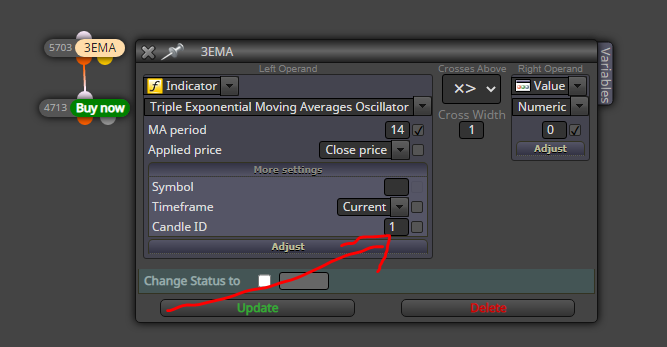
        @zhahz Set candle ID = 1

        0_1629981186255_Cattura.PNG

        Z 1 Reply Last reply Reply Quote 0
        • Z
          ZhAhZ @ambrogio last edited by ZhAhZ

          @ambrogio Did it work for you? cause for me it didn't trigger any trade just like before.

          I just noticed that if I set the condition to bigger or less than zero or unequal to zero will also not work. The only way it works is when I set the condition equal to zero. That means the value of this indicator is always ZERO!!!!

          I believe this is a bug which needs to be addressed @FXDREEMA

          jstap A 2 Replies Last reply Reply Quote 0
          • jstap
            jstap @ZhAhZ last edited by jstap

            @zhahz Put all in a comment to see what's happening, also try putting a no position block above.

            Learn fxDreema Without the Wait!

            My comprehensive book, available on Amazon, is packed with examples and invaluable insights to help you fast-track your learning journey.

            The paperback and hardback editions include MT4 & MT5 QR codes for easy access to all prebuilt projects and robots, including my latest gold trading robot!

            Don’t miss out

            Click here➡️ https://mybook.to/fxDreema to get your copy today!

            Enjoy! 😊

            Z 2 Replies Last reply Reply Quote 0
            • Z
              ZhAhZ @jstap last edited by ZhAhZ

              @jstap No this is the Oscillator and on the MT5 has a clear 0 line and plays around it with a tolerance of +-0.00007 (roughly). The one you mentioned is a the trend indicator which will appear on the chart.

              1 Reply Last reply Reply Quote 0
              • Z
                ZhAhZ @jstap last edited by

                @jstap I just did and the value is constantly 0.0, no change despite the fact that you can see the Oscillator moves above and below the 0.

                jstap 1 Reply Last reply Reply Quote 0
                • jstap
                  jstap @ZhAhZ last edited by jstap

                  @zhahz In this link you'll see what I did to test if we have an above & below 0, for it to determine if it's <> 0 means the same logic can be used to place a trade. Have a look and see if you can get it working in your project, if not let me know and I'll see what is happening

                  Learn fxDreema Without the Wait!

                  My comprehensive book, available on Amazon, is packed with examples and invaluable insights to help you fast-track your learning journey.

                  The paperback and hardback editions include MT4 & MT5 QR codes for easy access to all prebuilt projects and robots, including my latest gold trading robot!

                  Don’t miss out

                  Click here➡️ https://mybook.to/fxDreema to get your copy today!

                  Enjoy! 😊

                  Z 1 Reply Last reply Reply Quote 1
                  • A
                    ambrogio @ZhAhZ last edited by ambrogio

                    @zhahz this works https://fxdreema.com/shared/OUjEi2Hcc
                    by increasing cross width area and by putting a no trade block at the top like @jstap has suggested
                    This is not the first time that I have to increase the area, even on the crossings of moving averages. In the past the administrator @Fxdreema could not explain why this malfunction (never happened on MT4)
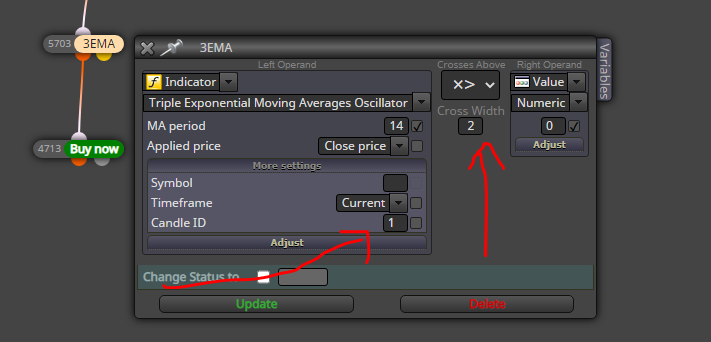
                    0_1630013954984_Cattura.PNG

                    Z 1 Reply Last reply Reply Quote 1
                    • Z
                      ZhAhZ @jstap last edited by

                      @jstap I tried your code and from the beginning to the end of the period (1 month, M1) the comment was like below picture. No change at all no matter the oscillator crossed above or below zero.
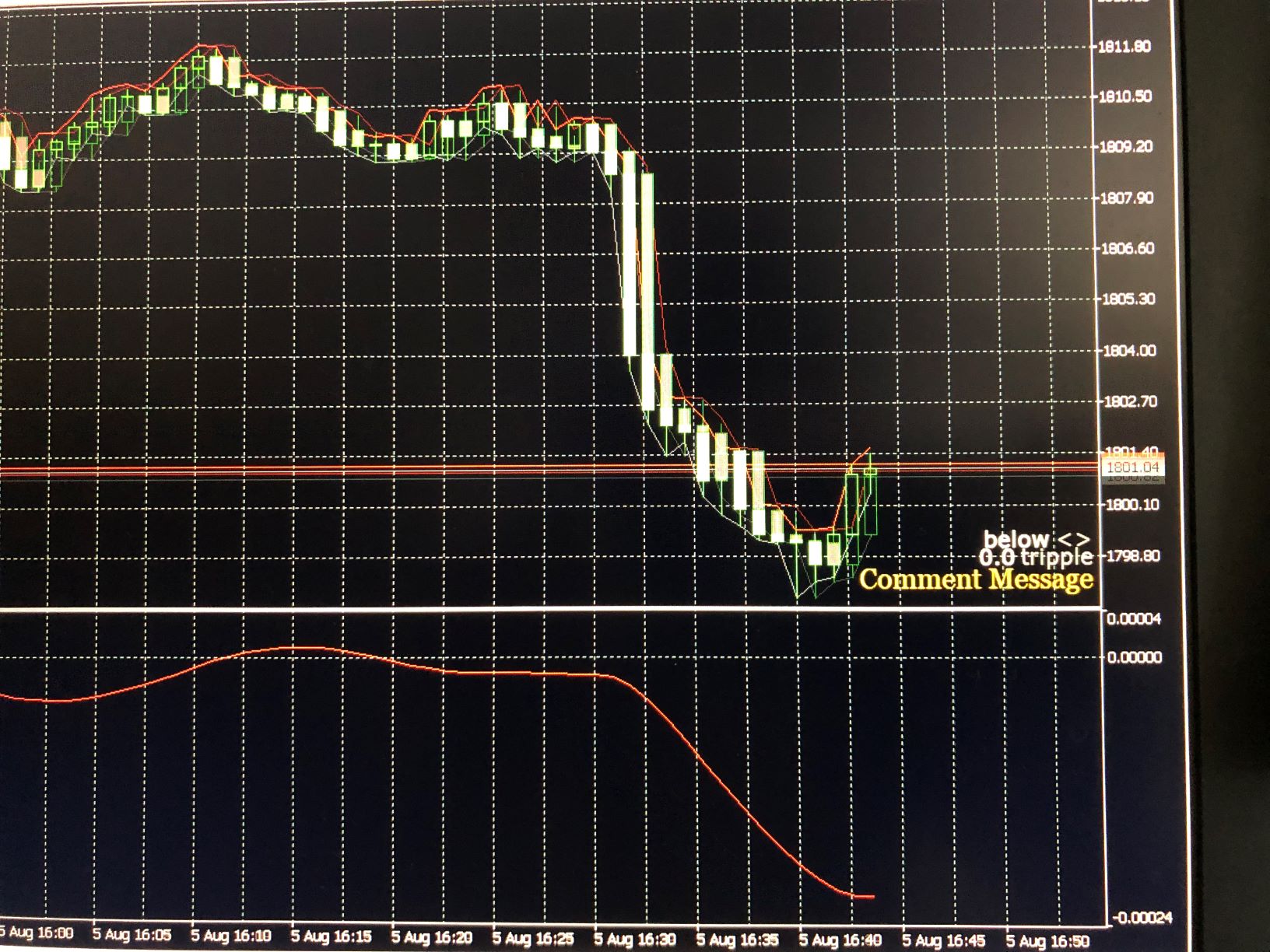
                      0_1630043477466_mmexport1630043217559.jpg

                      1 Reply Last reply Reply Quote 0
                      • Z
                        ZhAhZ @ambrogio last edited by

                        @ambrogio I tried this version too, but no trade is triggered.

                        A 1 Reply Last reply Reply Quote 0
                        • A
                          ambrogio @ZhAhZ last edited by

                          @zhahz It works for me. Check the journal for any errors.
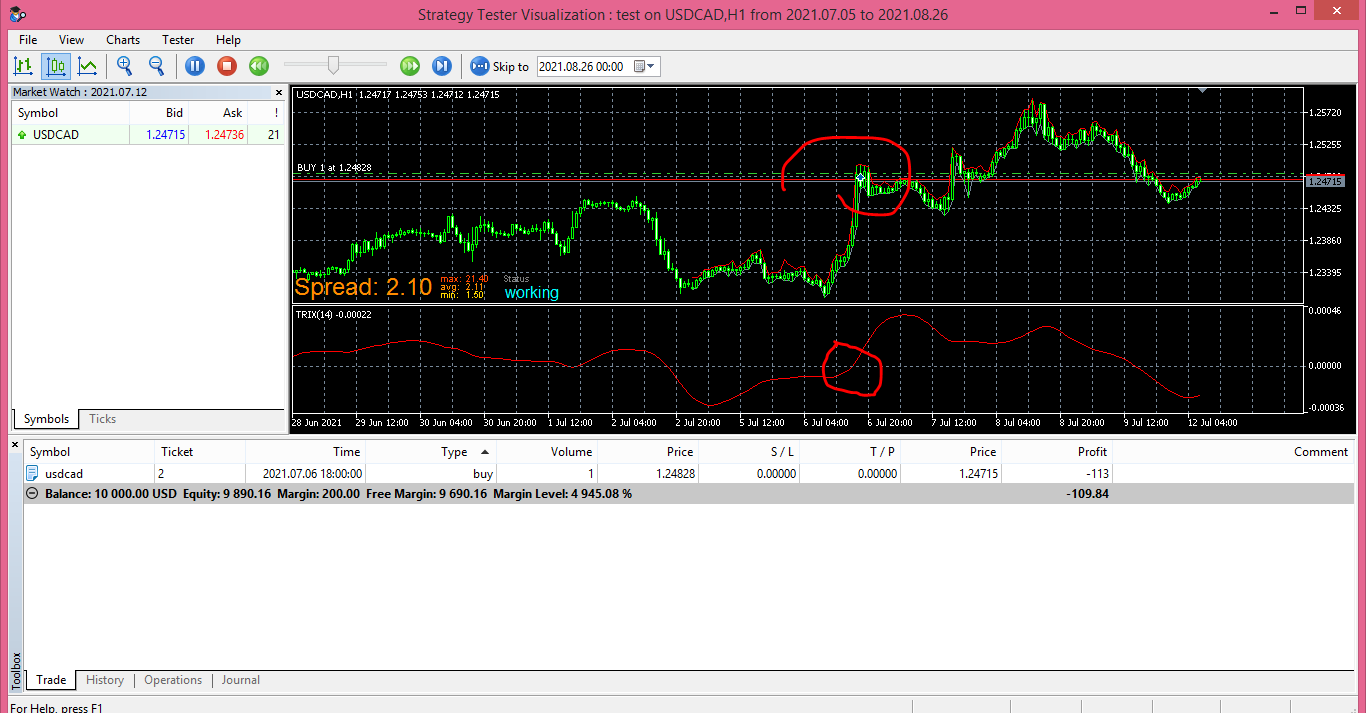
                          0_1630053519680_Cattura.PNG

                          jstap 1 Reply Last reply Reply Quote 1
                          • jstap
                            jstap @ambrogio last edited by jstap

                            @ZhAhZ I am quite selective on using cross, on this I would use above > or below <, although the line goes from one side and crosses to the other, I would just use < or >, if you look in the link I posted this is the condition I used, also doesn't wait for this to happen on previous candle or check the width for condition do happen, so is all about what works best and what suites your condition best.

                            As people have said what you are doing should work, on your picture triple is on 0.0, this says that that the indicator is not working for your conditions, if you click the link I put then press ex5 you will get that ea so you can test and see working, if you then press mq5 and import back into dreema you will have the project to copy or amend.

                            Learn fxDreema Without the Wait!

                            My comprehensive book, available on Amazon, is packed with examples and invaluable insights to help you fast-track your learning journey.

                            The paperback and hardback editions include MT4 & MT5 QR codes for easy access to all prebuilt projects and robots, including my latest gold trading robot!

                            Don’t miss out

                            Click here➡️ https://mybook.to/fxDreema to get your copy today!

                            Enjoy! 😊

                            Z 1 Reply Last reply Reply Quote 1
                            • Z
                              ZhAhZ @jstap last edited by

                              @jstap I did copy your project in a new project with no extra blocks and sent you the picture. I am frustrated at this moment, I even tried a simple MA cross over to make sure my MT5 is working properly and did worked with no issue. Also tried all the possible conditions for triggering the trade but it only works if I set it = 0. Any other case would just do nothing...

                              @ambrogio I have no idea then why it does not work for me cause I also exactly copy paste your project into a new file and tested.

                              jstap 1 Reply Last reply Reply Quote 0
                              • jstap
                                jstap @ZhAhZ last edited by

                                @zhahz My only assumption is you have a problem with your terminal, I would reinstall or install a different one to see what happens, if you have used the exact project but it's not working then the problem is likely on your side.

                                Learn fxDreema Without the Wait!

                                My comprehensive book, available on Amazon, is packed with examples and invaluable insights to help you fast-track your learning journey.

                                The paperback and hardback editions include MT4 & MT5 QR codes for easy access to all prebuilt projects and robots, including my latest gold trading robot!

                                Don’t miss out

                                Click here➡️ https://mybook.to/fxDreema to get your copy today!

                                Enjoy! 😊

                                Z 1 Reply Last reply Reply Quote 0
                                • Z
                                  ZhAhZ @jstap last edited by ZhAhZ

                                  @jstap Just tested ambrogio project on a different broker terminal and same results, no trade:)))))))))

                                  does it also works on your MT5?

                                  jstap A 2 Replies Last reply Reply Quote 0
                                  • jstap
                                    jstap @ZhAhZ last edited by

                                    @zhahz I have just tested this on mine and it works, it has no SL and no position block so if you miss the first placed trade you may not realise it's in one so not understand why it's not placing another.

                                    Learn fxDreema Without the Wait!

                                    My comprehensive book, available on Amazon, is packed with examples and invaluable insights to help you fast-track your learning journey.

                                    The paperback and hardback editions include MT4 & MT5 QR codes for easy access to all prebuilt projects and robots, including my latest gold trading robot!

                                    Don’t miss out

                                    Click here➡️ https://mybook.to/fxDreema to get your copy today!

                                    Enjoy! 😊

                                    1 Reply Last reply Reply Quote 0
                                    • A
                                      ambrogio @ZhAhZ last edited by

                                      @zhahz If you copied and pasted the @jstap project you probably lost the variables. Do not copy and past, save directly on the terminal the projects of @jstap and mine (mq5 and ex5 also), and refresh the terminal or restart it.

                                      Z 1 Reply Last reply Reply Quote 1
                                      • Z
                                        ZhAhZ @ambrogio last edited by

                                        @ambrogio @jstap guys, guys, I may not know how to solve the issue but I am also not that armature :))))
                                        Of course I redefined the variable and also tried with SL and TP tp make sure nothing is hidden also checked trade history and journal but it just doesn't work. In addition tried different time frame, different time period and different currency but nope.

                                        Could be there something in the website as decimal count for calculations? this is my last guess that maybe calculation are done only to 3 decimal or less and that's why it never detect above or below 0

                                        I can only think of something to be turned OFF or ON somewhere in setting of something!

                                        jstap 1 Reply Last reply Reply Quote 0
                                        • jstap
                                          jstap @ZhAhZ last edited by jstap

                                          @zhahz Put the exact project that doesn't work here in a shared link, the reason why can be assessed.

                                          Learn fxDreema Without the Wait!

                                          My comprehensive book, available on Amazon, is packed with examples and invaluable insights to help you fast-track your learning journey.

                                          The paperback and hardback editions include MT4 & MT5 QR codes for easy access to all prebuilt projects and robots, including my latest gold trading robot!

                                          Don’t miss out

                                          Click here➡️ https://mybook.to/fxDreema to get your copy today!

                                          Enjoy! 😊

                                          Z 1 Reply Last reply Reply Quote 0
                                          • Z
                                            ZhAhZ @jstap last edited by

                                            @jstap there you go:

                                            https://fxdreema.com/shared/mXNWafTib

                                            By the way I really apricate your time guys, thanks for support

                                            jstap 1 Reply Last reply Reply Quote 0
                                            • 1
                                            • 2
                                            • 1 / 2
                                            • First post
                                              Last post

                                            Online Users

                                            K
                                            C
                                            E
                                            M
                                            F
                                            T
                                            M

                                            20
                                            Online

                                            146.6k
                                            Users

                                            22.4k
                                            Topics

                                            122.6k
                                            Posts

                                            Powered by NodeBB Forums | Contributors