(Solved) How to stop horizontal Line from dynamic moving after someting happen.?
-
Hi.
I have a problem to stop horizontal Line from moving. Please Help- My 2 Hori Line (as seen in the orange box in the chart) I gave them some distance Highest and Lowest price of current day if the Highest and Lowest price have changed the lines will move to keep the distance. (the value of distance changes everyday)
** I want to Stop them Both from moving at current price " when the current price Hit one of them either Up or down Hori line and then change the color of them both to notice that one of them are hitted" ...
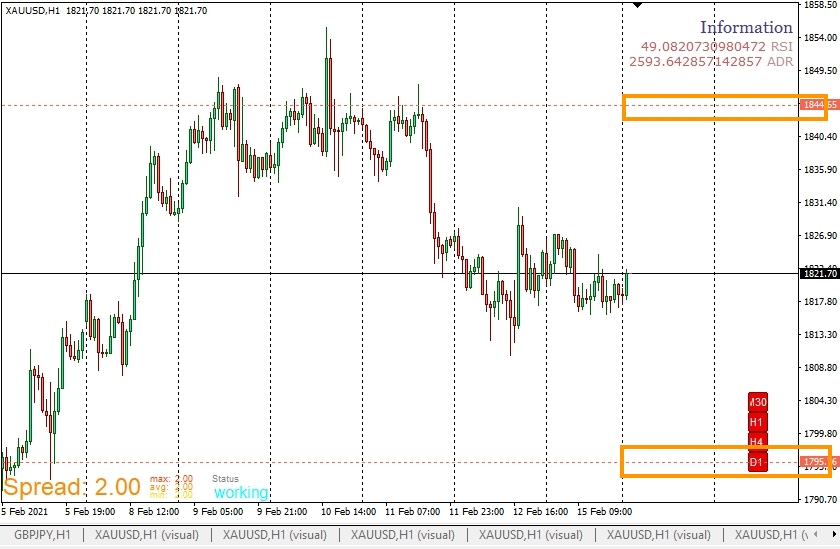
Thank you I am looking forward for your help.
-
@jobotgold1 Not completely sure what you mean. If those lines are supposed to be set a specific distance every day it is obvious that the will move every day according to new prices today. When are those lines supposed to be 'stopped' exactly?
-
Apologize for unclear writing. I am from Thailand and not so good at English .
I will explain the line strategy now .
The up line and down line made from The ADR (Average Daily Range) calculated by last 14 daily candles to find the Average Range the graph move in one day in pips.
@Condition1
When I got the Average daily Range in pips..
It will draw 2 Hori lines.THE UP LINE made from Today's Lowest price +plus ADR (pips)
THE DOWN LINE made from Today's Highest price -minus ADR (pips)
#Delete both of them at 22.00 sever time everyday
#This condition will start at 01.00 am server time everydayV
V
V
"The problem is" I want to stop these 2 lines immediately when price hit one of the lines and change their color.
And then delete them both at 22.00 server timeTomorow it will start run @condition1
I also try to delete them and draw new line instead at the old lines point. But it is not working as picture in the next comment.
Thanks for your responding.
-
@jobotgold1 The logic you have written should work, you can use custom code to change colour but this can be difficult and depends on weather MT4 or MT5, if you put a shared link here someone can look and see what's happening.
-
@jstap Ok I am going to share Thank you
-
@jobotgold1 said in How to stop horizontal Line from dynamic moving after someting happen.?:
Apologize for unclear writing. I am from Thailand and not so good at English .
I will explain the line strategy now .
The up line and down line made from The ADR (Average Daily Range) calculated by last 14 daily candles to find the Average Range the graph move in one day in pips.
@Condition1
When I got the Average daily Range in pips..
It will draw 2 Hori lines.THE UP LINE made from Today's Lowest price +plus ADR (pips)
THE DOWN LINE made from Today's Highest price -minus ADR (pips)
#Delete both of them at 22.00 sever time everyday
#This condition will start at 01.00 am server time everydayV
V
V
"The problem is" I want to stop these 2 lines immediately when price hit one of the lines and change their color.
And then delete them both at 22.00 server timeTomorow it will start run @condition1
I also try to delete them and draw new line instead at the old lines point. But it is not working as picture in the next comment.
Thanks for your responding.
It is MT4
My 2 delete lines methods which are not working . the lines still same lines not deleted and not creating the new line after hitted. -
@jobotgold1 Have a look in HERE you'll see a few things I've added that are probably of use to you, not sure why your constants/variables didn't copy but you'll get the idea, I've not tested any. The reason why your versions weren't working is because your condition was expecting a candle to close exactly on a line, a quite unlikely situation.
||||On a side note, I will put conditions into a boolean variable and place in a comment so I can visually check what is or isn't working. Hope this helps
-
@jstap Thank you so much .. But I think it doesn't work . I tried many ways by your helping Example shared. but it doesn't work I really don't know what I missed.
Here are the hole project share link :
https://fxdreema.com/shared/YpQj56LVc -
@jstap This one Worked !!! https://fxdreema.com/shared/GTYhPegFc
Thank you so much for you help . But I Converted into MQL5 and delete objects must contains the line color and adjust some on and off block.By the way... I have learned something new from you . I am very new to FXDREEMA and learning by searching other's problem in the forum.
Thanks again
-
@jobotgold1 LINK, I couldn't get the custom code (strange because this work's on buttons I use) changing the line, but it works in a similar way to your buttons. You had the lines being drawn two ways and this was causing a name confliction, have not completed all to get working but have done enough for you to see what you need to do, check names because I changed a few just to get working, also changed style, just for visual effect.
-
@jstap Ohhh Thank you so much ^^
-
@jobotgold1 Your welcome

