SuperTrend (Non Repainting). Higher time frame Colour Change as macro signal to lower timeframe
-
Hi there everyone,
I am a new member to fxDreema and I am looking forward to building my EA, hopefully with some assistance from the members who have mastered the settings in fxDreema. I think it will be a tricky learning curve but we all have to start somewhere.
I am currently stuck on a condition box. This is what I want the box to do:
I added a non-repainting SuperTrend and I want the Daily SuperTrend to create a signal (Bullish or Bearish) based on the "colour" of the Daily SuperTrend. I do not want a Buy or Sell signal for the Daily chart. I want the signal to be used as a filter for the lower timeframe charts. If the Daily chart SuperTrend is bullish (Blue or Green in colour) then the 1H chart for example will only take Buy tradeson the 1H and ignore all Sell signals.
Once the greater trend on the Daily is known then the 1H will use the 1H SuperTrend, (maybe Heiken Ashi Smoothed) and the Kijun-sen line from the Ichimoku indicator to enter trades only in the direction of the daily trend.
-
@edify-1984 You can connect 'condition' blocks with different timeframes to check like this:
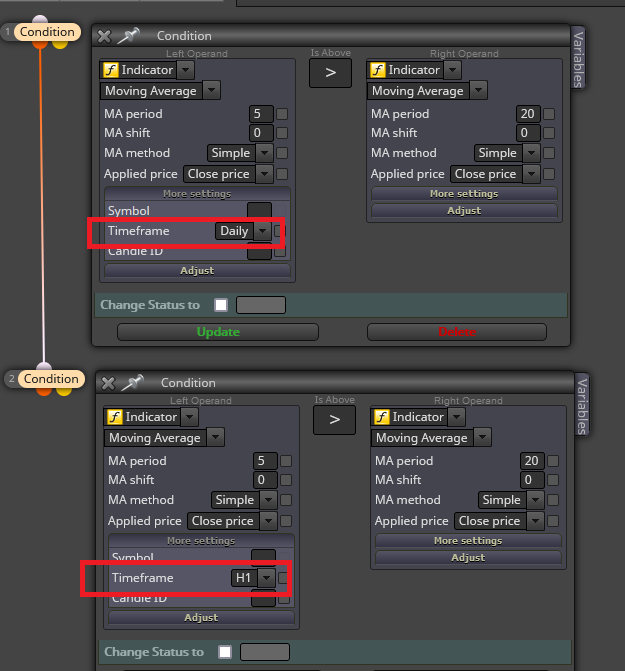
However, are you completely sure is there a supertrend indy tat doesn't repaint. I'm very skeptical.
(English) I will try to help everyone in these fxDreema forums. But if you want to learn how to use the platform in depth or more quickly, I can help you with my introductory fxDreema course in English at https://www.theandorraninvestor.eu.
(Català) Miraré d’ajudar tothom en aquests fòrums d’fxDreema. Tanmateix, si vols aprendre a fer servir la plataforma amb més profunditat o més de pressa, t’hi puc ajudar amb el meu curs d’introducció a fxDeema en català a https://www.theandorraninvestor.eu/ca.
(Español) Intentaré ayudar a todo el mundo en estos foros de fxDreema. Sin embargo, si quieres aprender a usar la plataforma en profundidad o más deprisa, te puedo ayudar con mi curso de introducción a fxDreema en español en https://www.theandorraninvestor.eu/es.
-
@l-andorrà Are you sure you cannot check different TF MA's in one block? I have never tried but to me left operand is returning the price level of daily MA & the right operand is returning the current TF MA price level, so in FX/EA it is just comparing if one price is above the other.
Learn fxDreema Without the Wait!
My comprehensive book, available on Amazon, is packed with examples and invaluable insights to help you fast-track your learning journey.
The paperback and hardback editions include MT4 & MT5 QR codes for easy access to all prebuilt projects and robots, including my latest gold trading robot!
Don’t miss out
Click here➡️ https://mybook.to/fxDreema to get your copy today!
Enjoy! 😊
-
Thanks for your reply. I think I already found your YouTube channel in my search for a solution.
I understand I cannot connect the block directly with different timeframes.
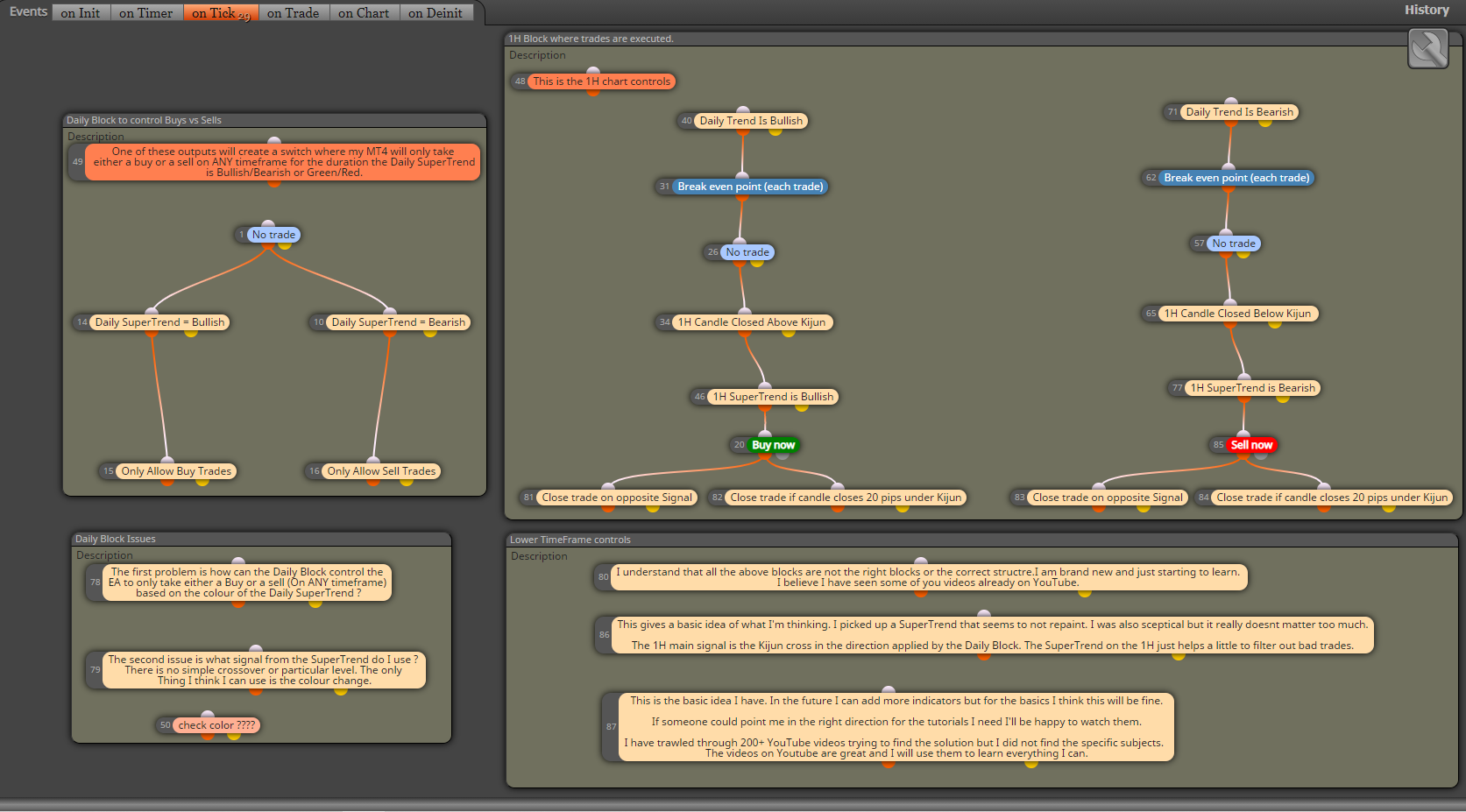
I will post a screenshot of what I am thinking.
Please understand that I have only been on fxDreema for 3 days so the blocks will not be in the correct order.
-
On the sell side of the 1H area I made a small typo.
I meant to say "Close trade if candle closes 20 pips ABOVE Kijun"
-
@l-andorrà Do you think there is any way for me to do this ? Thanks for your help

-
@jstap My screenshot was just an example. Obviously both operands should be coordinated.
-
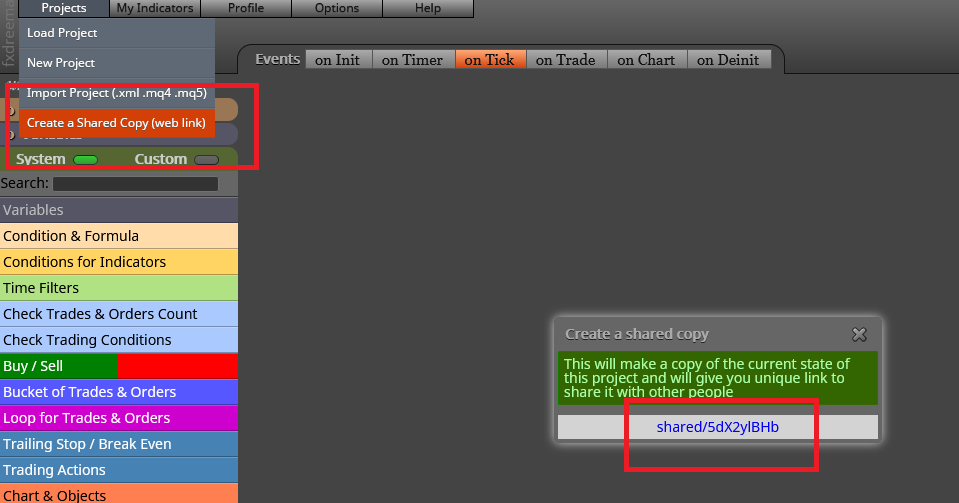
@edify-1984 Can you please share the link to your project instead? That would help us to look at it:
-
@l-andorrà Hi, thank for your reply.
I can't build the EA until I can find a solution to the problem.
I just need that one question answered and then I can use all the YouTube and online tutorials t finish the rest.
I put the description of the issue in the screen shot above. I can not find a tutorial on how to do this particular condition.
The rest I will finish alone as it will be a good learning experience to follow all the tutorials.
I don't want to take up too much of peoples time. Even just a link to a tutorial on how I can do it will be fine.
-
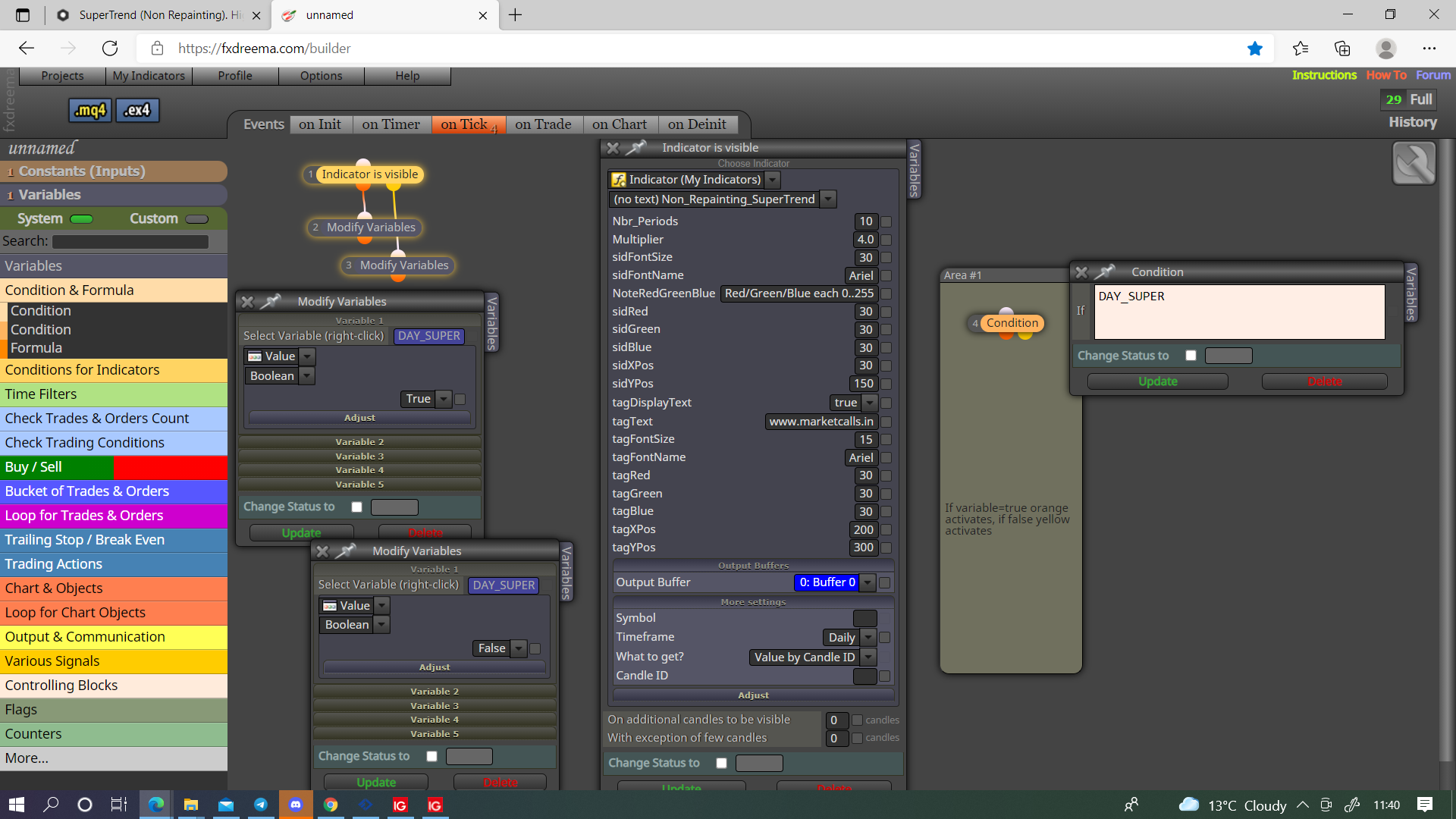
@edify-1984Like this is probably what you want.
-
@jstap Wow, thanks a million !
As soon as I get the time later I will try and build around your suggestion.
This is great. I can finally just get to work on it now. I hope your SuperTrend has similar settings to mine.
If I have any trouble with the SuperTrend settings then maybe you can shoot your SuperTrend .mq4 over to me.
Thanks a lot again.
-
@edify-1984 I am not sure what buffer does what just used it as example.
-
We found the exact same SuperTrend.. What are the odds !
-
@jstap I have a feeling that this will be a tricky project.
-
@edify-1984 It shouldn't be that difficult, if you get stuck just ask.

