fxDreema

    • Register
    • Login
    • Search
    • Back to the main page
    • Categories
    • Recent
    • Tags
    • Popular
    • Search

    how add positions on a loosing position after 10 or 20 pips

    Questions & Answers
    3
    8
    343
    Loading More Posts
    • Oldest to Newest
    • Newest to Oldest
    • Most Votes
    Reply
    • Reply as topic
    Log in to reply
    This topic has been deleted. Only users with topic management privileges can see it.
    • T
      tsepodube last edited by tsepodube

      how add extra positions on a loosing position after 10 or 20 pips

      jstap T 2 Replies Last reply Reply Quote 0
      • jstap
        jstap @tsepodube last edited by jstap

        @tsepodube A seperate tree, pink for each trade block, pink pips away block, buy/sell block. Will need a minus number for buys and a positive number for sells.

        Learn fxDreema Without the Wait!

        My comprehensive book, available on Amazon, is packed with examples and invaluable insights to help you fast-track your learning journey.

        The paperback and hardback editions include MT4 & MT5 QR codes for easy access to all prebuilt projects and robots, including my latest gold trading robot!

        Don’t miss out

        Click here➡️ https://mybook.to/fxDreema to get your copy today!

        Enjoy! 😊

        T 1 Reply Last reply Reply Quote 0
        • T
          TalalKhan @tsepodube last edited by

          @tsepodube Create a new tree.
          Block 1: For Each Trade
          Block 2: Pips Away From Open Price
          Block 3: No Trade (Group 2)
          Block 4: Buy Now

          T 1 Reply Last reply Reply Quote 0
          • T
            tsepodube @TalalKhan last edited by

            @talalkhan thank you will try it out and share the results

            1 Reply Last reply Reply Quote 0
            • T
              tsepodube @jstap last edited by

              @jstap can you please do a tutorial video on this. I cant seem to get it right please sir and my email is dubetsepo@gmail.com

              jstap 1 Reply Last reply Reply Quote 0
              • T
                tsepodube last edited by

                @talalkhan can you atleast share an Example or a video please sir dubetsepo@gmail.com

                T 1 Reply Last reply Reply Quote 0
                • T
                  TalalKhan @tsepodube last edited by TalalKhan

                  @tsepodube Check this and set same as it is.
                  Note: Please open every block to check settings
                  https://fxdreema.com/shared/9ljPLI2ac

                  1 Reply Last reply Reply Quote 0
                  • jstap
                    jstap @tsepodube last edited by

                    @tsepodube You only need the blue no trade if working with groups is needed.
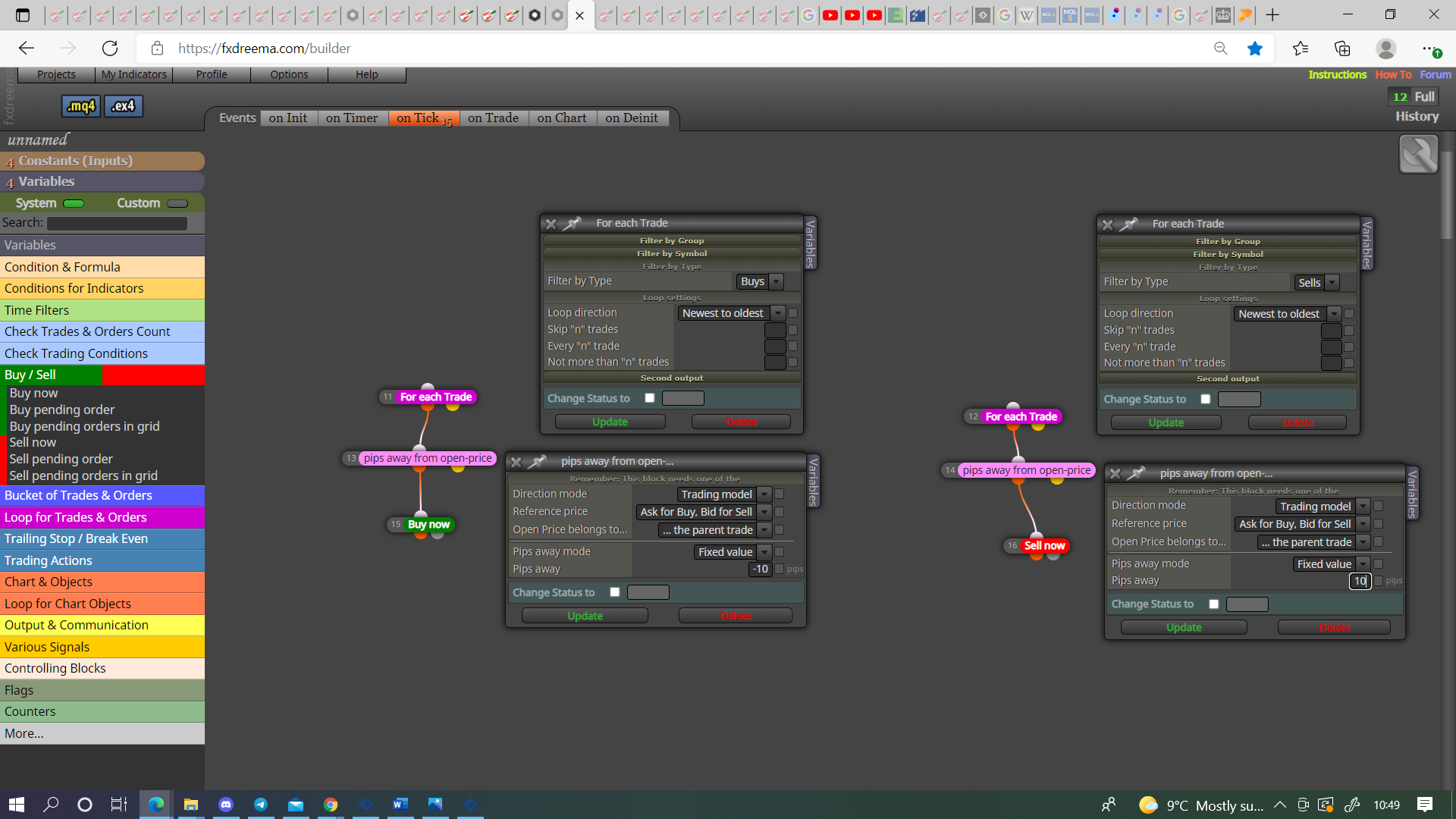
                    0_1634291455860_f08061ee-9dc9-4142-b174-4277746b0db6-image.png

                    Learn fxDreema Without the Wait!

                    My comprehensive book, available on Amazon, is packed with examples and invaluable insights to help you fast-track your learning journey.

                    The paperback and hardback editions include MT4 & MT5 QR codes for easy access to all prebuilt projects and robots, including my latest gold trading robot!

                    Don’t miss out

                    Click here➡️ https://mybook.to/fxDreema to get your copy today!

                    Enjoy! 😊

                    1 Reply Last reply Reply Quote 0
                    • 1 / 1
                    • First post
                      Last post

                    Online Users

                    V
                    O
                    J
                    B

                    21
                    Online

                    146.7k
                    Users

                    22.4k
                    Topics

                    122.6k
                    Posts

                    Powered by NodeBB Forums | Contributors