I Want To Create A EA With Custom Indicator
-
@jstap sir i tried with differnt ways, please can you please set this for me,
 i am very confused
 -
@talalkhan What you need to do is start with one condition and variable, once this is working add the other conditions one at a time until all is working. This is how me and many other people have learnt to use.
-
@jstap I am doing exactly like this block by block and this is only possible when you know what logic are you applying on your EA, i am trying blindly because i am still confused what logic i should need for this problem
Anyways check and tell me what is wrong with project because problem is still not solved
https://fxdreema.com/shared/CNDVOvixb -
@talalkhan In HERE is a simple RSI above/below EA that puts the answer into a comment, replace the RSI condition with your indicator, so you see what it takes to get the trade conditions you need, then add your other conditions.
-
@jstap Thanks Alot Dear I Done It With A Different Way Till Now Its Working Fine, Hope It Will In Future, You Are Great, You Helped Me Alot In Past 2 Months
 More Power To You
Come To The Next Point If I Am Using Trade Count Block With Lower Than 3 Trades, EA Is Opening 4 Trades Not 3, If I Changed To 5 EA is Opening 6 Trades. Means Once More From Given Command. I Used Check Trade Count At Top Of Tree -
@talalkhan This works for me is probably the condition, if it's set to =< it will place another trade so go over the number, if is set to < then to place a trade the number of trades has to be 1 under the set number, so you get the correct maximum set.
-
@jstap yes you are right i was using =<, i just checked this, Thank you very very very much, < is working fine.
And please don't mind, I straiten/unsettle you very much -
@talalkhan It's ok, you are welcome.
-
@jstap Bro i want to add this conditions in my EA
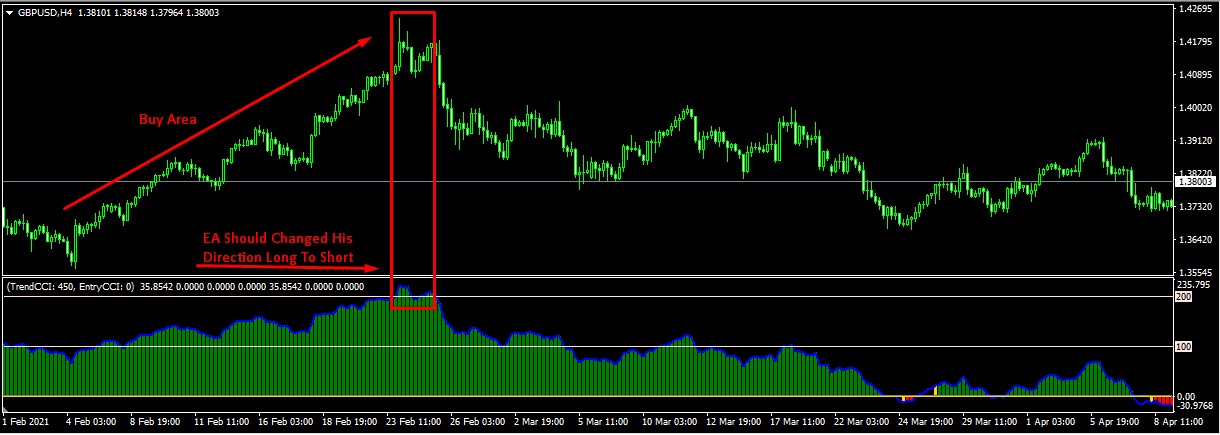
- Custom oscillator value is above 0 to Max value EA find buying setups (Which already added in my EA)
- EA changed direction buy to sell if oscillator value is crossing down from 200 (Check rectangle area in below picture)
Note: If value is above 200 EA direction is long when crossing down from 200 EA changed direction.
(Vice Versa For Sell Side)
-
@talalkhan I have showed you how to do this, set an variable for when tour cinditions are correct, use a condition to enter the trade in tree.
-
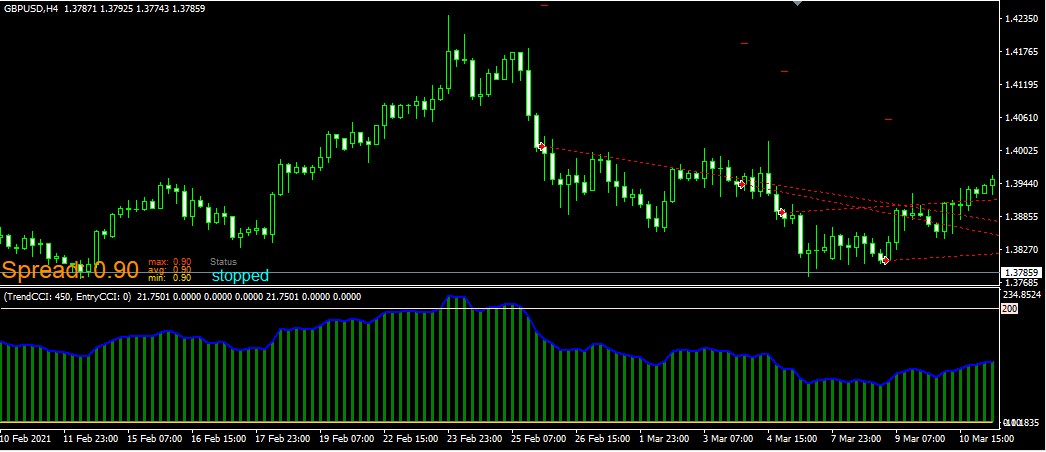
@jstap Sir please check looks like it's working, I will test it again, but one problem is i want to reset this condition to normal again when blue oscillator line touches 0. How can I ?
Project: https://fxdreema.com/shared/FolecOH7b
-
@talalkhan Set a separate tree with oscillator line = 25 reset variable.
-
@jstap where is reset variable option?
-
@talalkhan another modify variable block with the reset value you want.
-
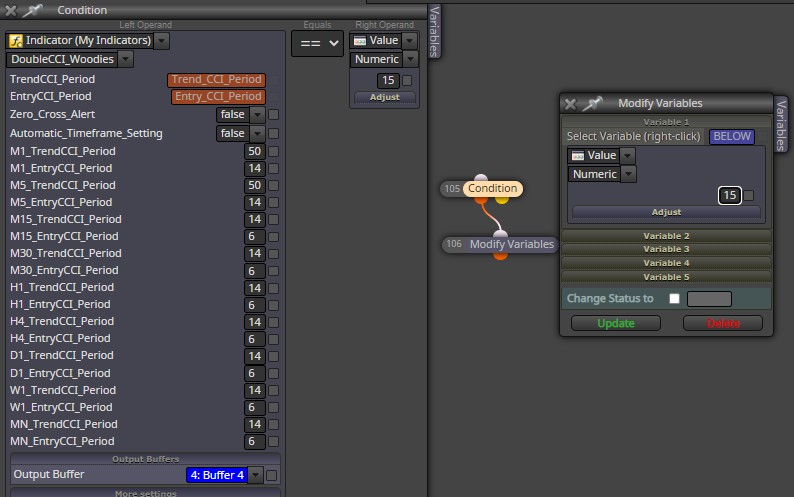
@jstap Like this?
I tried, This is not working. I am doing it wrong
-
@talalkhan This depends on wether 15 is the result you need in the variable, would of thaught you need a Boolean true or false to allow/disallow trade.
-
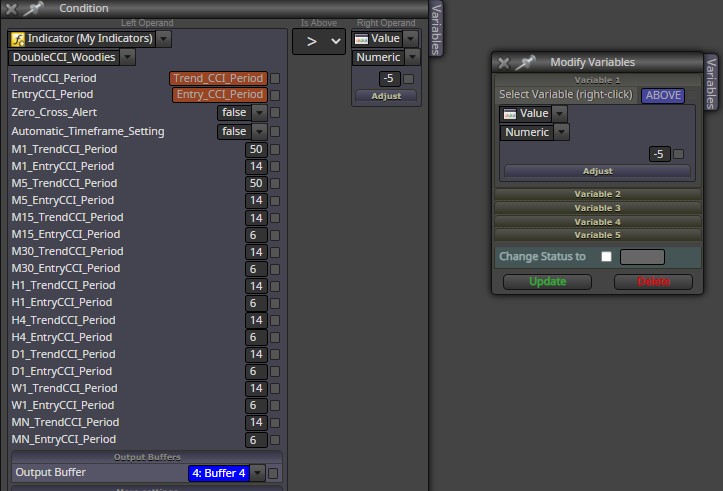
@jstap its working fine i will test on live account then ask you about trade true false if needed, I want to ask something when indicator is below -200 means oversold zone i set the condition for buy, condition is working fine but i want this condition to reset when indicator value is above -5,
This is not working with minus 5 but working with 0, how can i set - value ?
-
@talalkhan I am unsure what you mean, the modify variables block will change to any number you want it to.
-
@jstap exactly i am also thinking the same, but when i am using negative value EA is not working fine, indicator have both side value + and -
-
@talalkhan When using a negative value use <.




