fxDreema

    • Register
    • Login
    • Search
    • Back to the main page
    • Categories
    • Recent
    • Tags
    • Popular
    • Search

    Need help in setting pending orders

    Questions & Answers
    3
    43
    3023
    Loading More Posts
    • Oldest to Newest
    • Newest to Oldest
    • Most Votes
    Reply
    • Reply as topic
    Log in to reply
    This topic has been deleted. Only users with topic management privileges can see it.
    • S
      styleflesh last edited by

      Hello traders,
      I want to make an EA after this simple rule :
      1: Initially, I open a trade ( buy/sell - it doesn't matter )
      2: I set a pending sell order and a pending buy order from the initial buy.
      3: After the pending order is activated ( buy or sell ), I want to do the following : Cancel the other pending order AND activate 2 new pending orders anchored from the new position
      Can anyone help me with an advice on how to manage point No.3 ?
      Thank you !

      jstap 1 Reply Last reply Reply Quote 0
      • jstap
        jstap @styleflesh last edited by

        @styleflesh In HERE is a few options, the bottom is how to achieve this, check all tabs and the group use in each block.

        Learn fxDreema Without the Wait!

        My comprehensive book, available on Amazon, is packed with examples and invaluable insights to help you fast-track your learning journey.

        The paperback and hardback editions include MT4 & MT5 QR codes for easy access to all prebuilt projects and robots, including my latest gold trading robot!

        Don’t miss out

        Click here➡️ https://mybook.to/fxDreema to get your copy today!

        Enjoy! 😊

        1 Reply Last reply Reply Quote 0
        • S
          styleflesh last edited by

          @jstap Thank you for your answer but I am afraid that I'm doing something wrong. In only places the initial buy stop and sell stop, one of them activates when the price moves 20 pips ( which is correct ) but after that there are no new pending orders for the new opened position.

          jstap D 2 Replies Last reply Reply Quote 0
          • jstap
            jstap @styleflesh last edited by

            @styleflesh Look in the on trade tab at top.

            Learn fxDreema Without the Wait!

            My comprehensive book, available on Amazon, is packed with examples and invaluable insights to help you fast-track your learning journey.

            The paperback and hardback editions include MT4 & MT5 QR codes for easy access to all prebuilt projects and robots, including my latest gold trading robot!

            Don’t miss out

            Click here➡️ https://mybook.to/fxDreema to get your copy today!

            Enjoy! 😊

            1 Reply Last reply Reply Quote 0
            • S
              styleflesh last edited by

              @jstap Would you be so kind to show me the exact steps ? I copied the ones from your example and I can't make it to work as intended.
              Thank you !

              jstap 1 Reply Last reply Reply Quote 0
              • jstap
                jstap @styleflesh last edited by

                @styleflesh Put it in to a project and share the link, what I put will work just need to set each block conditions. I will then see what you have done and see what's wrong.

                Learn fxDreema Without the Wait!

                My comprehensive book, available on Amazon, is packed with examples and invaluable insights to help you fast-track your learning journey.

                The paperback and hardback editions include MT4 & MT5 QR codes for easy access to all prebuilt projects and robots, including my latest gold trading robot!

                Don’t miss out

                Click here➡️ https://mybook.to/fxDreema to get your copy today!

                Enjoy! 😊

                1 Reply Last reply Reply Quote 0
                • S
                  styleflesh last edited by

                  Dear @jstap, please check bellow. I canceled stop loos/take profit because i want to test that the EA opens trades non-stop when condition is met ( moving 20 pips )
                  https://fxdreema.com/shared/YvujqQTHd

                  jstap 1 Reply Last reply Reply Quote 0
                  • jstap
                    jstap @styleflesh last edited by

                    @styleflesh https://fxdreema.com/shared/61Y87kYWd, This works now, just need to decide what you're doing with the SL's.

                    Learn fxDreema Without the Wait!

                    My comprehensive book, available on Amazon, is packed with examples and invaluable insights to help you fast-track your learning journey.

                    The paperback and hardback editions include MT4 & MT5 QR codes for easy access to all prebuilt projects and robots, including my latest gold trading robot!

                    Don’t miss out

                    Click here➡️ https://mybook.to/fxDreema to get your copy today!

                    Enjoy! 😊

                    S 1 Reply Last reply Reply Quote 0
                    • S
                      styleflesh last edited by

                      Dear @jstap . First of all, thank you for your help, I really appreciate it.
                      I tried the project and strange enough it behaves different on different runs( I think this is because of the random outputs option). I will try to make it more simple, here are the steps:
                      1: We place a buy.
                      2: place buy/sell if 20 pips up/down ( not necessary with buy order or sell order ) -> if we open the buy then we cancel the sell order and then we repeat this step, place buy/sell if 20 pips up/down ( from the last position opened ) . We will always place buy/sell if price moves 20 pips from the last opened position

                      Bassically, from the starting point, place buy/sell if 20 pips up/down, then from the latest opened position, do the same ( and cancel the previous orders - we have active only 2 pending orders for the last opened position )

                      I'm sorry, I don't know how to explain it better, english is not my first language 😞

                      jstap 1 Reply Last reply Reply Quote 0
                      • S
                        styleflesh @jstap last edited by

                        @jstap Please see bellow image. This is what the EA must do. Thank you !
                        https://imgur.com/2eSb1En

                        1 Reply Last reply Reply Quote 0
                        • jstap
                          jstap @styleflesh last edited by jstap

                          @styleflesh If you want to always place a buy on first order delete random and the sell side of the 1st tree, also this will always place from the bid/ask reference, maybe use the MID price.

                          Learn fxDreema Without the Wait!

                          My comprehensive book, available on Amazon, is packed with examples and invaluable insights to help you fast-track your learning journey.

                          The paperback and hardback editions include MT4 & MT5 QR codes for easy access to all prebuilt projects and robots, including my latest gold trading robot!

                          Don’t miss out

                          Click here➡️ https://mybook.to/fxDreema to get your copy today!

                          Enjoy! 😊

                          1 Reply Last reply Reply Quote 0
                          • S
                            styleflesh last edited by

                            Dear @jstap ,
                            I deleted the random option and replaced with a buy that has 2 pending orders attached, please see bellow.
                            The EA opens a buy and it close it almost instant ( I don't know why 😞
                            https://fxdreema.com/shared/uJ1LnhHud
                            Thank you,

                            jstap 1 Reply Last reply Reply Quote 0
                            • jstap
                              jstap @styleflesh last edited by

                              @styleflesh Try this, you had the group number in symbol.
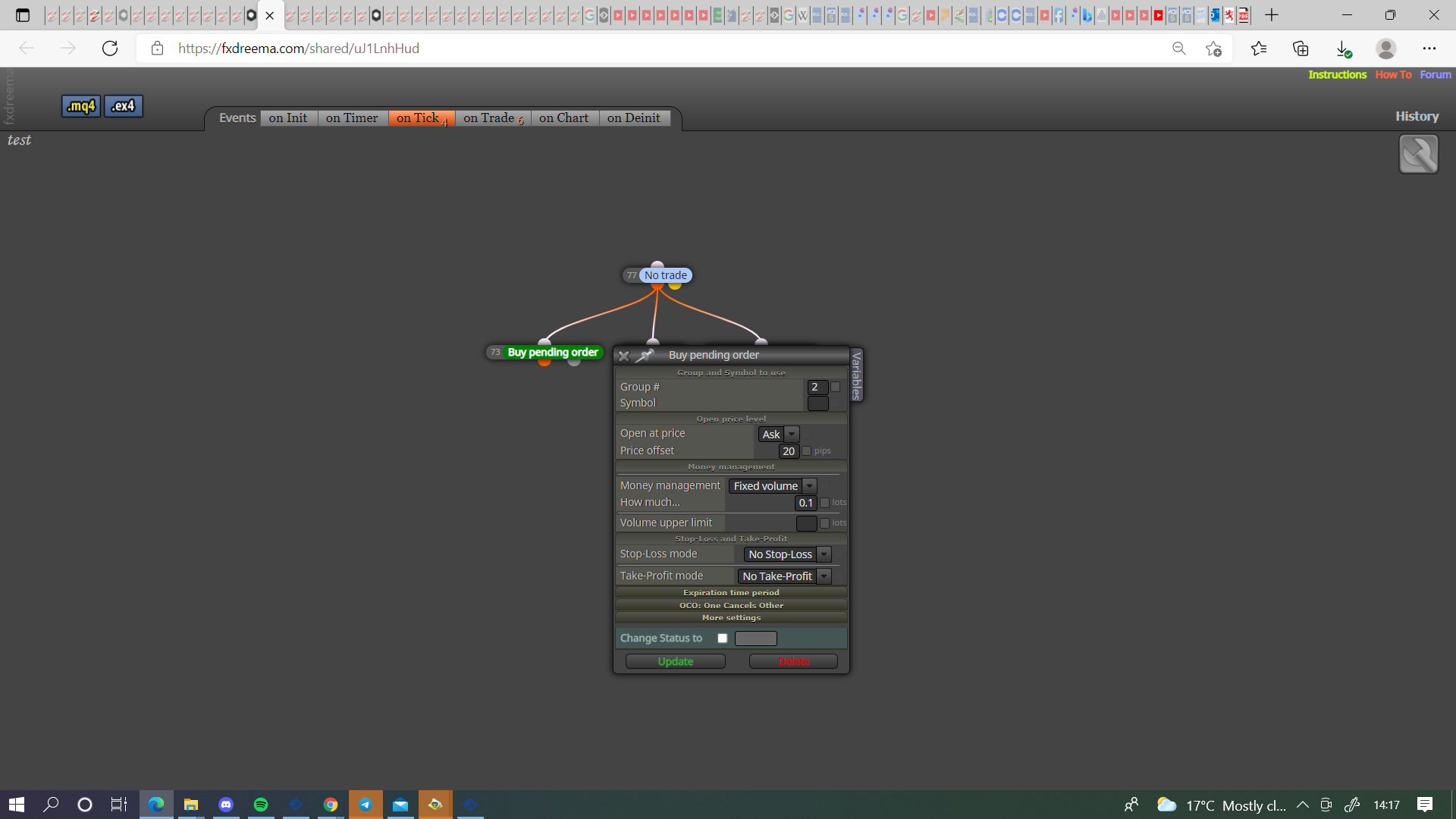
                              0_1635340670497_510d77aa-171e-49c3-86cd-74e70ab2b821-image.png

                              Learn fxDreema Without the Wait!

                              My comprehensive book, available on Amazon, is packed with examples and invaluable insights to help you fast-track your learning journey.

                              The paperback and hardback editions include MT4 & MT5 QR codes for easy access to all prebuilt projects and robots, including my latest gold trading robot!

                              Don’t miss out

                              Click here➡️ https://mybook.to/fxDreema to get your copy today!

                              Enjoy! 😊

                              1 Reply Last reply Reply Quote 0
                              • S
                                styleflesh last edited by

                                Dear @jstap. With this change something changed for the better but still is not working as intended.
                                Still the trades are closed by something and I don't know what it is. Also, there are no new positions open ( If the price moves 100 pips in one directions, there should be 5 open trades, at 20 pips interval) . Can you please advise ?
                                Thank you,

                                jstap 1 Reply Last reply Reply Quote 0
                                • jstap
                                  jstap @styleflesh last edited by

                                  @styleflesh There is no blocks to close an order, just delete pending, as is this will only place an order if group 2 trade is created, it will only place a buy if no trades are open, you need to decide the logic that causes more trades to open, maybe place pending every time a trade opens and not in grid.

                                  Learn fxDreema Without the Wait!

                                  My comprehensive book, available on Amazon, is packed with examples and invaluable insights to help you fast-track your learning journey.

                                  The paperback and hardback editions include MT4 & MT5 QR codes for easy access to all prebuilt projects and robots, including my latest gold trading robot!

                                  Don’t miss out

                                  Click here➡️ https://mybook.to/fxDreema to get your copy today!

                                  Enjoy! 😊

                                  1 Reply Last reply Reply Quote 0
                                  • S
                                    styleflesh last edited by

                                    Dear @jstap . I change what you suggested, now The EA only opens first 3 buys, then it does nothing. :

                                    https://fxdreema.com/shared/pq1YcUSDb
                                    Thank you,

                                    jstap 1 Reply Last reply Reply Quote 0
                                    • jstap
                                      jstap @styleflesh last edited by

                                      @styleflesh
                                      Connect these directly to the no trade block.
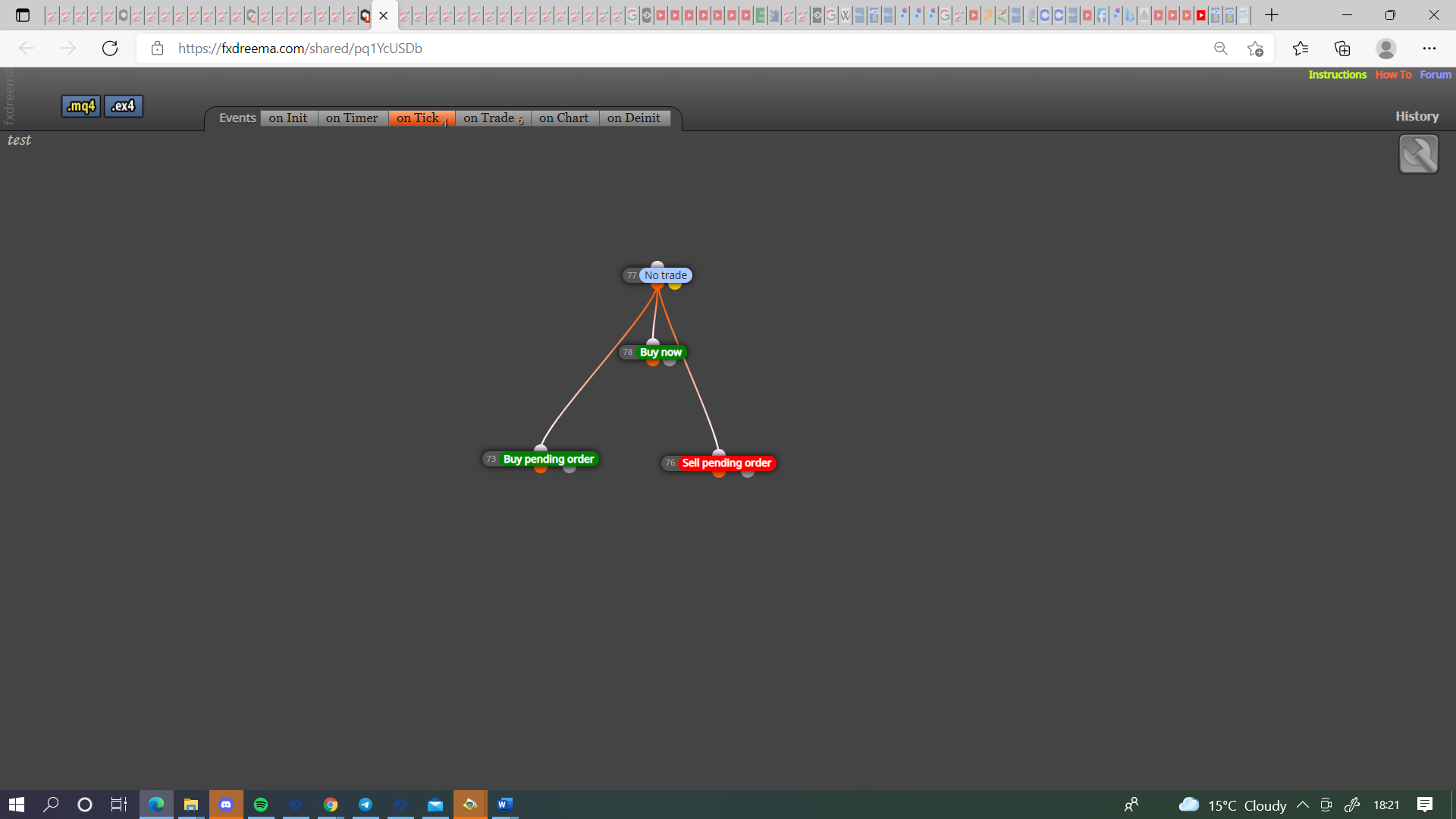
                                      0_1635355283076_34791dd5-a4a2-4226-8f66-ae8592c37e2c-image.png

                                      You have no group in the trade created block that allows pending's to be placed upon the new pending becoming a trade.
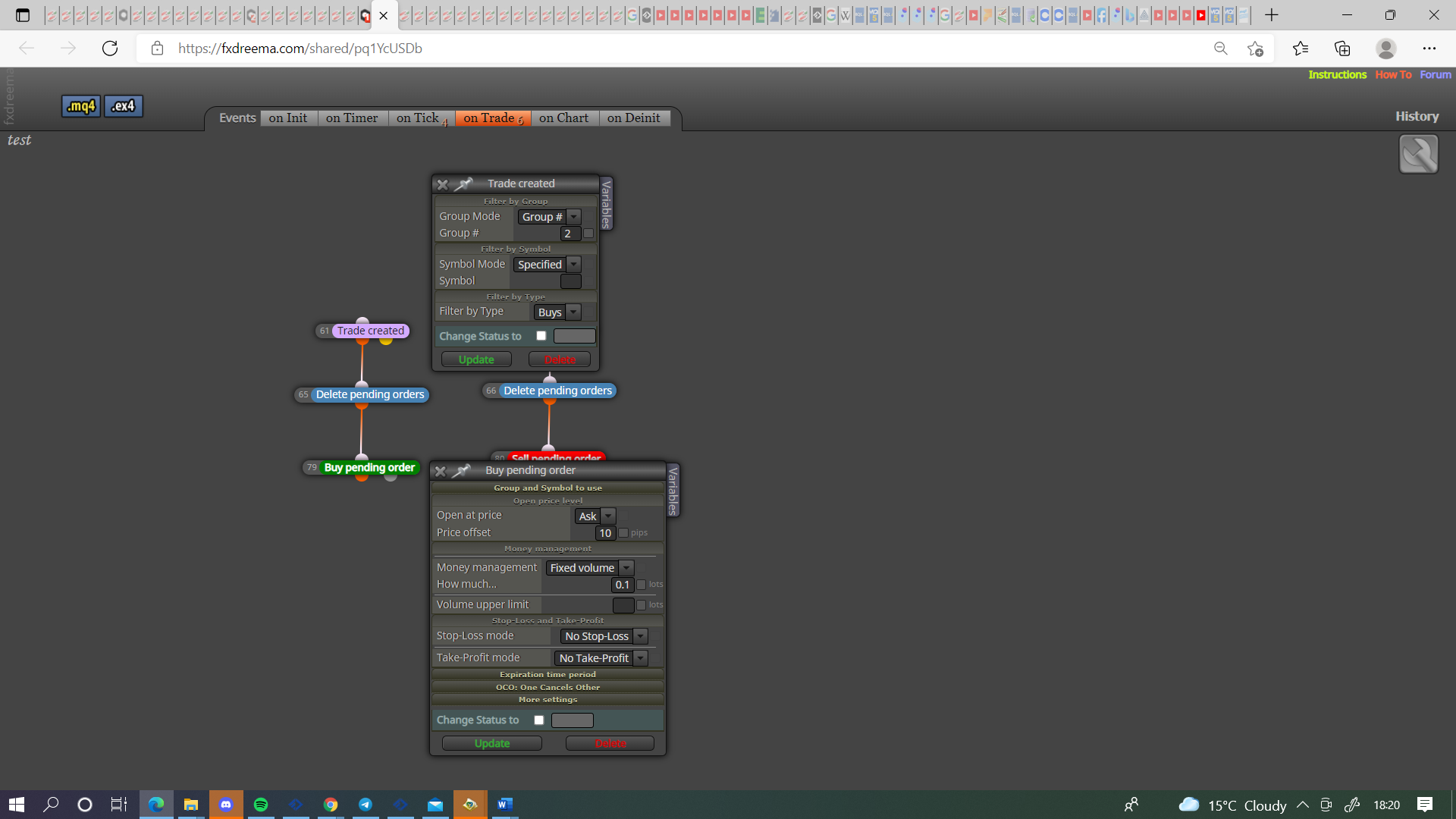
                                      0_1635355239440_7f40ce9d-70ba-45ef-88ca-fc818a9fb7be-image.png

                                      Learn fxDreema Without the Wait!

                                      My comprehensive book, available on Amazon, is packed with examples and invaluable insights to help you fast-track your learning journey.

                                      The paperback and hardback editions include MT4 & MT5 QR codes for easy access to all prebuilt projects and robots, including my latest gold trading robot!

                                      Don’t miss out

                                      Click here➡️ https://mybook.to/fxDreema to get your copy today!

                                      Enjoy! 😊

                                      1 Reply Last reply Reply Quote 0
                                      • S
                                        styleflesh last edited by

                                        Dear @jstap , thank you for your answer. I did what you suggested in the first statement ( i have connected all blocks to no trade block ) but at the second statement I'm not sure what you mean. What should I modify ?
                                        Thank you,

                                        jstap 1 Reply Last reply Reply Quote 0
                                        • jstap
                                          jstap @styleflesh last edited by

                                          @styleflesh Add a group number to the buy/sell blocks, add this number to the trade created blocks, this way when a pending becomes a trade it will place a new pending.

                                          Learn fxDreema Without the Wait!

                                          My comprehensive book, available on Amazon, is packed with examples and invaluable insights to help you fast-track your learning journey.

                                          The paperback and hardback editions include MT4 & MT5 QR codes for easy access to all prebuilt projects and robots, including my latest gold trading robot!

                                          Don’t miss out

                                          Click here➡️ https://mybook.to/fxDreema to get your copy today!

                                          Enjoy! 😊

                                          S 1 Reply Last reply Reply Quote 0
                                          • S
                                            styleflesh last edited by

                                            Dear @jstap . I have group number 2 entered on every block that has that option. Do I have to create something new apart from what is in the project ?
                                            https://fxdreema.com/shared/msCqPYZnb
                                            Thank you,

                                            jstap 1 Reply Last reply Reply Quote 0
                                            • 1
                                            • 2
                                            • 3
                                            • 1 / 3
                                            • First post
                                              Last post

                                            Online Users

                                            A
                                            L
                                            S

                                            20
                                            Online

                                            146.7k
                                            Users

                                            22.4k
                                            Topics

                                            122.6k
                                            Posts

                                            Powered by NodeBB Forums | Contributors