fxDreema

    • Register
    • Login
    • Search
    • Back to the main page
    • Categories
    • Recent
    • Tags
    • Popular
    • Search

    Delete Pending order

    Questions & Answers
    2
    12
    776
    Loading More Posts
    • Oldest to Newest
    • Newest to Oldest
    • Most Votes
    Reply
    • Reply as topic
    Log in to reply
    This topic has been deleted. Only users with topic management privileges can see it.
    • D
      drankman last edited by drankman

      Hello guys,

      I have a question on using delete pending order.
      I'd like to create a function where EA will delete pending order when certain condition met
      For example if MACD above 0, delete the sell pending order and if MACD below 0, delete the buy pending order

      https://fxdreema.com/shared/yI0C4FiNb

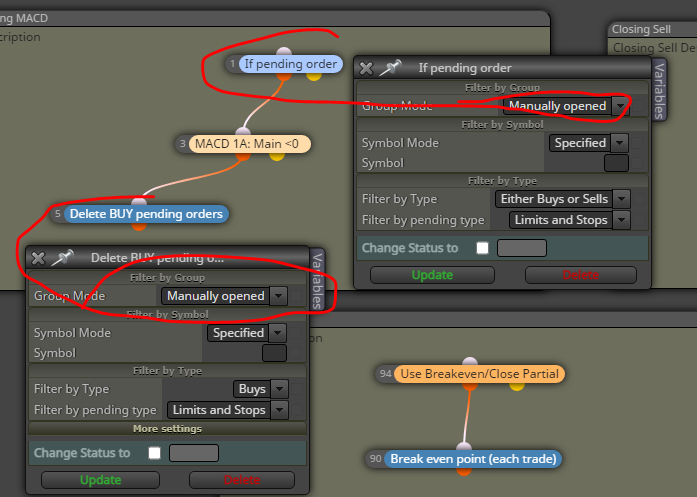
      However, when I backtested, the EA is apparently deleting all pending orders.
      So, lets say when I put the EA in NZDCAD and its MACD is below 0 level, then all buy pending orders (even not NZDCAD) will be deleted as well. I was expecting only NZDCAD buy pending order to be deleted.

      I used the function "all automated and manually opened" as below. but whenever I changed it to group #, the EA somehow didnt function properly (does not delete at all).
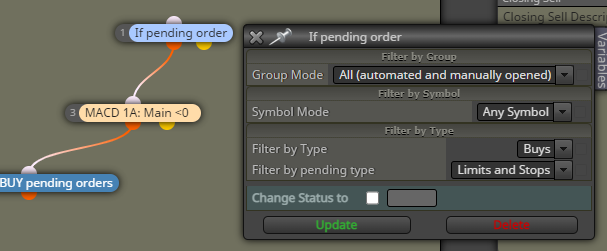
      0_1637069801486_2df38703-af3f-4e0c-8e4d-5b1080fb625f-image.png

      Could anyone help me out?
      Thank you! đŸ™‚

      A 1 Reply Last reply Reply Quote 0
      • A
        ambrogio @drankman last edited by

        @andrewfrank This happens because you yourself set up to delete all orders of any group and on any chart. If you want to work only on the graph to which you attack the EA you have to leave these settings as below
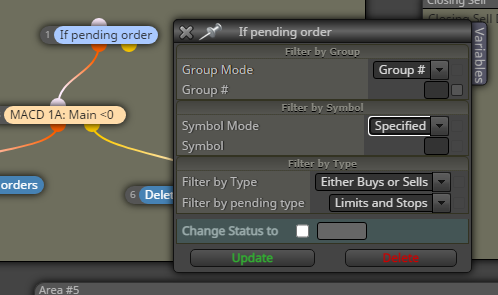
        0_1637071071264_sgabello.PNG

        D 1 Reply Last reply Reply Quote 0
        • D
          drankman @ambrogio last edited by

          @ambrogio Thanks for reply.
          I also tried this one. but it didnt work properly. it somehow did not delete at all..

          A 1 Reply Last reply Reply Quote 0
          • A
            ambrogio @drankman last edited by

            @andrewfrank please, share your new project

            D 1 Reply Last reply Reply Quote 0
            • D
              drankman @ambrogio last edited by drankman

              @ambrogio here is : https://fxdreema.com/shared/0gn1PJOHc

              I tried the EA by open the pending order manually and it did not delete the pending order (when the conditions are met)

              Thanks!

              A 1 Reply Last reply Reply Quote 0
              • A
                ambrogio @drankman last edited by

                @andrewfrank these conditions must match
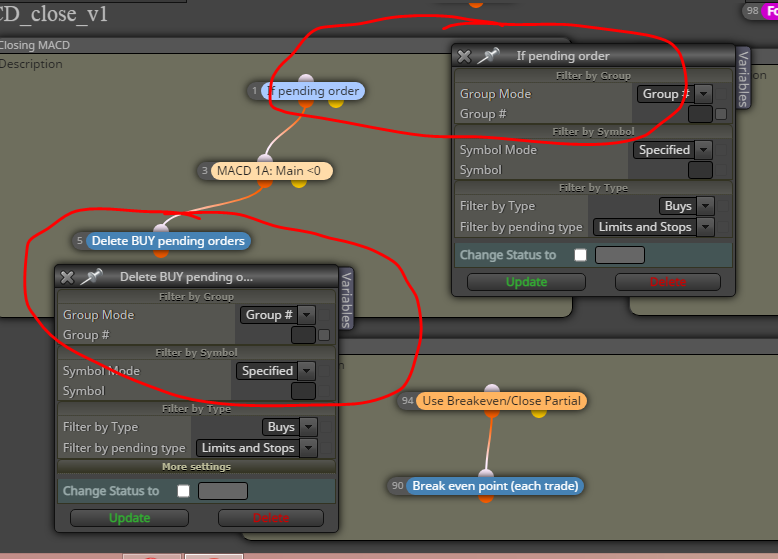
                0_1637072005046_sgabello.PNG

                0_1637072080851_sgabello.PNG

                D 2 Replies Last reply Reply Quote 0
                • D
                  drankman @ambrogio last edited by

                  @ambrogio ah ok...Thanks!
                  So I ll use the first one, because I'd use it for pending order both manually and automatically opened.
                  That should be okay, correct?

                  A 1 Reply Last reply Reply Quote 0
                  • D
                    drankman @ambrogio last edited by

                    @ambrogio
                    I tried again with your first suggestion but it did not work for manually opened pending order.
                    for your suggestion number 2, but it works only for manually opened.

                    Do you know what settings so I can use for both manually and automatically pending order?

                    1 Reply Last reply Reply Quote 0
                    • A
                      ambrogio @drankman last edited by

                      @andrewfrank the first one is valid for order opened by the expert only on the specified symbol (symbol field is empty, mean you are working on the chart you have attached the EA)
                      The second one is valid for the order opened manually only, on the same chart as above

                      D 1 Reply Last reply Reply Quote 0
                      • A
                        ambrogio last edited by

                        @andrewfrank this one for delete all orders on the chart you have attached the EA (and not on all chart)
                        by leave the symbol field empty
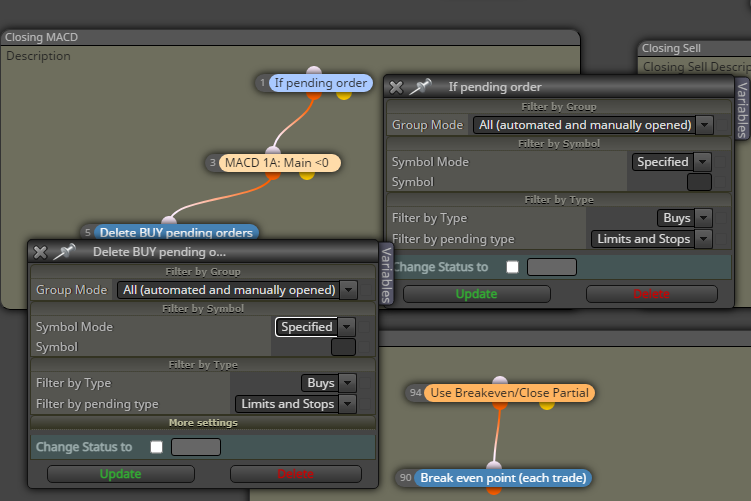
                        0_1637073401257_sgabello.PNG

                        D 1 Reply Last reply Reply Quote 0
                        • D
                          drankman @ambrogio last edited by

                          @ambrogio
                          -Does it mean, would it also work if other EA opened pending order?
                          I mean, I have a pending order opened by different EA for NZDCAD, and then if I attached this particular EA to close delete pending order for NZDCAD

                          -If I use "all automated and manually opened" and "specified" for symbol mode, would this work?

                          1 Reply Last reply Reply Quote 0
                          • D
                            drankman @ambrogio last edited by

                            @ambrogio Ok. Thank you! will try with this setting.

                            1 Reply Last reply Reply Quote 0
                            • 1 / 1
                            • First post
                              Last post

                            Online Users

                            S
                            S
                            C
                            F
                            S
                            R
                            M

                            19
                            Online

                            146.8k
                            Users

                            22.4k
                            Topics

                            122.6k
                            Posts

                            Powered by NodeBB Forums | Contributors