Custom indicator values
-
Hi, im fairly new with fxdreema, and trying to understand how to use custom indicators and their values!
so Im adding TMA+CG indicator which is indicator that shows price extremes based on Price channel!
so when price crosses this extreme it shows up no chart as a blue cross if above channel, or red cross if below ! how do I enter my values in condition section so EA picks those extremes?
and when i do anything to this indicator and put it in strategy tester it even doesnt show up there but strategy tester status shows "working"!
thanks,
Any help appreciated -
@nejaukais89
Since some indicators of tma and all center of gravity repaints the ea can have a hard time acting to something that changes all of the time.
Had a few indicators that repaints and the ea didnt even trade.
So you better stick to something that dont repaint. -
Some indicators show continuous lines, others show arrows here and there. For arrow indicators, where there is no arrow, the value is EMPTY_VALUE. And most of the times, if you want to get the current value of such indicator... it is actually the value from few candles behind, because arrows are placed somewhere in the past. Try with Candle ID bigger than 0.
Try this block to look at the values:
https://fxdreema.com/demo/mt4-trace-multiple -
@fxDreema @nejaukais89 @timmyhanke I'm struggling with this exact same problem at the moment. I'm not a coder, but I believe the problem is that the buffers don't store values so that there is an actual value to compare conditions. No value means that the EA sees it as Empty_Value if I'm not mistaken?
Can anyone edit this indicator so that it stores values (maybe global variables?) for TMA so that we can use this indicator for conditions (i.e. indicator = >0 or empty_value)?
Indicator's source code: 0_1639265690330_TMA+CG mladen NRP.mq4
Shared Project: https://fxdreema.com/shared/GrLLouw7c -
@sauce This indicator badly repaints, just watch on backrest and you will see the red x appear then disappear, before it finally stays many candles later, you could pay someone to re code but you will find better for free elsewhere.
In the data window is buffers that can be used (these are different to the normal buffers), icustom code would get you this information if still interested.
iCustom(
string symbol, // symbol
int timeframe, // timeframe
string name, // path/name of the custom indicator compiled program
... // custom indicator input parameters (if necessary)
int mode, // line index
int shift // shift
);You would put it in a custom code block, something like this:
VARIABLE=iCustom(NULL,0,"1639265690468-tma-cg-mladen-nrp",4,0);Learn fxDreema Without the Wait!
My comprehensive book, available on Amazon, is packed with examples and invaluable insights to help you fast-track your learning journey.
The paperback and hardback editions include MT4 & MT5 QR codes for easy access to all prebuilt projects and robots, including my latest gold trading robot!
Don’t miss out
Click here➡️ https://mybook.to/fxDreema to get your copy today!
Enjoy! 😊
-
@jstap so I tired doing this, but like I said before, I'm not a coder... after spending a couple hours trying to work this out I've come to the conclusion that I have no idea what I'm doing typing this code, haha. Any coding help would be appreciated!
I'm trying to make it so the I can compare the values of the bands drawn relative to price values (i.e. candle low < custom indicators lower band). I'd like to be able to work with this custom indicator values in FXDreema so I can compare other values as well (i.e. Upper arrow is visible then buy... or something like that)
Again, I'm not a coder so I don't really understand how to get the buffers to retrieve this information.
-
Open the data window on your terminal, when you move your mouse over something the value in the data window will change, in the code variable = what ever name you have you have named your variable, put in in your project, in the data window you have the used buffers starting at 0 (not the ones used for other stuff), put each variable in a comment block to check if match data window. Start a new question and put the shared link, @jstap me so I get the notification, put the issues you are having and I'll see what I can do.
-
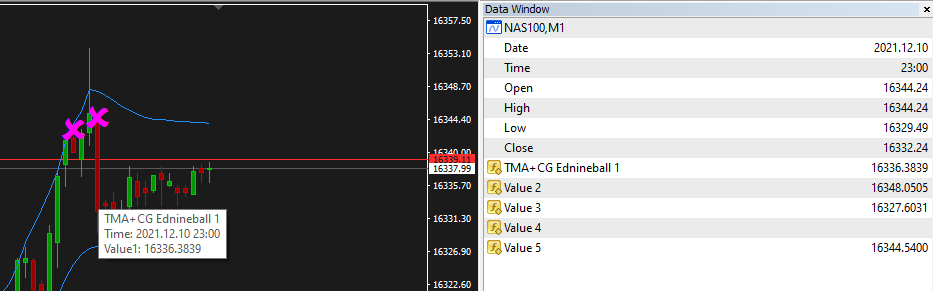
@jstap so I see doubles of the buffers (tmBuffer[];) but the Data window shows it as "TMA+CG Ednineball 1"
I'm not sure what a comment block is and when I type variable = TMA+CG Ednineball 1 it's just text not variable. Let me know what I should type, thanks for your help!
TMA+CG is value 1 which is a middle line between the channel (currently not shown)
Value 2 = Upper channel line
Value 3 = Lower channel line
Value 4 = Lower X
Value 5 = Upper X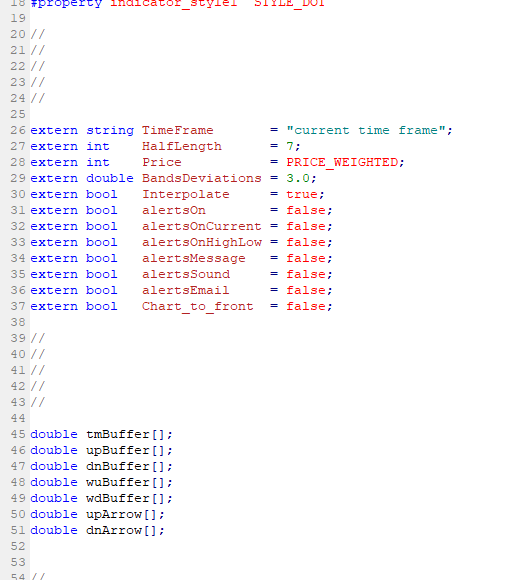
-
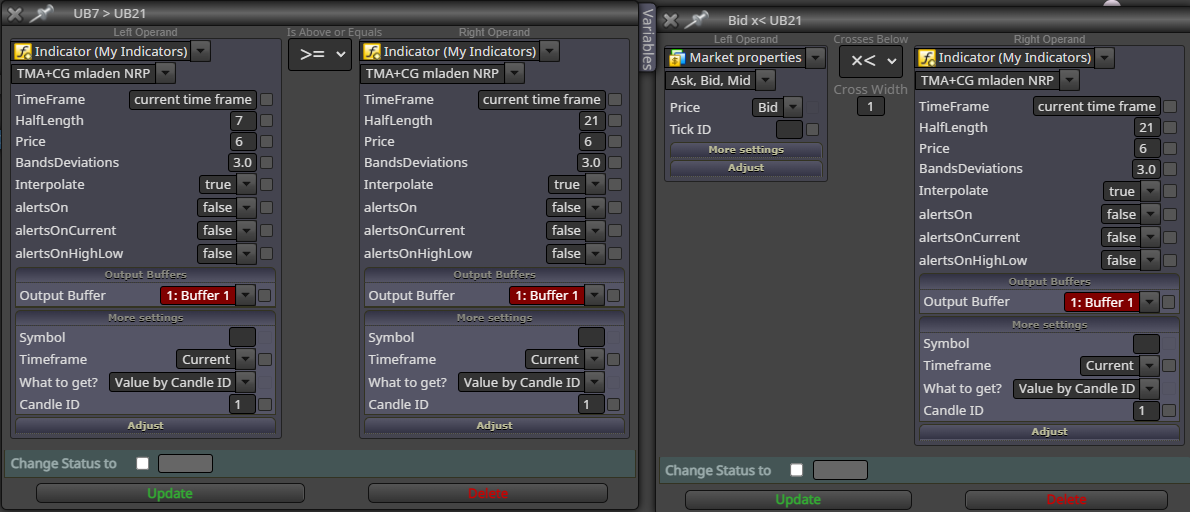
@jstap here's some basic idea of what I'm trying to do on FxDreema with this custom indicator
-
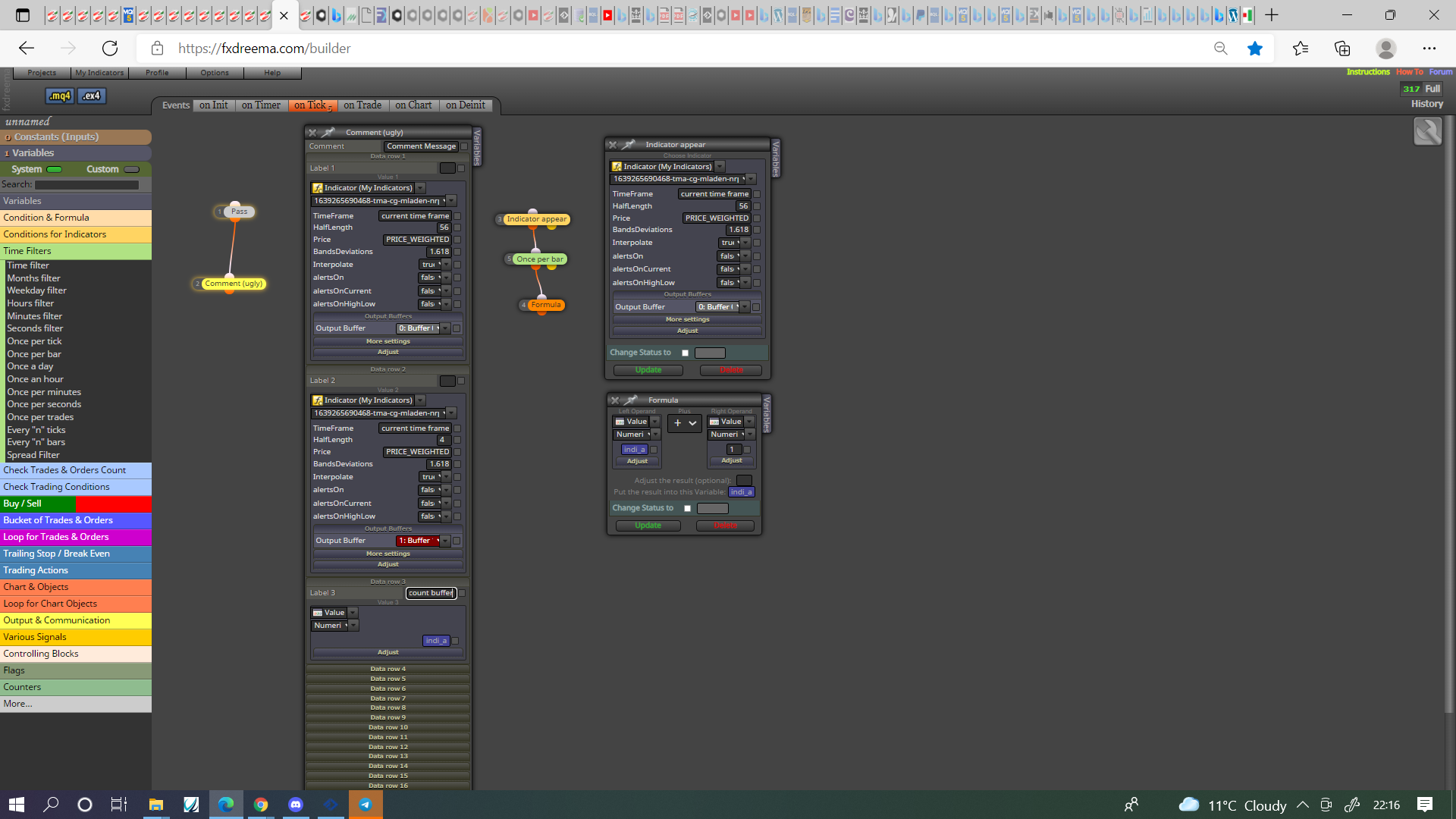
@sauce Not sure how I got confused as this indicator seems to have buffers in it, in this picture you'll see how to view and count objects appearing, use a combonation of this till you know what each buffer represents.
Learn fxDreema Without the Wait!
My comprehensive book, available on Amazon, is packed with examples and invaluable insights to help you fast-track your learning journey.
The paperback and hardback editions include MT4 & MT5 QR codes for easy access to all prebuilt projects and robots, including my latest gold trading robot!
Don’t miss out
Click here➡️ https://mybook.to/fxDreema to get your copy today!
Enjoy! 😊
-
@jstap can you share that project please? I cant see how i should create variable indi_a. what is this doing exactly?thanks for the help!
-
@sauce That variable is just what I named a variable, it could be anything, start by putting every buffer into a comment and that have constantly changing numbers (like a MA for example) have the price values you can use, once you know this create a variable for every other buffer and count, put this variable into a comment so when each object appears you will know which variable buffer to use to make EA do something.
-
@jstap I don't understand what you are trying to do in the screenshot

To understand what buffers are, first look at their colors. For this indicator they were recognized quite well.
Then, use the Trace block (connected with some Pass block in "on Tick") to see the values in Visual mode. While the EA is working manually add the indicator with the same inputs just to see it on the chart as well as the lines from the Trace block.
I did that and saw what I expected:Buffer 0 is the middle DimGray line.
Buffer 1 is the upper Maroon line.
Buffer 2 is the lower DarkBlue line.These 3 buffers are continuous lines, so for them "Indicator appear" will not work.
Buffer 3 is the Red X arrow.
Buffer 4 is the Blue X arrow.For these buffers "Indicator appear" would work, because this block expects to see value that is EMPTY_VALUE most of the time and eventually turns into some different value.
But yes, the indicator repaints too much. Not only the X arrows, but the lines too. When I backtest it in Visual mode and I manually add it, I see the lines as expected... but at the end when I stop the test, the other instance of the indicator appears, but it looks different:
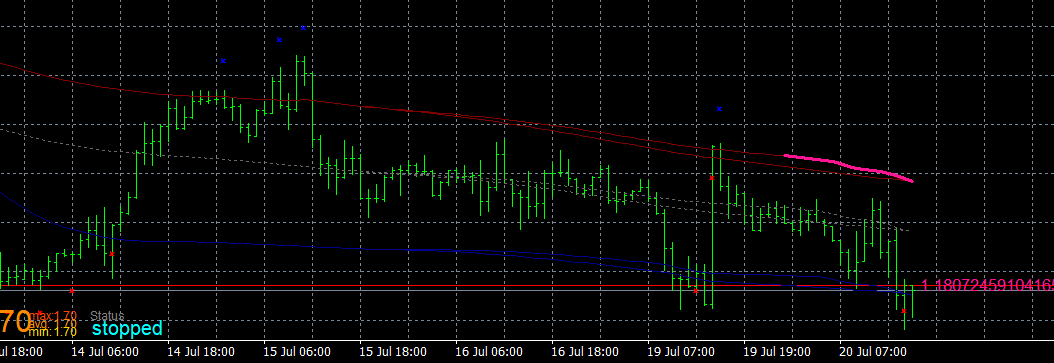
Both have the same input parameters. It matters when I manually add the indicator. If I add it at the end, both are the same. -
@fxdreema I didn't see the lines when I tested (probably me), although the colours normally match I have seen cases where they don't so I count occurrences on one per per bar and see what changes happens when an object appears, I also but the buffer into a comment so if they constantly change I know I can use the price level as a condition.
Learn fxDreema Without the Wait!
My comprehensive book, available on Amazon, is packed with examples and invaluable insights to help you fast-track your learning journey.
The paperback and hardback editions include MT4 & MT5 QR codes for easy access to all prebuilt projects and robots, including my latest gold trading robot!
Don’t miss out
Click here➡️ https://mybook.to/fxDreema to get your copy today!
Enjoy! 😊
-
@jstap Lines are almost invisible. Even for that reason alone I wouldn't call this an indicator - it doesn't indicate anything, it's too dim.
-
@fxdreema : )
-
@fxDreema @jstap thanks for taking the time to look into this for me. So, for a newbie coder/fxdreema user, I want to be able to take Buffer1 and Buffer2 current line value and compare that with price. (i.e. current candle high > buffer1)
How would I do this with blocks in fxdreema?
-
@sauce In fxDreema's post line values are in buffer 0, 1, 2, a condition block candle high > indicator buffer, will give you this.
-
@jstap if look above, that was my original problem basically, it does not work the way it should. I'm unable to get it to draw an arrow when high > indicator buffer. @l-andorrà can agree with this from a previous post with using the custom indicator buffers. @jstap can you see if it works for you?
-
@sauce In HERE is how to basically do all you want, just add to it, make changes and change the buffer you want to use.
Learn fxDreema Without the Wait!
My comprehensive book, available on Amazon, is packed with examples and invaluable insights to help you fast-track your learning journey.
The paperback and hardback editions include MT4 & MT5 QR codes for easy access to all prebuilt projects and robots, including my latest gold trading robot!
Don’t miss out
Click here➡️ https://mybook.to/fxDreema to get your copy today!
Enjoy! 😊