Clean system no indicators no pattens just place and go
-
Hi guys I am trying to build an idea. no indicators no pattens etc just place and go.
I just need a little help refining itHere is the idea
Place a Buy and Sell pending orders 5 pips away from the median pricePlace the trailing stop at 5 pips from the orders so pretty much in the middle of the pending orders
When an order has been activated cancel the opposite pending order
e.g opens a buy position cancel the sell pending order and vice versaWhen position is closed out by the traling stop open another buy and sell pending order.
This is what I have put together so far https://fxdreema.com/shared/qIJL739ke
Current problems
Not opening buy and sell pending orders at close
Money Management is TBCAny help would be greatly appreciated
-
@sibkis mmmmmmmmm why do you use block 3?
On the "On trade" label, use these blocks ant then put your pending orders block
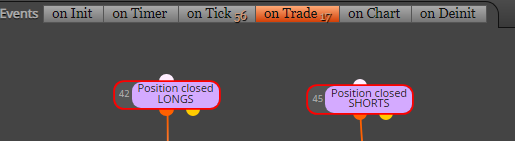
-
delete blocks 3 8 and 7. and put a time filter and if no order filter
-
@uriel-0 I used block 3 because I am not sure how to place positions based around the current price and that is the solution I came up with, if you have a better idea I would love to hear.
-
@sibkis bro did you see my comment? also when you put the pending order thare are parameteres to a reference price. u have it set to ask. but u need to change it to mid
-
-
@youngtreptrader Hey bro thanks for your help, yep I rebuilt it and it's just the same as your example.! But It seemd tp be placing just the buy pending order
sorry I am no trader or coder but figured I would give this a go and learn the ropes as I have a bit of time at the moment.
 image url)
I have tried creating 2 columns as well as loads of other ideas but no luck.
I have been reading up about hedging systems as this is similar. -
that looks likes its placing both
-
Hi Guys this is the progress so far, its opening positions 2 of each at a time so I end up with 4 stop orders 2 but and 2 sell, not sure how to fix that.
And once the tp or sl have been hit it stops trading.
How do I get it to place another set of orders.
https://fxdreema.com/shared/14rwBwKA -
@youngtreptrader try the check orders count block and add hat
-
Sorry what do you mean by add hat?
