fxDreema

    • Register
    • Login
    • Search
    • Back to the main page
    • Categories
    • Recent
    • Tags
    • Popular
    • Search

    Custom Code Conversion MT4 to MT5

    Questions & Answers
    5
    12
    1627
    Loading More Posts
    • Oldest to Newest
    • Newest to Oldest
    • Most Votes
    Reply
    • Reply as topic
    Log in to reply
    This topic has been deleted. Only users with topic management privileges can see it.
    • B
      btrader last edited by btrader

      I have just converted an MT4 project to MT5 using the convertor and all fine apart from some custom code I have to set button states after pressed in the tester.

      I've used it in the MT4 version of an EA I'm building and it works perfectly.
      Just converted my creation to MT5 and I get a compile error on all these blocks.

      What would be the MT5 version of this code?
      ObjectSet(LoadedObjectName(),OBJPROP_STATE,0);

      The code is from this thread but think it's buried so deep people didnt see my question. 🙂
      https://fxdreema.com/forum/topic/9883/working-buttons-in-strategytester
      Any help much appreciated.

      l'andorrà 1 Reply Last reply Reply Quote 0
      • l'andorrà
        l'andorrà @btrader last edited by

        @btrader This question is for real programmers (not em, sorry). Could you please upload the compilation errors?

        (English) I will try to help everyone in these fxDreema forums. But if you want to learn how to use the platform in depth or more quickly, I can help you with my introductory fxDreema course in English at https://www.theandorraninvestor.eu.

        (Català) Miraré d’ajudar tothom en aquests fòrums d’fxDreema. Tanmateix, si vols aprendre a fer servir la plataforma amb més profunditat o més de pressa, t’hi puc ajudar amb el meu curs d’introducció a fxDeema en català a https://www.theandorraninvestor.eu/ca.

        (Español) Intentaré ayudar a todo el mundo en estos foros de fxDreema. Sin embargo, si quieres aprender a usar la plataforma en profundidad o más deprisa, te puedo ayudar con mi curso de introducción a fxDreema en español en https://www.theandorraninvestor.eu/es.

        1 Reply Last reply Reply Quote 0
        • B
          btrader last edited by

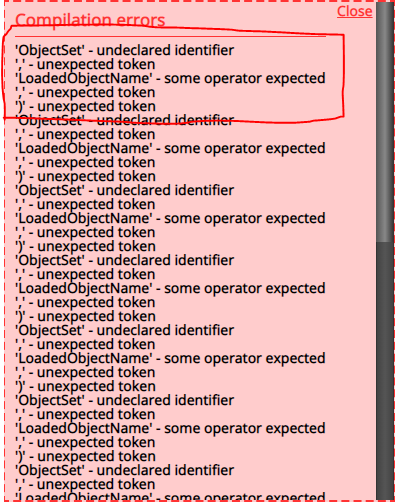
          Same error for each of the buttons.
          0_1646818551339_37c2cb05-ec21-462f-8083-01747786b3b0-image.png

          jstap 1 Reply Last reply Reply Quote 0
          • jstap
            jstap @btrader last edited by

            @btrader Undeclared identifier is normally when a variable is expected, not sure why it would do this. You could try not using the custom code and redrawing the button, not sure if works but worth a try.

            Learn fxDreema Without the Wait!

            My comprehensive book, available on Amazon, is packed with examples and invaluable insights to help you fast-track your learning journey.

            The paperback and hardback editions include MT4 & MT5 QR codes for easy access to all prebuilt projects and robots, including my latest gold trading robot!

            Don’t miss out

            Click here➡️ https://mybook.to/fxDreema to get your copy today!

            Enjoy! 😊

            1 Reply Last reply Reply Quote 0
            • TipsyWisdom
              TipsyWisdom last edited by TipsyWisdom

              if he converted it, he is probably new, and just copied all the blocks from another project...and disregarded the need to just save and edit. i.e. he didn't transfer over the variables and constants?

              just a guess.

              jstap 1 Reply Last reply Reply Quote 0
              • TipsyWisdom
                TipsyWisdom last edited by

                Id make sure you have the 2 purple(blue?) variables listed.
                ObjectSet & LoadedObjectName

                Both will have a default value of 0.

                1 Reply Last reply Reply Quote 0
                • jstap
                  jstap @TipsyWisdom last edited by

                  @tipsywisdom On MT4 a variable isn't needed.

                  Learn fxDreema Without the Wait!

                  My comprehensive book, available on Amazon, is packed with examples and invaluable insights to help you fast-track your learning journey.

                  The paperback and hardback editions include MT4 & MT5 QR codes for easy access to all prebuilt projects and robots, including my latest gold trading robot!

                  Don’t miss out

                  Click here➡️ https://mybook.to/fxDreema to get your copy today!

                  Enjoy! 😊

                  1 Reply Last reply Reply Quote 0
                  • TipsyWisdom
                    TipsyWisdom last edited by

                    i found recently that mt5 buttons work without fucking with anything...

                    B 1 Reply Last reply Reply Quote 0
                    • B
                      btrader @TipsyWisdom last edited by

                      @tipsywisdom That code makes the buttons work in the tester. It's a conversion from an MT4 EA built in FXDreema using the convertor to MT5. You didnt read the bloody post I posted did you. Suspect you are new 😉

                      TipsyWisdom 1 Reply Last reply Reply Quote 0
                      • TipsyWisdom
                        TipsyWisdom @btrader last edited by

                        @btrader said in Custom Code Conversion MT4 to MT5:

                        @tipsywisdom That code makes the buttons work in the tester. It's a conversion from an MT4 EA built in FXDreema using the convertor to MT5. You didnt read the bloody post I posted did you. Suspect you are new 😉

                        in MT5 you dont need to use any code to make buttons work, thats where I'm lost....I tested closing all trades with a OnChart button, in a backtest with MT5 and it didn't require code to work.
                        I'm not new, love the smartass reply though 😄
                        haha... you'll have to forgive me! You caught me though....I'm just used to people saying and making the same mistakes over and over....like copying someone else's blocks into their own project and asking why it doesn't work. Or converting entire EA's from MT4 to MT5 without reading or browsing forum for themselves to find that you still must manually convert blocks.

                        1 Reply Last reply Reply Quote 0
                        • cptjaw
                          cptjaw last edited by

                          did you figure out a solution to this yet? I'm having the same problem.

                          cptjaw 1 Reply Last reply Reply Quote 0
                          • cptjaw
                            cptjaw @cptjaw last edited by

                            @cptjaw said in Custom Code Conversion MT4 to MT5:

                            did you figure out a solution to this yet? I'm having the same problem.

                            Nevermind use this code instead: ObjectSetInteger(0, "sell", OBJPROP_STATE, 0);

                            Change sell to the name of your button. keep quotation.

                            1 Reply Last reply Reply Quote 0
                            • 1 / 1
                            • First post
                              Last post

                            Online Users

                            N
                            S
                            T
                            A
                            Y

                            31
                            Online

                            146.7k
                            Users

                            22.4k
                            Topics

                            122.6k
                            Posts

                            Powered by NodeBB Forums | Contributors