Please suggest where my settings are wrong. Condition MA working skip a proces
-
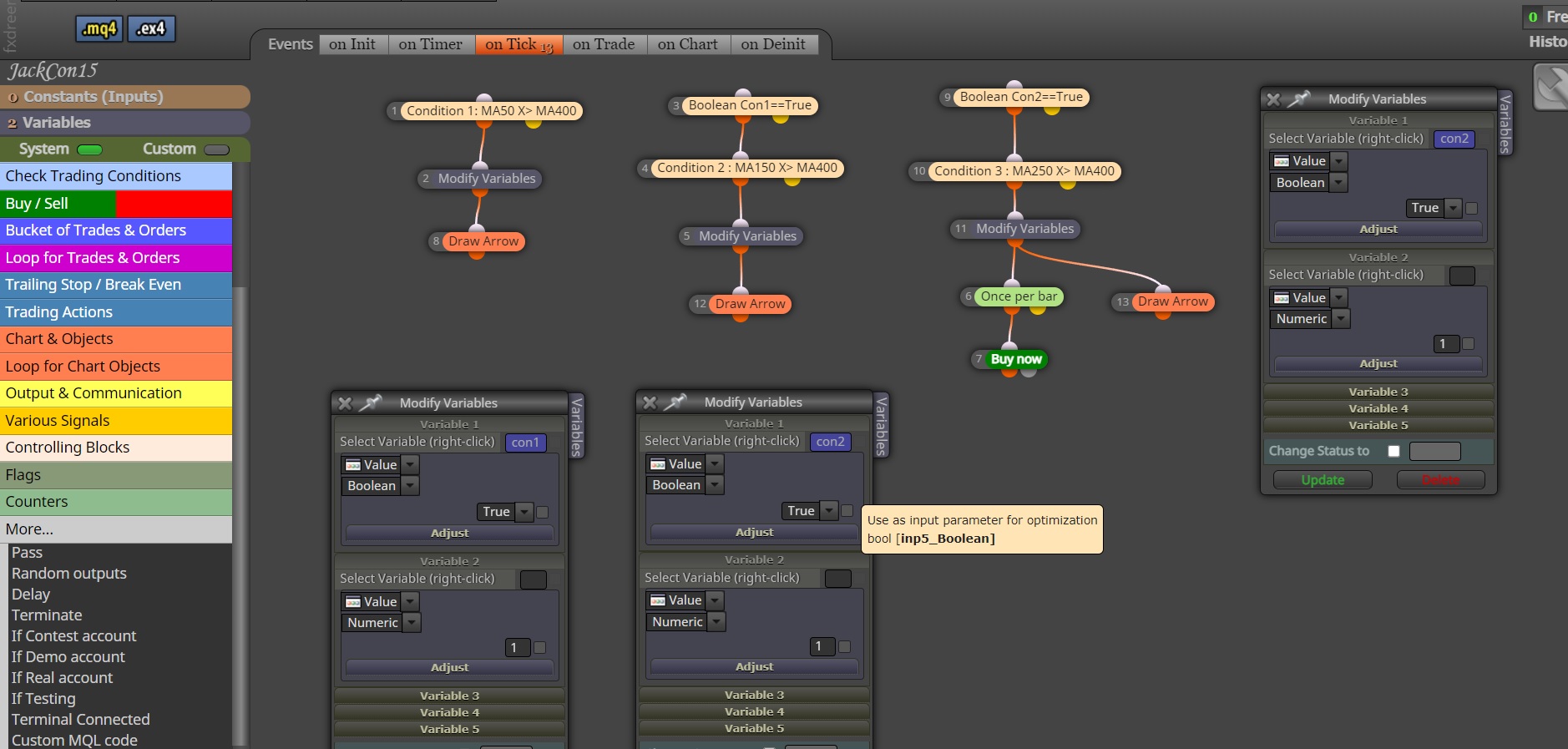
Please suggest where my settings are wrong.
I want the MA condition to run sequentially, condition 1,2,3.
But the problem is that sometimes it runs skip a condition, for example condition 1 is done, it jumps to working condition 3. ( Skip process Condition 2 )
Example
 ︎ Condition1 MA 50 x> MA400 ( start conditions and waiting condition 2 )︎ Condition2. MA150 x> MA400 ( waiting condition 3 )︎ Condition -3 MA250 x> MA400 ( All condition is met 3 condition )︎ Buy now ( When all three conditions are met 3 condition, respectively. )
!!! Please suggest where I misconfigured it.
-
@jackeaa Could you please share the link to the project instead of the mq4 file? I will take a look at it.
-
@l-andorrà
I still don't know what part I'm doing wrong, EA doesn't work in sequence.Sometimes it finishes working in Condition 1, it skip to work in Condition 3 ( doesn't work in Condition 2 ).
please suggest I'm wrong and where should I correct the block position?
My sharing URL
https://fxdreema.com/shared/puRlVi7ydMy .MQ4 File
0_1649218524742_JackCon1st.mq4thanks in advance
-
Just looking at it, it might be a problem with the candle ID...I know I often have problems when I use ID 0, which is the current candle together with candle close...seems like that contradicts itself since as soon as you have the candle close, it becomes ID 1. Try changing the IDs in the condition blocks to 1 instead of leaving them empty and let me know if it works.
-
@sirluk
Thanks for the advice.But my problem is that EA doesn't work in sequence Condition1 , Condition2 , Condition 3 .
Sometimes it finishes working in Condition 1, it skip to work in Condition 3 ( doesn't work in Condition 2 )
My Condition
︎ Condition1 MA 50 x> MA400 ( start conditions and waiting condition 2 )︎ Condition2. MA150 x> MA400 ( waiting condition 3 )︎ Condition 3 MA250 x> MA400 ( All condition is met 3 condition )︎ Buy now ( When all three conditions are met 3 condition, respectively. )Picture Problem
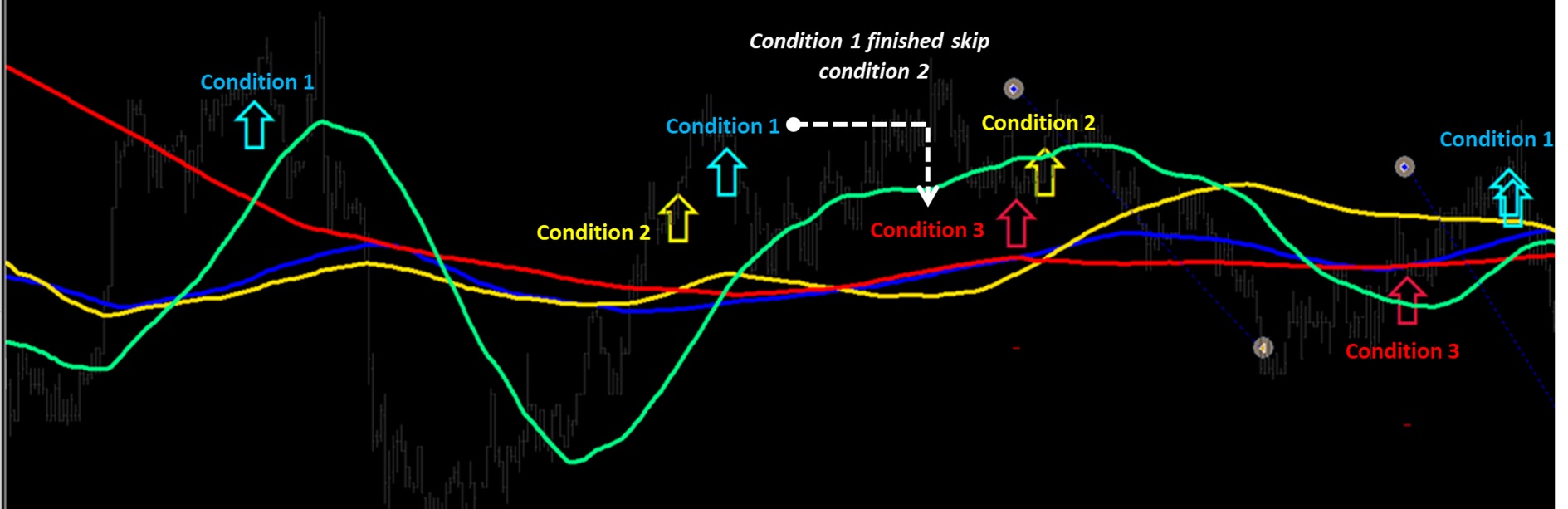
Please help me find a solution to this problem.
-
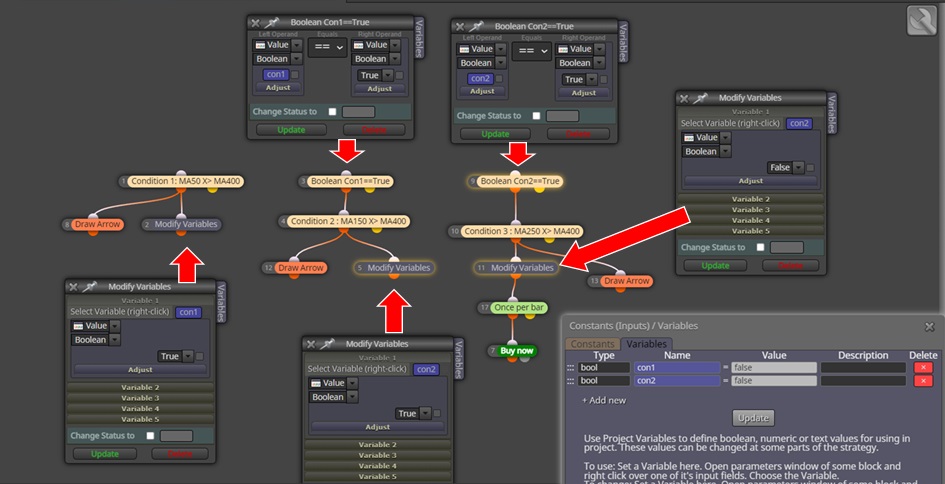
@jackeaa The problem I see is that you have the bools set to true but nothing setting them back to false, decide what makes the condition false, maybe delete arrows when this happens and things should work as needed.
-
I have done as you suggested. but still encountered problems in working skip conditions
( I put draw arrows because I want to monitor The process is in the order of steps 1 2 3 or not. )Please advise me on what part I'm doing wrong.
The result
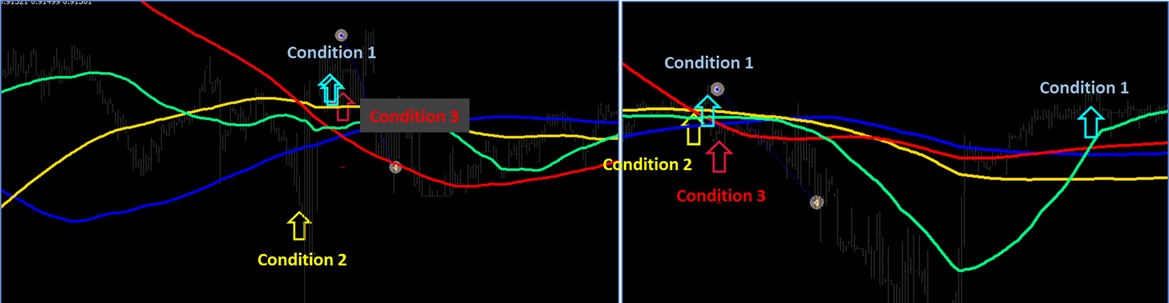
it skip to work in Condition 3 ( doesn't work in Condition 2 )My .mq4 file
0_1649342646477_JackCon1st.mq4My sharing URL
https://fxdreema.com/shared/9ulPAGwib -
@jackeaa Am unsure what your struggling with but this is how I would do it:
MA1x>MA4 ==B1true, if MA1 X<MA4==B1false
MA2x>MA4 ==B2true, if MA2 X<MA4==B2false
MA3x>MA4 ==B3true, if MA3 X<MA4B3==falseif all conditions are true or false activate what you want, the numbers are random to try and show what I mean, you could also use >< instead of X><.
-
@JackEAA, why don't you just stack 3 conditions like ABC?
︎ Condition1 MA 50 x> MA400
--- connect to
︎ Condition2. MA150 x> MA400
--- connect to
︎ Condition 3 MA250 x> MA400
--- connect to
︎ Buy now -
@biztet Doing it this way you are relying that the candle ID's match the conditions, if you use something like a bool or a flag the candle ID's do not matter.
-
i feel like you are requesting you EA to make a sell or a buy whenever there are 3 crossovers at the same time in terms of your blocks which is very rare or impossible why dont you just say 50<150, 150< 250 and finally 250x<400 which will be the confirming condition


