fxDreema

    • Register
    • Login
    • Search
    • Back to the main page
    • Categories
    • Recent
    • Tags
    • Popular
    • Search

    send VARIABLES to TELEGRAM

    Questions & Answers
    5
    19
    1720
    Loading More Posts
    • Oldest to Newest
    • Newest to Oldest
    • Most Votes
    Reply
    • Reply as topic
    Log in to reply
    This topic has been deleted. Only users with topic management privileges can see it.
    • X
      XDV last edited by XDV

      Hello , How I send VARIABLES to TELEGRAM ? , now I can send text to telegram but I don't know how to send variables to telegram.

      l'andorrà 1 Reply Last reply Reply Quote 0
      • l'andorrà
        l'andorrà @XDV last edited by

        @xdv Did you search the word 'telegram' othe the search tool of the forum? You'll find many treahs dedicated to that app. Maybe you can find help there.

        (English) I will try to help everyone in these fxDreema forums. But if you want to learn how to use the platform in depth or more quickly, I can help you with my introductory fxDreema course in English at https://www.theandorraninvestor.eu.

        (Català) Miraré d’ajudar tothom en aquests fòrums d’fxDreema. Tanmateix, si vols aprendre a fer servir la plataforma amb més profunditat o més de pressa, t’hi puc ajudar amb el meu curs d’introducció a fxDeema en català a https://www.theandorraninvestor.eu/ca.

        (Español) Intentaré ayudar a todo el mundo en estos foros de fxDreema. Sin embargo, si quieres aprender a usar la plataforma en profundidad o más deprisa, te puedo ayudar con mi curso de introducción a fxDreema en español en https://www.theandorraninvestor.eu/es.

        1 Reply Last reply Reply Quote 0
        • X
          XDV last edited by

          Thank you very much for the advice, I've searched on forums and YouTube.
          But couldn't find anything about passing variables from fxdreema to Telegram.
          If you found it , please send me a link would be very appreciate

          thank you so much

          jstap 1 Reply Last reply Reply Quote 0
          • jstap
            jstap @XDV last edited by

            @xdv This has come up a few times, I saw a comment on one last week, not sure what it was called called though and don't have link.

            Learn fxDreema Without the Wait!

            My comprehensive book, available on Amazon, is packed with examples and invaluable insights to help you fast-track your learning journey.

            The paperback and hardback editions include MT4 & MT5 QR codes for easy access to all prebuilt projects and robots, including my latest gold trading robot!

            Don’t miss out

            Click here➡️ https://mybook.to/fxDreema to get your copy today!

            Enjoy! 😊

            1 Reply Last reply Reply Quote 0
            • R
              Rodrigo Ortuzar last edited by

              https://fxdreema.com/forum/search?term=telegram&in=titlesposts

              Affectionate Rodrigo

              1 Reply Last reply Reply Quote 0
              • X
                XDV last edited by

                Thank you so much @jstap @RODRIGO ORTUZAR
                from your advice I found this forum

                https://fxdreema.com/forum/topic/6958/how-to-send-a-screenshot-to-a-telegram-channel

                and now ready to send Variable to Telegram.
                Thank you very very very much

                1 Reply Last reply Reply Quote 0
                • X
                  XDV last edited by

                  A few questions if I want to join multiple words or multiple variables .
                  How I do this ?
                  I try this in key2,3,4 but Telegram can recive from key2 (first "text") only.
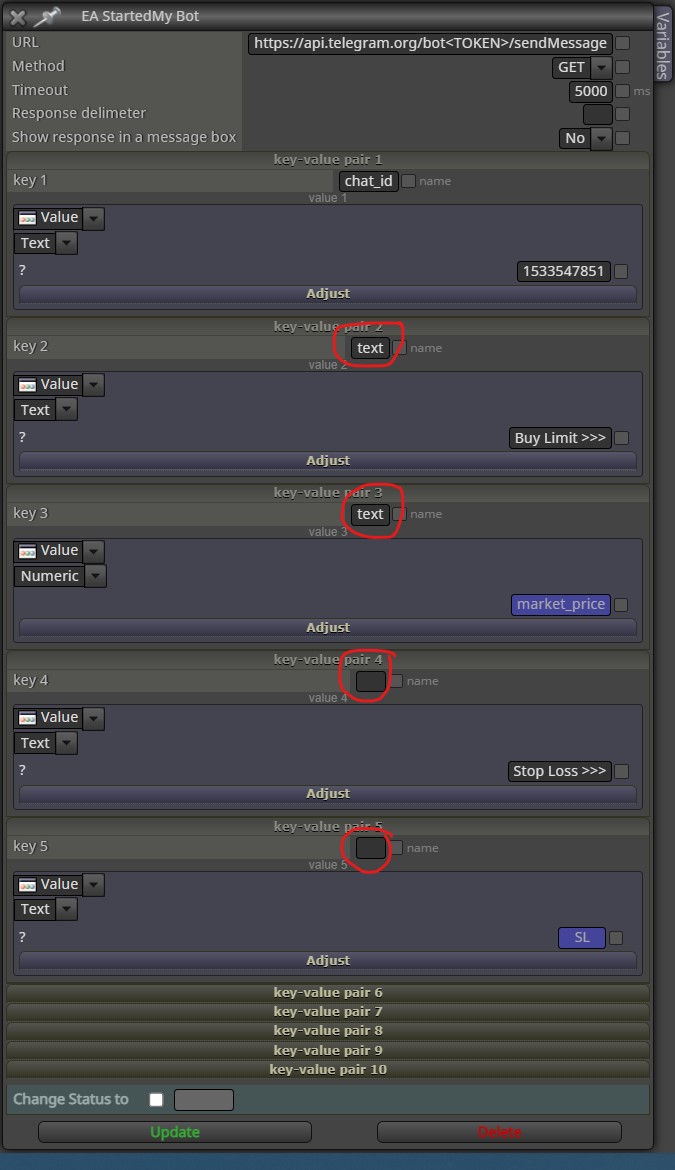
                  0_1654113436706_Screenshot 2022-06-02 024920.jpg

                  jstap 1 Reply Last reply Reply Quote 0
                  • jstap
                    jstap @XDV last edited by

                    @xdv Add as text input, anything in " " like "TEXT" will show as text, add to this with + like "TEXT"+"TEXT", variables/constants are added by the name so adding a few together would look like, "TEXT"+variable1+" "+variable2. To add this to a text box save into a string variable.

                    Learn fxDreema Without the Wait!

                    My comprehensive book, available on Amazon, is packed with examples and invaluable insights to help you fast-track your learning journey.

                    The paperback and hardback editions include MT4 & MT5 QR codes for easy access to all prebuilt projects and robots, including my latest gold trading robot!

                    Don’t miss out

                    Click here➡️ https://mybook.to/fxDreema to get your copy today!

                    Enjoy! 😊

                    X 1 Reply Last reply Reply Quote 0
                    • X
                      XDV @jstap last edited by XDV

                      @jstap Thank you so much
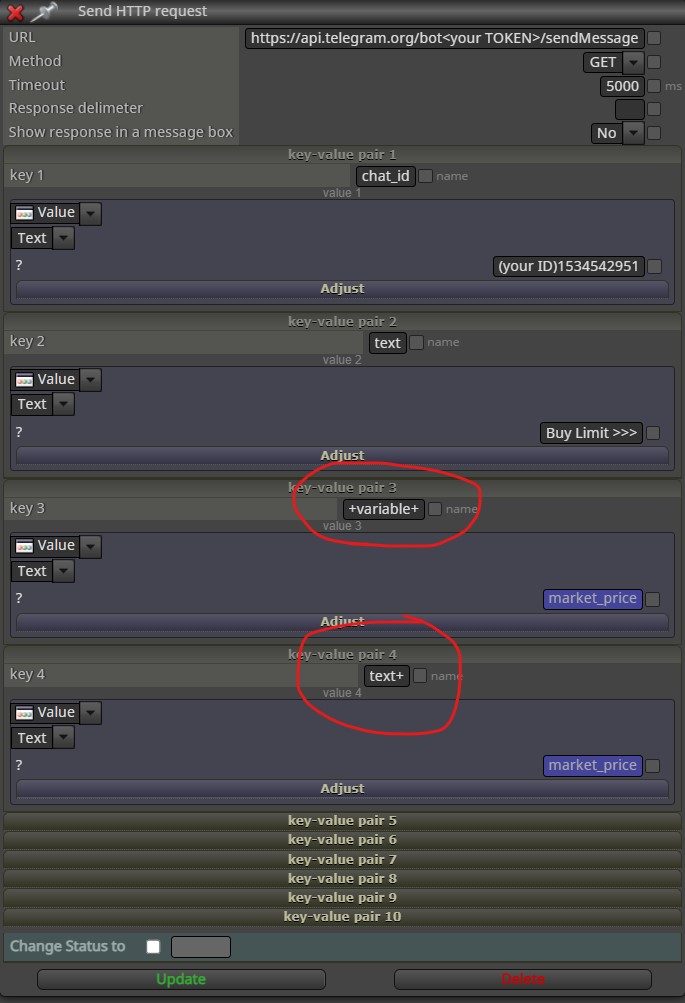
                      From your advice I try on Fxdreema, but Telegram recive from key2 (first "text") only.
                      And I don't know MetaQuotes Language.
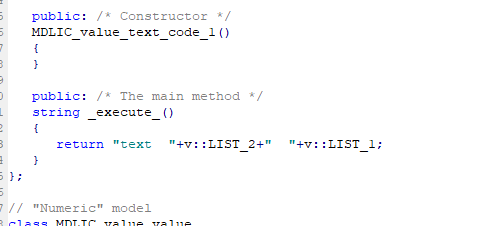
                      If possible , please edit in fxdreema would be very appreciate.
                      Thank you so much

                      https://fxdreema.com/shared/KO9pUE8D

                      0_1654155782516_Screenshot 2022-06-02 144238.jpg

                      jstap 1 Reply Last reply Reply Quote 0
                      • jstap
                        jstap @XDV last edited by

                        @xdv You will see what I meant here https://fxdreema.com/shared/rmprr1vWc you can also rum on strategy tester to see what all's doing.

                        Learn fxDreema Without the Wait!

                        My comprehensive book, available on Amazon, is packed with examples and invaluable insights to help you fast-track your learning journey.

                        The paperback and hardback editions include MT4 & MT5 QR codes for easy access to all prebuilt projects and robots, including my latest gold trading robot!

                        Don’t miss out

                        Click here➡️ https://mybook.to/fxDreema to get your copy today!

                        Enjoy! 😊

                        X aman 2 Replies Last reply Reply Quote 0
                        • X
                          XDV @jstap last edited by

                          @jstap Thank you so much. That's great yeah!!! now I can send it.
                          Thank you very very very much @jstap

                          jstap 1 Reply Last reply Reply Quote 0
                          • jstap
                            jstap @XDV last edited by

                            @xdv Your welcome

                            Learn fxDreema Without the Wait!

                            My comprehensive book, available on Amazon, is packed with examples and invaluable insights to help you fast-track your learning journey.

                            The paperback and hardback editions include MT4 & MT5 QR codes for easy access to all prebuilt projects and robots, including my latest gold trading robot!

                            Don’t miss out

                            Click here➡️ https://mybook.to/fxDreema to get your copy today!

                            Enjoy! 😊

                            1 Reply Last reply Reply Quote 0
                            • aman
                              aman @jstap last edited by

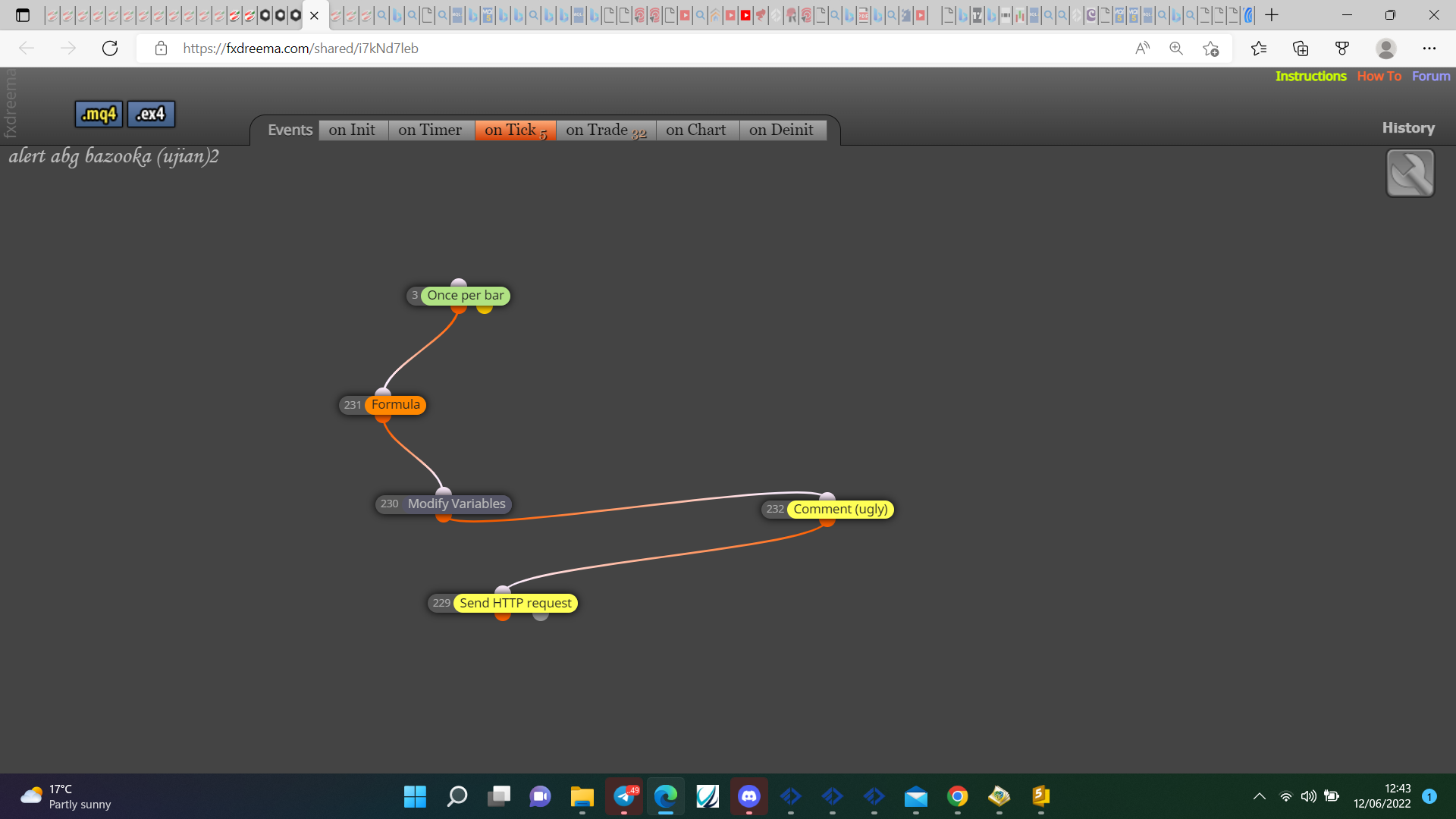
                              @jstap i am doing same project as shown by u but still fail.. Am i put wrong code source? please help me
                              https://fxdreema.com/shared/i7kNd7leb

                              jstap 1 Reply Last reply Reply Quote 0
                              • jstap
                                jstap @aman last edited by

                                @aman Put all in the order it needs to happen, 0_1655034259169_97f8e862-a320-4e5d-91a9-a57cfd505c6a-image.png
                                Learn fxDreema Without the Wait!

                                My comprehensive book, available on Amazon, is packed with examples and invaluable insights to help you fast-track your learning journey.

                                The paperback and hardback editions include MT4 & MT5 QR codes for easy access to all prebuilt projects and robots, including my latest gold trading robot!

                                Don’t miss out

                                Click here➡️ https://mybook.to/fxDreema to get your copy today!

                                Enjoy! 😊

                                aman 1 Reply Last reply Reply Quote 0
                                • aman
                                  aman @jstap last edited by

                                  @jstap I put this on variable code input but not getting same what are u done.

                                  "LIST "+LIST_1+" "+LIST_2

                                  i tried modify code but still not done it
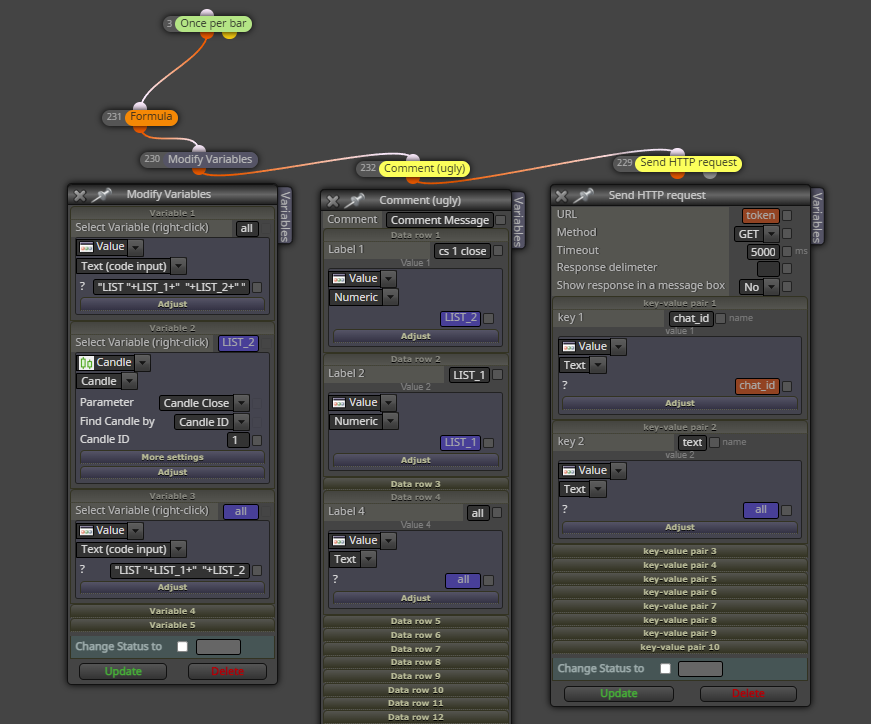
                                  0_1655043595566_48536f82-f4c5-4421-8510-57ac1ebe7984-image.png

                                  https://fxdreema.com/shared/PzvyLDeGc

                                  jstap 1 Reply Last reply Reply Quote 0
                                  • jstap
                                    jstap @aman last edited by

                                    @aman Remove the 1st all text input variable, move all so there in order, the values you want in variable from text code need to have already been put into the variables, this can be a block above another, or it could just be 1st in a modify variable block.

                                    Learn fxDreema Without the Wait!

                                    My comprehensive book, available on Amazon, is packed with examples and invaluable insights to help you fast-track your learning journey.

                                    The paperback and hardback editions include MT4 & MT5 QR codes for easy access to all prebuilt projects and robots, including my latest gold trading robot!

                                    Don’t miss out

                                    Click here➡️ https://mybook.to/fxDreema to get your copy today!

                                    Enjoy! 😊

                                    aman 2 Replies Last reply Reply Quote 0
                                    • aman
                                      aman @jstap last edited by

                                      @jstap 0_1655045961079_ef163d4e-5ab7-459b-b8cc-3f10dc33ffb3-image.png

                                      This is the code i have modify a bit and got no error after compile..
                                      thanks for your help sir..

                                      1 Reply Last reply Reply Quote 0
                                      • aman
                                        aman @jstap last edited by

                                        @jstap help me to put text in new line..
                                        usually in mql coding i understand to put this code " /n " for jump to the next line but how about on this https block ?

                                        this is the photo sample what i want to do
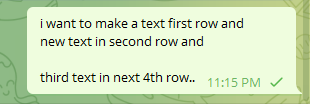
                                        0_1655046993462_9657d639-4bfd-4413-8f7c-dadf0389aac0-image.png

                                        jstap 1 Reply Last reply Reply Quote 0
                                        • jstap
                                          jstap @aman last edited by

                                          @aman I don't know, Iv'e never tried but in custom code/code input you can add most mql code.

                                          Learn fxDreema Without the Wait!

                                          My comprehensive book, available on Amazon, is packed with examples and invaluable insights to help you fast-track your learning journey.

                                          The paperback and hardback editions include MT4 & MT5 QR codes for easy access to all prebuilt projects and robots, including my latest gold trading robot!

                                          Don’t miss out

                                          Click here➡️ https://mybook.to/fxDreema to get your copy today!

                                          Enjoy! 😊

                                          1 Reply Last reply Reply Quote 0
                                          • 1 / 1
                                          • First post
                                            Last post

                                          Online Users

                                          S
                                          T
                                          A
                                          Y
                                          H
                                          B
                                          K

                                          16
                                          Online

                                          146.7k
                                          Users

                                          22.4k
                                          Topics

                                          122.6k
                                          Posts

                                          Powered by NodeBB Forums | Contributors