fxDreema

    • Register
    • Login
    • Search
    • Back to the main page
    • Categories
    • Recent
    • Tags
    • Popular
    • Search

    How to check for Bolinger Band 'Squeeze'

    Questions & Answers
    0
    12
    809
    Loading More Posts
    • Oldest to Newest
    • Newest to Oldest
    • Most Votes
    Reply
    • Reply as topic
    Log in to reply
    This topic has been deleted. Only users with topic management privileges can see it.
    • Zereleth
      Zereleth last edited by

      I am curious on how to check for a bolinger band squeeze. I want to be able to detect how close together the upper and lower band are and require it to fall within this range for a time.

      I have tried using the indicator moves within limits function but I am not sure if I am understanding how to set it up to these parameters. If anyone knows it would be appreciated.

      jstap 1 Reply Last reply Reply Quote 0
      • jstap
        jstap @Zereleth last edited by

        @zereleth I think the best way is to check distance between top and bottom line.

        Learn fxDreema Without the Wait!

        My comprehensive book, available on Amazon, is packed with examples and invaluable insights to help you fast-track your learning journey.

        The paperback and hardback editions include MT4 & MT5 QR codes for easy access to all prebuilt projects and robots, including my latest gold trading robot!

        Don’t miss out

        Click here➡️ https://mybook.to/fxDreema to get your copy today!

        Enjoy! 😊

        1 Reply Last reply Reply Quote 0
        • Zereleth
          Zereleth last edited by

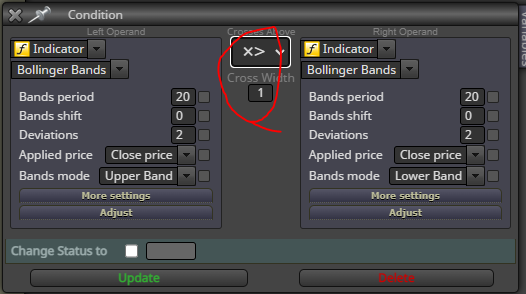
          0_1672951864967_f652aa8b-0218-4764-834b-58056cd55092-image.png

          I was thinking something like this although I am not too certain how to use the cross width function

          jstap 1 Reply Last reply Reply Quote 0
          • jstap
            jstap @Zereleth last edited by

            @zereleth upper band will never cross the lower band, use the check distance block, if < chosen pips is a squeese.

            Learn fxDreema Without the Wait!

            My comprehensive book, available on Amazon, is packed with examples and invaluable insights to help you fast-track your learning journey.

            The paperback and hardback editions include MT4 & MT5 QR codes for easy access to all prebuilt projects and robots, including my latest gold trading robot!

            Don’t miss out

            Click here➡️ https://mybook.to/fxDreema to get your copy today!

            Enjoy! 😊

            Zereleth 1 Reply Last reply Reply Quote 0
            • Zereleth
              Zereleth @jstap last edited by

              @jstap Thank you this was exactly what I needed, the check distance block

              jstap 1 Reply Last reply Reply Quote 0
              • jstap
                jstap @Zereleth last edited by

                @zereleth Your welcome

                Learn fxDreema Without the Wait!

                My comprehensive book, available on Amazon, is packed with examples and invaluable insights to help you fast-track your learning journey.

                The paperback and hardback editions include MT4 & MT5 QR codes for easy access to all prebuilt projects and robots, including my latest gold trading robot!

                Don’t miss out

                Click here➡️ https://mybook.to/fxDreema to get your copy today!

                Enjoy! 😊

                Zereleth 1 Reply Last reply Reply Quote 0
                • Zereleth
                  Zereleth @jstap last edited by

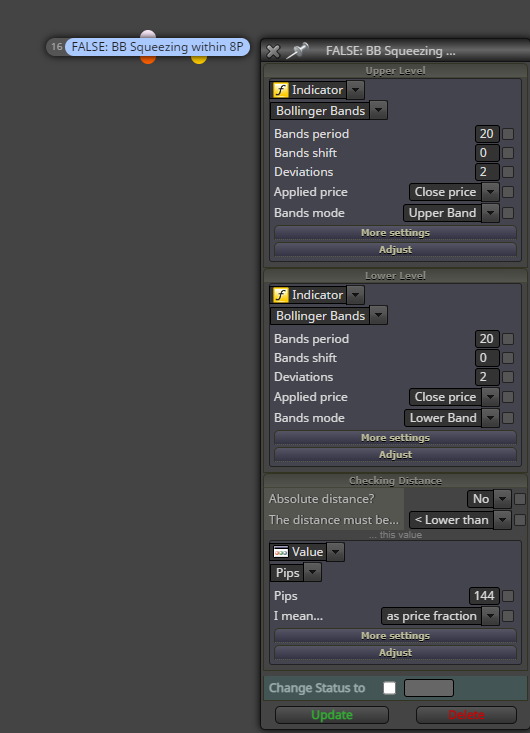
                  @jstap So I have been testing this out and it doesn't seem to be working, I am not sure if a BB can't measure a pip value but when I set it to not sell when its within 5 pips of each other it doesn't prevent any trades. Even if I set it to a comical value of something like 144 pips it still sells. 0_1673050999889_3a19fd17-b5ce-49c6-a413-dfeef24b363b-image.png
                  jstap 1 Reply Last reply Reply Quote 0
                  • jstap
                    jstap @Zereleth last edited by

                    @zereleth Put a shared link to look at, will only work if in-between blocks.

                    Learn fxDreema Without the Wait!

                    My comprehensive book, available on Amazon, is packed with examples and invaluable insights to help you fast-track your learning journey.

                    The paperback and hardback editions include MT4 & MT5 QR codes for easy access to all prebuilt projects and robots, including my latest gold trading robot!

                    Don’t miss out

                    Click here➡️ https://mybook.to/fxDreema to get your copy today!

                    Enjoy! 😊

                    1 Reply Last reply Reply Quote 0
                    • Zereleth
                      Zereleth last edited by

                      https://fxdreema.com/shared/N1Kd9YmE

                      Something like this?

                      jstap 1 Reply Last reply Reply Quote 0
                      • jstap
                        jstap @Zereleth last edited by

                        @zereleth Looks right, why connect via yellow? this means if gap is >

                        Learn fxDreema Without the Wait!

                        My comprehensive book, available on Amazon, is packed with examples and invaluable insights to help you fast-track your learning journey.

                        The paperback and hardback editions include MT4 & MT5 QR codes for easy access to all prebuilt projects and robots, including my latest gold trading robot!

                        Don’t miss out

                        Click here➡️ https://mybook.to/fxDreema to get your copy today!

                        Enjoy! 😊

                        Zereleth 1 Reply Last reply Reply Quote 0
                        • Zereleth
                          Zereleth @jstap last edited by

                          @jstap I effectively don't want it to trade when the bands are not squeezing, my issue is that when I set it to red (incorrect) it never trades and when I set it to yellow it always trades as if the block doesn't exist. The block seems to be correct but just doesn't work as intended

                          jstap 1 Reply Last reply Reply Quote 0
                          • jstap
                            jstap @Zereleth last edited by

                            @zereleth Orange is correct, put all into a comment, this way you can visually se why things are/aren't working.

                            Learn fxDreema Without the Wait!

                            My comprehensive book, available on Amazon, is packed with examples and invaluable insights to help you fast-track your learning journey.

                            The paperback and hardback editions include MT4 & MT5 QR codes for easy access to all prebuilt projects and robots, including my latest gold trading robot!

                            Don’t miss out

                            Click here➡️ https://mybook.to/fxDreema to get your copy today!

                            Enjoy! 😊

                            1 Reply Last reply Reply Quote 0
                            • 1 / 1
                            • First post
                              Last post

                            Online Users

                            S
                            O
                            K
                            M
                            M
                            C

                            14
                            Online

                            146.7k
                            Users

                            22.4k
                            Topics

                            122.6k
                            Posts

                            Powered by NodeBB Forums | Contributors