Results in variables processed by formula
-
https://fxdreema.com/shared/37z5o8vSd
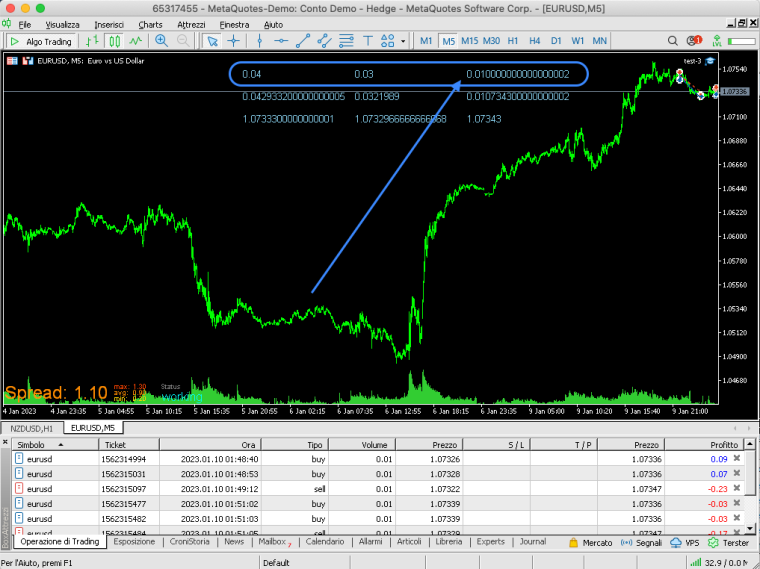
Hi, I noticed that the results processed by the formula block when they are then transcribed inside the variable bring excess decimals, distorting and dirtying the result, is there an explanation/solution to this? 0.04 - 0.03 = 0.01 (0.01000....2 ???) Thank you
-
@duepips add this as text code input: DoubleToString(variable,2); there are other ways to use this code but this generally what you need.
-
@jstap said in Results in variables processed by formula:
@duepips add this as text code input: DoubleToString(variable,2); there are other ways to use this code but this generally what you need.
I know this method, but I need the correction of the data inside the variable, not outside on the draw text
-
@duepips Then add the code to the creation, never done it but added to adjust box will likly do it, add a shared link to see what calculations are doing.
-
@jstap said in Results in variables processed by formula:
Then add the code to the creation, never done it but added to adjust box will likly do it, add a shared link to see what calculations are doing.
if i add DoubleToString inside the formula it doesn't process, i added the shared code
-
@duepips Yes but it depends on what the formula is doing, for example DoubleToString(AccountBalance(),2)+DoubleToString(AccountProfit(),2): would give you account equity normalised to 2.
-
@jstap said in Results in variables processed by formula:
Yes but it depends on what the formula is doing, for example DoubleToString(AccountBalance(),2)+DoubleToString(AccountProfit(),2): would give you account equity normalised to 2.
subtracts the volume of Sell positions from the volume of Buy positions (Buy 0.04 - Sell 0.03 = 0.01) but writes 0.0100000000002
-
@duepips Then you can add.
-
@jstap said in Results in variables processed by formula:
Then you can add.
yes, the DoubleToString works outside the variable, but the data inside the variable that is generated by the formula remains the same
-
@duepips Show me he formula, better still just share the project.
-
@jstap said in Results in variables processed by formula:
@duepips Show me he formula, better still just share the project.
-
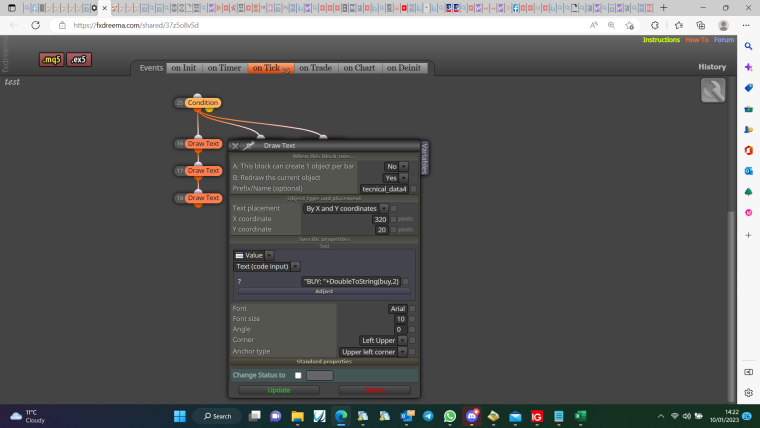
@duepips use bucket of trades to get average values, add variables as textcodeinput
-
@jstap said in Results in variables processed by formula:
@duepips use bucket of trades to get average values, add variables as textcodeinput
this corrects the result that the draw text block writes, but not the data inside the variable, I need to correct the data before saving it inside the variable to use it in the background
-
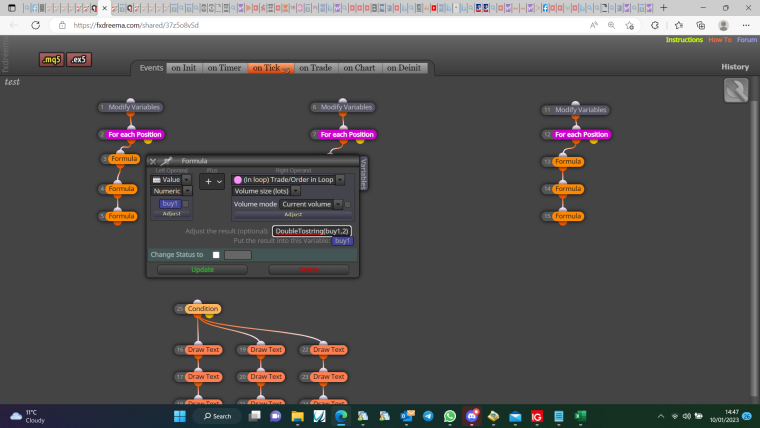
@duepips try adding to adjust:
-
@jstap said in Results in variables processed by formula:
@duepips try adding to adjust:
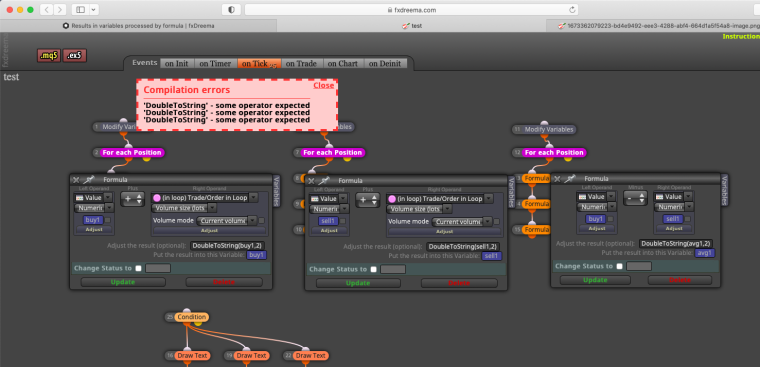
I had also tried this fix, but by mistake, look
-
@duepips Try removing the formula blocks and add this buy1=(DoubleToString(buy,2) + DoubleToString(OrderLots(),2));
buy2=(DoubleToString(OrderOpenPrice(),2)*DoubleToString(OrderLots(),2)+buy2);
buy3=(buy2/buy1);: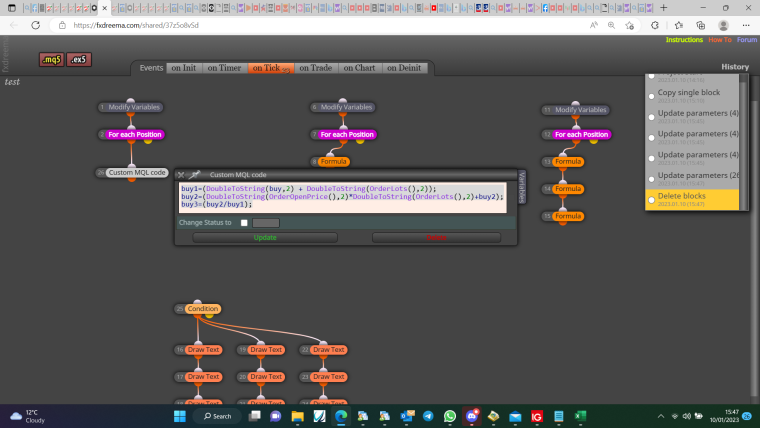
-
@jstap said in Results in variables processed by formula:
@duepips Try removing the formula blocks and add this buy1=(DoubleToString(buy,2) + DoubleToString(OrderLots(),2));
buy2=(DoubleToString(OrderOpenPrice(),2)*DoubleToString(OrderLots(),2)+buy2);
buy3=(buy2/buy1);:illegal?? Lol
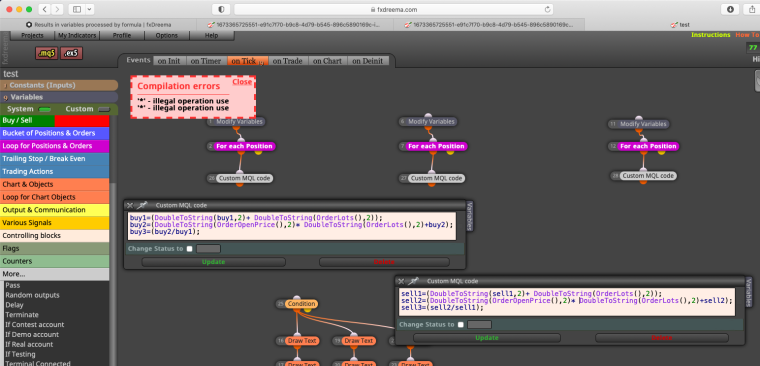
-
@duepips This is what the formula block is doing, just condenses it into 1 block. The error is just a missing/misplaced symbol, turn out it didn't like the DoubleToString: buy1=(DoubleToString(buy1,2) + DoubleToString(OrderLots(),2));
buy2=(OrderOpenPrice()*OrderLots()+buy2);
buy3=(buy2/buy1); -
@jstap said in Results in variables processed by formula:
@duepips This is what the formula block is doing, just condenses it into 1 block. The error is just a missing/misplaced symbol.
what's missing/misplaced?
-
@duepips nothing, just misses the normalise place sometimes: buy1=(DoubleToString(buy1,2) + DoubleToString(OrderLots(),2));
buy2=(OrderOpenPrice()*OrderLots()+buy2);
buy3=(buy2/buy1);





