fxDreema

    • Register
    • Login
    • Search
    • Back to the main page
    • Categories
    • Recent
    • Tags
    • Popular
    • Search

    EA not opening trades

    Questions & Answers
    0
    24
    1066
    Loading More Posts
    • Oldest to Newest
    • Newest to Oldest
    • Most Votes
    Reply
    • Reply as topic
    Log in to reply
    This topic has been deleted. Only users with topic management privileges can see it.
    • M
      Moneyman012 0 last edited by Moneyman012 0

      Hi, may I please receive help with my EA it works properly on backtest however on Demo it's showing the smile and saying expert enabled .

      jstap 1 Reply Last reply Reply Quote 0
      • jstap
        jstap @Moneyman012 0 last edited by

        @moneyman012-0 Your link is not loading

        Learn fxDreema Without the Wait!

        My comprehensive book, available on Amazon, is packed with examples and invaluable insights to help you fast-track your learning journey.

        The paperback and hardback editions include MT4 & MT5 QR codes for easy access to all prebuilt projects and robots, including my latest gold trading robot!

        Don’t miss out

        Click here➡️ https://mybook.to/fxDreema to get your copy today!

        Enjoy! 😊

        1 Reply Last reply Reply Quote 0
        • M
          Moneyman012 0 last edited by Moneyman012 0

          https://fxdreema.com/shared/jireirefmlcd

          jstap 1 Reply Last reply Reply Quote 0
          • jstap
            jstap @Moneyman012 0 last edited by jstap

            @moneyman012-0 Your modify chart should be on init as 1 block, maybe with a pass block above. You don't need the condition blocks, above close and trail, just if trade. Looks like should place a trade, change this and see what happens.

            Learn fxDreema Without the Wait!

            My comprehensive book, available on Amazon, is packed with examples and invaluable insights to help you fast-track your learning journey.

            The paperback and hardback editions include MT4 & MT5 QR codes for easy access to all prebuilt projects and robots, including my latest gold trading robot!

            Don’t miss out

            Click here➡️ https://mybook.to/fxDreema to get your copy today!

            Enjoy! 😊

            1 Reply Last reply Reply Quote 0
            • M
              Moneyman012 0 last edited by

              I removed the condition and things went left, And then I built I changed a few other things, please tell me what you think: https://fxdreema.com/shared/pzPKY4stc

              jstap l'andorrà 2 Replies Last reply Reply Quote 0
              • jstap
                jstap @Moneyman012 0 last edited by

                @moneyman012-0 Looks like should work, not sure about turning off bull bear with out connecting around, is any thing not working.

                Learn fxDreema Without the Wait!

                My comprehensive book, available on Amazon, is packed with examples and invaluable insights to help you fast-track your learning journey.

                The paperback and hardback editions include MT4 & MT5 QR codes for easy access to all prebuilt projects and robots, including my latest gold trading robot!

                Don’t miss out

                Click here➡️ https://mybook.to/fxDreema to get your copy today!

                Enjoy! 😊

                1 Reply Last reply Reply Quote 0
                • l'andorrà
                  l'andorrà @Moneyman012 0 last edited by

                  @moneyman012-0 You are not using any purple block on the 'On trade' tab. When are those blocks there supposed to be activated? You can also remove both 'pass' blocks. They are unnecessary.

                  (English) I will try to help everyone in these fxDreema forums. But if you want to learn how to use the platform in depth or more quickly, I can help you with my introductory fxDreema course in English at https://www.theandorraninvestor.eu.

                  (Català) Miraré d’ajudar tothom en aquests fòrums d’fxDreema. Tanmateix, si vols aprendre a fer servir la plataforma amb més profunditat o més de pressa, t’hi puc ajudar amb el meu curs d’introducció a fxDeema en català a https://www.theandorraninvestor.eu/ca.

                  (Español) Intentaré ayudar a todo el mundo en estos foros de fxDreema. Sin embargo, si quieres aprender a usar la plataforma en profundidad o más deprisa, te puedo ayudar con mi curso de introducción a fxDreema en español en https://www.theandorraninvestor.eu/es.

                  1 Reply Last reply Reply Quote 0
                  • M
                    Moneyman012 0 last edited by

                    @l-andorrà should I use the order created or trade created?

                    l'andorrà 1 Reply Last reply Reply Quote 0
                    • l'andorrà
                      l'andorrà @Moneyman012 0 last edited by

                      @moneyman012-0 They should be 'trade closed'.

                      (English) I will try to help everyone in these fxDreema forums. But if you want to learn how to use the platform in depth or more quickly, I can help you with my introductory fxDreema course in English at https://www.theandorraninvestor.eu.

                      (Català) Miraré d’ajudar tothom en aquests fòrums d’fxDreema. Tanmateix, si vols aprendre a fer servir la plataforma amb més profunditat o més de pressa, t’hi puc ajudar amb el meu curs d’introducció a fxDeema en català a https://www.theandorraninvestor.eu/ca.

                      (Español) Intentaré ayudar a todo el mundo en estos foros de fxDreema. Sin embargo, si quieres aprender a usar la plataforma en profundidad o más deprisa, te puedo ayudar con mi curso de introducción a fxDreema en español en https://www.theandorraninvestor.eu/es.

                      1 Reply Last reply Reply Quote 0
                      • M
                        Moneyman012 0 last edited by

                        I am confused so, that's going to make them change colors ?

                        1 Reply Last reply Reply Quote 0
                        • M
                          Moneyman012 0 last edited by

                          Please send me an exmple

                          1 Reply Last reply Reply Quote 0
                          • M
                            Moneyman012 0 last edited by

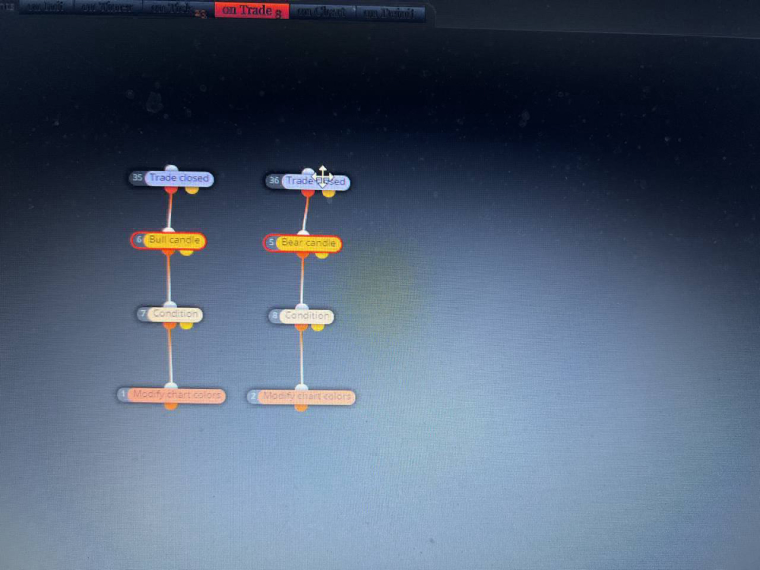
                            @l-andorrà should it look like this with opposite trades ?
                            0_1674780451220_photo_2023-01-27_02-47-11.jpg

                            l'andorrà 1 Reply Last reply Reply Quote 0
                            • l'andorrà
                              l'andorrà @Moneyman012 0 last edited by

                              @moneyman012-0 Sorry. I'm afraid I misunderstood your request. What do you exactly need now?

                              (English) I will try to help everyone in these fxDreema forums. But if you want to learn how to use the platform in depth or more quickly, I can help you with my introductory fxDreema course in English at https://www.theandorraninvestor.eu.

                              (Català) Miraré d’ajudar tothom en aquests fòrums d’fxDreema. Tanmateix, si vols aprendre a fer servir la plataforma amb més profunditat o més de pressa, t’hi puc ajudar amb el meu curs d’introducció a fxDeema en català a https://www.theandorraninvestor.eu/ca.

                              (Español) Intentaré ayudar a todo el mundo en estos foros de fxDreema. Sin embargo, si quieres aprender a usar la plataforma en profundidad o más deprisa, te puedo ayudar con mi curso de introducción a fxDreema en español en https://www.theandorraninvestor.eu/es.

                              1 Reply Last reply Reply Quote 0
                              • M
                                Moneyman012 0 last edited by Moneyman012 0

                                @l-andorrà When I buy I would like to turn all candle sticks green and when I sell I want to turn all of them red, I also want the status at the bottom to change according to the type of trades open .

                                Link : https://fxdreema.com/shared/jirnoenkldkod

                                l'andorrà 1 Reply Last reply Reply Quote 0
                                • l'andorrà
                                  l'andorrà @Moneyman012 0 last edited by

                                  @moneyman012-0 In that case what you need is using a 'Trade created' block on top and then the 'modify chart color' block below. You need to remove all other blocks in between.

                                  (English) I will try to help everyone in these fxDreema forums. But if you want to learn how to use the platform in depth or more quickly, I can help you with my introductory fxDreema course in English at https://www.theandorraninvestor.eu.

                                  (Català) Miraré d’ajudar tothom en aquests fòrums d’fxDreema. Tanmateix, si vols aprendre a fer servir la plataforma amb més profunditat o més de pressa, t’hi puc ajudar amb el meu curs d’introducció a fxDeema en català a https://www.theandorraninvestor.eu/ca.

                                  (Español) Intentaré ayudar a todo el mundo en estos foros de fxDreema. Sin embargo, si quieres aprender a usar la plataforma en profundidad o más deprisa, te puedo ayudar con mi curso de introducción a fxDreema en español en https://www.theandorraninvestor.eu/es.

                                  1 Reply Last reply Reply Quote 0
                                  • M
                                    Moneyman012 0 last edited by

                                    @l-andorrà I also want the status at the bottom to change according to the type of trades open. How do I do that ?

                                    jstap 1 Reply Last reply Reply Quote 0
                                    • jstap
                                      jstap @Moneyman012 0 last edited by

                                      @moneyman012-0 Many blocks have the option to change status.

                                      Learn fxDreema Without the Wait!

                                      My comprehensive book, available on Amazon, is packed with examples and invaluable insights to help you fast-track your learning journey.

                                      The paperback and hardback editions include MT4 & MT5 QR codes for easy access to all prebuilt projects and robots, including my latest gold trading robot!

                                      Don’t miss out

                                      Click here➡️ https://mybook.to/fxDreema to get your copy today!

                                      Enjoy! 😊

                                      1 Reply Last reply Reply Quote 0
                                      • M
                                        Moneyman012 0 last edited by Moneyman012 0

                                        @jstap Can I use blocks 13 and 14?

                                        https://fxdreema.com/shared/KHnTbzfgjgo

                                        jstap 1 Reply Last reply Reply Quote 0
                                        • jstap
                                          jstap @Moneyman012 0 last edited by

                                          @moneyman012-0 Yes as you have changed, when this block activates the status will change.

                                          Learn fxDreema Without the Wait!

                                          My comprehensive book, available on Amazon, is packed with examples and invaluable insights to help you fast-track your learning journey.

                                          The paperback and hardback editions include MT4 & MT5 QR codes for easy access to all prebuilt projects and robots, including my latest gold trading robot!

                                          Don’t miss out

                                          Click here➡️ https://mybook.to/fxDreema to get your copy today!

                                          Enjoy! 😊

                                          1 Reply Last reply Reply Quote 0
                                          • M
                                            Moneyman012 0 last edited by Moneyman012 0

                                            @jstap and @l-andorrà I have done what was suggested and all I am seeing now is the arrows on my chart which is great, but I am not seeing the status change, I am not seeing the chart change and now the new issue that it doesn't open trades on backtest, please help.

                                            https://fxdreema.com/shared/1j2KUwidfjfod

                                            A 1 Reply Last reply Reply Quote 0
                                            • 1
                                            • 2
                                            • 1 / 2
                                            • First post
                                              Last post

                                            Online Users

                                            C
                                            M
                                            O
                                            H
                                            F
                                            H
                                            M

                                            12
                                            Online

                                            146.7k
                                            Users

                                            22.4k
                                            Topics

                                            122.6k
                                            Posts

                                            Powered by NodeBB Forums | Contributors