fxDreema

    • Register
    • Login
    • Search
    • Back to the main page
    • Categories
    • Recent
    • Tags
    • Popular
    • Search

    Importing MT5 example indicator RSI.mq5 is failing

    Bug Reports
    4
    5
    487
    Loading More Posts
    • Oldest to Newest
    • Newest to Oldest
    • Most Votes
    Reply
    • Reply as topic
    Log in to reply
    This topic has been deleted. Only users with topic management privileges can see it.
    • S
      Sparrow last edited by Sparrow

      I cannot find a workaround for the following issue. Please help.

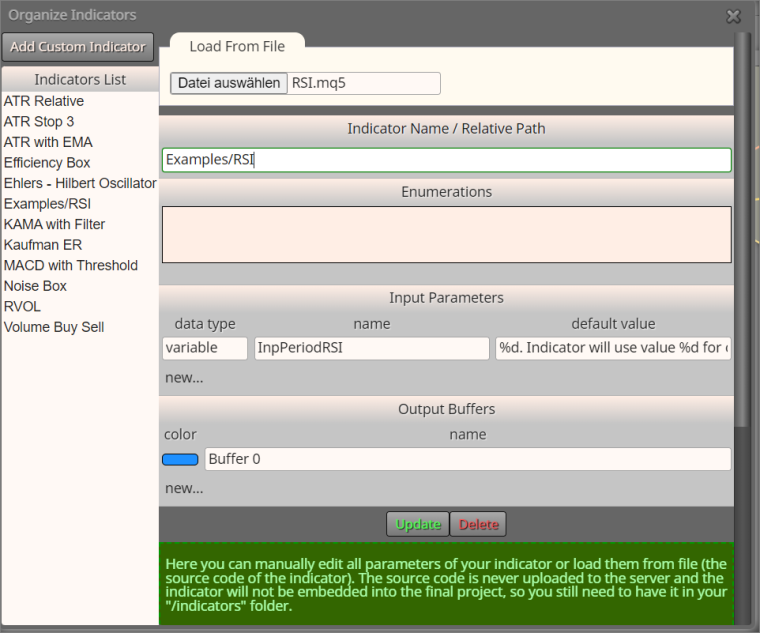
      When importing the example RSI.mq5 indicator (unmodified, out-of-the-box MT5 install), the default parameter is not recognized. Screenshot:
      0_1675433937140_f82af1a2-e55d-4efb-9f65-05fc3b0606b1-image.png

      After replacing the default value for InpPeriodRSI with "14", the import works.

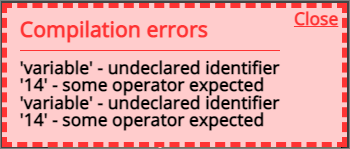
      EDIT: Meanwhile, I replaced data type "variable" with "int". With this, an EA using Examples/RSI.mq5 can be compiled. A similar issue persists, however, with another imported custom indicator. Even after replacing the incorrectly offered string value with "14", the parameter is missing in the generated source-code. When I manually insert the missing parameter in the handle-generating code, everything is working. Seems to be a bug in the handling of custom indicator imports.

      Using this custom indicator in a condition block seems to work flawlessly.

      The EA, however, does not compile anymore. Screenshot:
      0_1675434320862_ed689876-64f7-4a8f-9fa6-3ef71de0189b-image.png

      Compiling the EA in MT5:

      0_1675434450580_2554b5ff-258a-4fb1-9110-8f10d975cfe1-image.png

      What could be the problem?

      Download link for the imported indicator:
      RSI.mq5

      l'andorrà 1 Reply Last reply Reply Quote 0
      • l'andorrà
        l'andorrà @Sparrow last edited by

        @sparrow I'm not a programmer so I can't provide a solution for that but you can try to emulate the parameter as explained in the second half of this nice tutorial:

        https://fxdreema.com/forum/topic/4208/tutorial-06-my-indicators-in-fxdreema

        (English) I will try to help everyone in these fxDreema forums. But if you want to learn how to use the platform in depth or more quickly, I can help you with my introductory fxDreema course in English at https://www.theandorraninvestor.eu.

        (Català) Miraré d’ajudar tothom en aquests fòrums d’fxDreema. Tanmateix, si vols aprendre a fer servir la plataforma amb més profunditat o més de pressa, t’hi puc ajudar amb el meu curs d’introducció a fxDeema en català a https://www.theandorraninvestor.eu/ca.

        (Español) Intentaré ayudar a todo el mundo en estos foros de fxDreema. Sin embargo, si quieres aprender a usar la plataforma en profundidad o más deprisa, te puedo ayudar con mi curso de introducción a fxDreema en español en https://www.theandorraninvestor.eu/es.

        1 Reply Last reply Reply Quote 0
        • S
          Sparrow last edited by

          Also realized that data type "variable" was inserted and corrected this. Still had problems.

          Seems like the message string, i.e. the PrintFormat() argument, confuses the parser.

          Weird that importing a standard MT5 example custom indicator is so hard.

          Anyway, I got used to that but figure that many noobs - like I was - struggle with that. Might not be so good for the reputation of fxDreema. The graphical coding UI for MT5 that I love.

          S 1 Reply Last reply Reply Quote 1
          • S
            sktsec @Sparrow last edited by

            @Sparrow
            After a manual update of a custom indicator, it seems that the fxdreem output of mt4/mt5 may not update until some hours later. More likely to happen when items are corrected rather than appended.

            1 Reply Last reply Reply Quote 0
            • fxDreema
              fxDreema last edited by

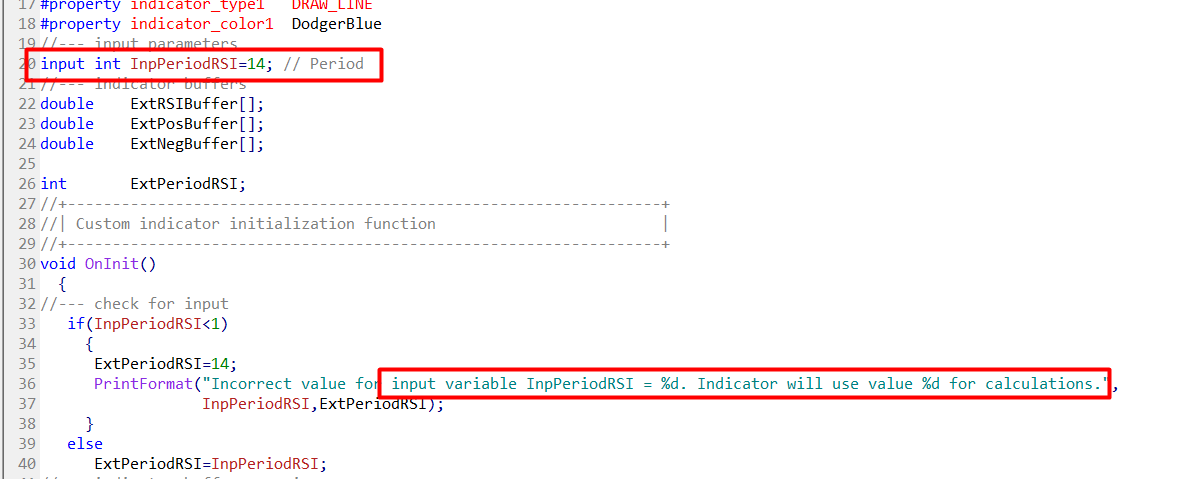
              Well, the parameters extraction happens on the browser and the code I wrote for this is not very capable, it doesn't really understand the MQL language. In this case I can see why the problem happens:
              0ecae38c-327c-4abf-ab66-aac9b287de27-image.png

              the code that I wrote thinks that the variable is defined on line 36 where this is clearly a string. In reality the variable is defined at line 20.

              The correct values are:
              data type => int
              name => InpPeriodRSI
              default value => 14

              1 Reply Last reply Reply Quote 1
              • 1 / 1
              • First post
                Last post

              Online Users

              N
              C
              F
              N

              12
              Online

              146.8k
              Users

              22.4k
              Topics

              122.6k
              Posts

              Powered by NodeBB Forums | Contributors