Is This Possible...?
-
Hello Dreemas*
I am using a custom indicator with 'Indicator is Visible'.
It paints Red and Blue arrows on the chart.
Is it possible that when it paints a new arrow to delete the previous arrow from the chart?
Example: Paints a Red arrow and deletes the previous Blue Arrow.....
TIA*
-
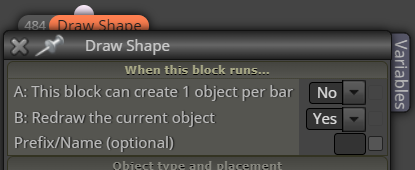
Use these settings
-
Thanks Roar and good to 'see' you.....
The arrows are based on the indicators buffer numbers. They do not show up as Objects on the chart.....
TIA*
-
EA cannot modify indicator buffer data, it can only read them... So you must edit the indicator source code here.
-
I see. Makes sense....
So is it possible then for the EA to read only the indicators that get printed in front of the current one, not previous ones....?
Regards*
-
@Morpheus_0 said in Is This Possible...?:
in front of the current one
What does it mean? Can you show a picture
-
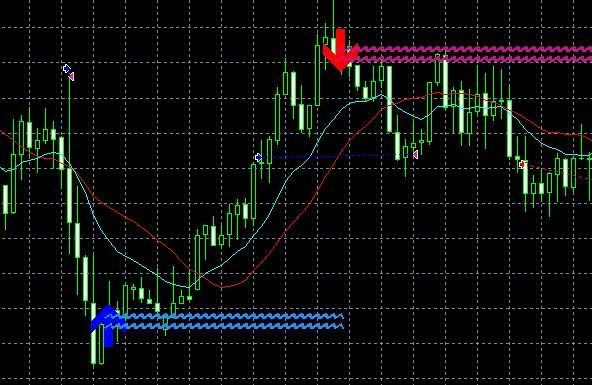
In this example: The EA opens a sell on red arrow....but closes it straight away because it can still read the blue arrow because price hasn't moved far enough away from the blue candle....
When Red arrow appears it will close Buys.
When Blue arrow appears it will close Sells.Regards*
-
That kind of indicator is more complicated to work with. You can't use "Indicator is visible", instead use a normal condition block where you check that candle ID 2 didnt have arrow but candle ID 1 does.
Maybe "Indicator appear" block will also work, I have never used it
-
Thanks for your help Roar* I'll have to continue on tomorrow as it's 3am here!
If I was to use a Condition block, which condition would you suggest I use....?
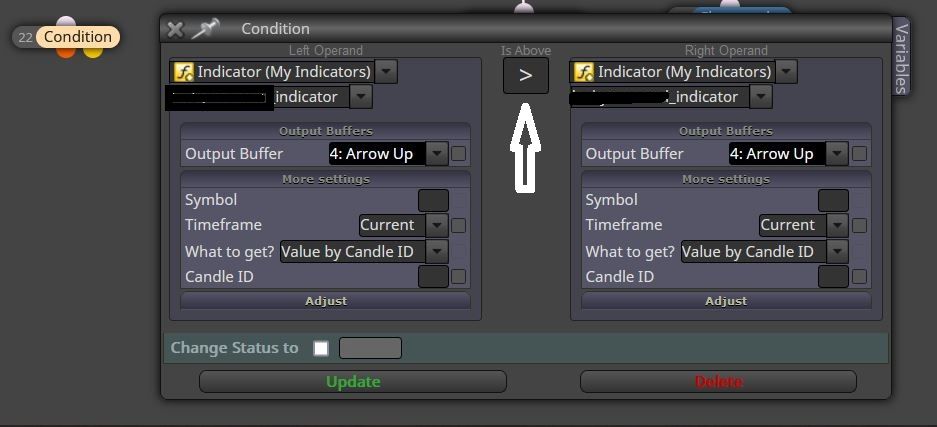
Perhaps I could use the Indicator to draw Objects and then base the trades off the Objects instead of the buffer values
-
Indicator buffers have values for all candles. If some candle doesnt have an arrow, its value is 0 (or EMPTY_VALUE).
So you need 2 condition blocks:
- First check that your indicator on buffer 4 and candle ID 2 has value 0 (use the operand == and then value numeric 0)
- Then check that your indicator on buffer 4 and candle ID 1 does not have value 0 (use the operand != and then value numeric 0)
This works if the non-arrow candles have value 0. If they have value EMPTY_VALUE, you need to repeat this process and replace 0 with EMPTY_VALUE
-
I see....
Also, if ID 1 is previous Candle, is ID -1 the next Candle....?
TIA*
-
@Morpheus_0 Yes, ID -1 would be the next candle in future. I think you should compare IDs 2 and 1.
0 would be the currently moving candle
Need small help? Tag me in your post
Need big help? https://www.fiverr.com/big_algo/automate-your-winning-strategy-in-mql4-or-mql5 -
@roar Thanks for your help. I'll see what I can come up with

