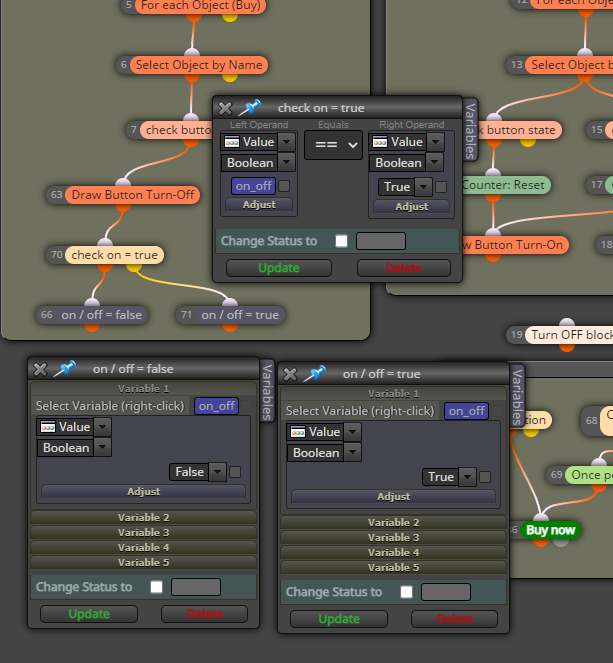
I need help on this 🙏🙏
-
hello
I need help how to create an On/Off button on the chart
Clicking it will turn off a block and clicking back or another dedicated button will turn on that same block... the same loop as that.
Really need help on this ASAP

-
You create the button on init, when clicked the button turns on activates the blocks you want, then you either redraw the button off, or when clicked off it deactivates the button
-
The LockCurrency by FXDREEMA has this functionality.
-
I did it here at https://fxdreema.com/shared/m0KB7HeKd
I want the Turn-OFF and Turn-ON buttons on the chart to do exactly what it's named. (to turn the opening order blocks on and off in this case). What I noticed is that it only works once, once it's clicked and turned off and on one time, if clicked again it doesn't work but I want it to keep working in a loop. How can I do that?
-
@tec-nacks Secondly; how can I edit the fxdreema text that shows up when I click those buttons? Where can I change it? as in the image below.

-
for a start I would have 1 button that does the on and off, you can use object on chart selected by the name used to draw, if = 1 is off, if = 0 is on depending on the state of button depends on whether on of off, you will see this in the journal
-
@tec-nacks
Here's a little idea, I haven't tested it, but that's how you use the blocks for a button. If I understand correctly, you need a button, not a switch.
https://fxdreema.com/shared/Pv2tbtkkb -
@jstap can you help me with a demonstration here pls?
-
@RGoo I tried this didn't work.], can you help look into it?
the on/off block isn't trigger the buy block. The idea is to turn off the buy block so it won't open trades within that timeframe and when the button is clicked again it turns on that block in order to keep trading and vice versa
-
@tec-nacks Ahh, I didn't understand that. let me think
-
So you want to press the button once and it should stay on until you press it again.
-
-
@RGoo I tried it, it didn;t work. it only turns on once and not again
-
Now it's back to me, a button is a switch not a button so it probably won't work. You have to take an object and activate it by clicking on it. This can be an area, you can then change the color individually. So you actually only need one button and the Delete objects button must be an area that is only activated once.
-
@RGoo thank you for the heads up but i really don't understand am not so good with variables as such. wouldn't mind if a demonstration would do
-
@tec-nacks
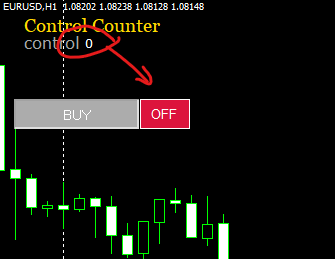
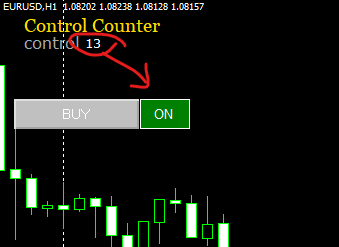
I think you can make what you want to do easier, I made an example for you that works. The Control Block is for control only. If it counts up with every tick, you know that the next block is switched, if not it is blocked.
But you have to do the rest on your own, this is the only way to get further in your understanding of the program.https://fxdreema.com/shared/WS5iUoaGc
-
Thank you, bro. IT worked you're a genius man
Thanks. Will like yo be in touch with you...Cool with that?
-
I'll like to apply this same logic to Delete Pending Orders, Is it gonna work ??
Having the delete pending order block replace the Buy Now
-
Here's an example on how to have a button toggling a few options: https://fxdreema.com/shared/oQNX9nnOb
-
@tec-nacks
Yes, of course you can do that with every action, but please try to do it yourself, otherwise you will always be dependent on others and will never get ahead!!!