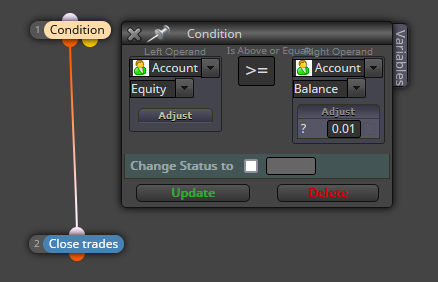
close open order at spesific %
-
I want to close all opened orders(automatic or manual)at the n% of my equity/balance/....
how can I do this? -
-
Thank you
-
You're welcome.
-
@l-andorrà
Hello
I hope you are doing great
I did exactly as you said by the blocks in the image, but the trade never closed by the EA.
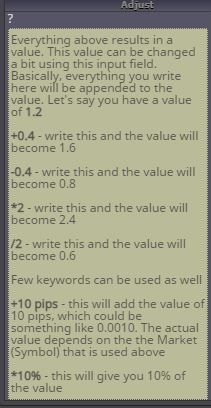
As the attached image shows, the note says different way for the "Adjust" box.
So, would you please guide me through?Thanks in advance!
-
@Taho_Trader said in close open order at spesific %:
@fxDreema
@l-andorrà
Hello
I hope you are doing great
I did exactly as you said by the blocks in the image, but the trade never closed by the EA.
As the attached image shows, the note says different way for the "Adjust" box.
So, would you please guide me through?
Thanks in advance! -
Can you please share the link to your project?
-
Since I am very new, I still don't know how to share a project
-
projects->create shared project link->open in web page->copy & paste here
-
Well, I have to explain that in the previous questions, I was looking for the exit point, for which I have the idea that even if I have several active trades in one chart, each one is constantly checked with the balance amount, and whenever each one is -3% in profit column Compared with The total balance ; transaction to be closed. In this case, I don't have to constantly look for a new stop loss percentage when my balance changes.
I will send you one of my project but it has many other problems that now I hope that I can solve them with your help -
https://fxdreema.com/shared/0QZ6gLdGd
But the first problem right now is the problem that I have with two entry conditions columns that when I put > or < between the two condition columns, it has to have repeated entries until these conditions are logically established ,But only two conditions are met when the two Indicators collide , and when the candles move away from the MA, the second condition is no longer met.
This happens in a situation where, on the contrary, my goal is to start trading after two conditions are completely fulfilled, and as you can see, I did not use >= or <= -
I sent another project
https://fxdreema.com/shared/SA13tssuc
THIS is that project -
Your logic is apparently correct. However, woking with PSAR on candle ID 0 is problematic when a change in the trend is identified. However, you connected both conditions directly. That means bot need to be true exactly at the same time. Is that what you need?
-
Dear l'andorrà
first I have to say thank you I will check and change 0 id number
Yes, it is true, this is the same logic (AND) that my goal is to do this transaction if both conditions exist.
But now I have a more important problem
My problem is that I defined two positions where I enter a trade when the price hits the line of one oscillator, and at another level, the trade is closed when it hits another line of the same oscillator, but the CLOSE POSITION command does not work.
Is there an order to EXIT trades other than CLOSE POSITION?
If I had defined the conditions incorrectly, it should not have worked in the first step, i.e. entering the transaction, so I conclude that the problem is in the exit order. -
Yes, there is another block than can close trades, but it is only working when connected to a loop block. The one you are using should work. That means the problem is in the conditions selected to close them. Can you please share the link to the latest version of the project to take a look at it?