Custom Value - Trailing Stop and Trailing Step (Please advise)
-
Hi Team...
I have put a trailing stop and step in my project. I am trying to create a custom value for the Trailing Stop and Trailing Step as input for these values (Not typed in a constant)
I have created a formula and added the value to a variable. The problem is that when I select this variable (as input for the Stop or Step) is produces the variable value allocated not the produced formula value.
Can someone please advise?
-
@John-Doe
use value as pips -
@ehsan1362 But of course, that's what is there by default. The algorithm still picks up the value of the variable number on the menu not the produced formula value.
-
It pics up the values highlighted in orange NOT the values of the Trailing Stop and Trailing Step highlighed Green (These variables produced are the pip values produced/allocated as per formula)
-
-
@John-Doe
If I understand correctly, the problem is how you fill your variable. In order for the new numbers to sit in the variable, the variable must be stored in itself -
@ehsan1362
means you should have a variable and put it in to another variable for new update numbers . and use the second variable for trailing not the one -
@ehsan1362 That's exactly what I've done. The output variable stored should equate to (as per formula which is correct) let's say 30 value (pips) Trailing Stop as per VARIABLE. The value derived from these variables are NOT picked up by the algorithm, the variable NUMBER assigned is picked up instead (as I've highlighted in orange). I don't know what to do to get those produced values as input into the stop and step.
So in other words I've used the formula block and created the output assigned to a variable (trailing stop).
This output variable (trailing stop) is then selected as the trailing stop value (pips).
The algorithm picks up the variable number and not the variable value calculated (let's say 30)
-
-
@John-Doe
maybe its better to use block comment and check your strategy step by step and see What is the output of each step?
or even you can share your block ( The desired part or the whole) for checking . -
@ehsan1362 I don't know how to do this but I'm determined, I will look into it after work. I will share better the formula and input blocks later (can't do it from my mobile). Appreciate your help thank you.
-
@John-Doe
You don't need a mobile phone, you can use sharing right here from the top bar of where your block : the project section, create a shared copy ( web link) -
@ehsan1362
I am a newbie, I just tried to help as much as possible, although I am not fluent enough in English good luck
 -
@ehsan1362 please check your private messages
-
@ehsan1362 I used the pass blocks and connected them to the formula block. The formulated values are now picked (allocated as variables).
Problem solved. Thank you so much for your help!!!

 ️
️ -

-
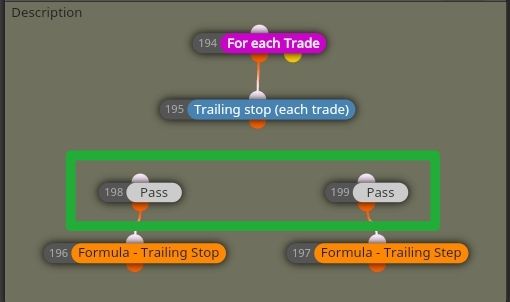
-
@John-Doe
GREAT


