fxDreema

    • Register
    • Login
    • Search
    • Back to the main page
    • Categories
    • Recent
    • Tags
    • Popular
    • Search

    EA robot and multiple charts

    Questions & Answers
    3
    13
    1115
    Loading More Posts
    • Oldest to Newest
    • Newest to Oldest
    • Most Votes
    Reply
    • Reply as topic
    Log in to reply
    This topic has been deleted. Only users with topic management privileges can see it.
    • H
      HDPaul last edited by

      Hello,

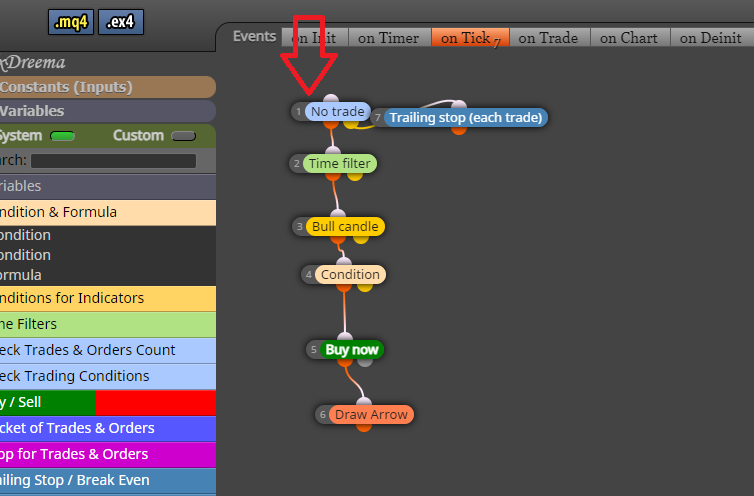
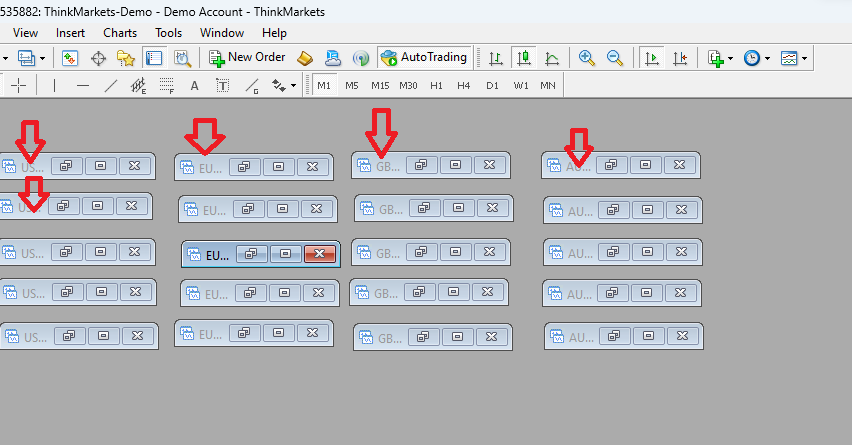
      I have an question. I use EA robot for multiple charts (pic.nr1) and by using a robot that trades on multiple charts, not one. However, I noticed that EA only executes one order at a time. If only USDJPY, only USDJPY, and it seems that EURUSD does not see it or dont start trade. I found out that because of the "No trade" function problem (pic nr.2). I just want it to work well. I want to trade with all currency pairs at once at once, it is necessary to trade continuously with all pairs, it does not matter if the order of another currency pair is open.. What block should I use? Maybe replace it with an "If trade" block? Is it better not to use it at all?

      Thank you
      Forex.png

      notrade.png

      1 Reply Last reply Reply Quote 0
      • jstap
        jstap last edited by

        Add a shared link rather than a picture, need to see inside each block. Probably in the no trade block you have all trades set.

        Learn fxDreema Without the Wait!

        My comprehensive book, available on Amazon, is packed with examples and invaluable insights to help you fast-track your learning journey.

        The paperback and hardback editions include MT4 & MT5 QR codes for easy access to all prebuilt projects and robots, including my latest gold trading robot!

        Don’t miss out

        Click here➡️ https://mybook.to/fxDreema to get your copy today!

        Enjoy! 😊

        1 Reply Last reply Reply Quote 0
        • H
          HDPaul last edited by

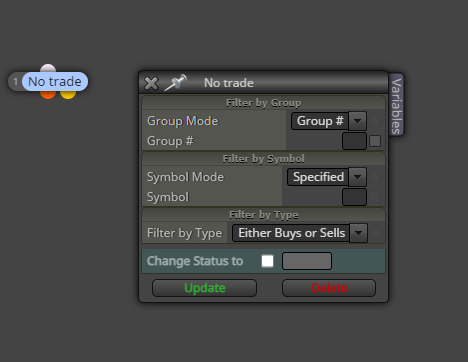
          jstap, thank you for replay. I am using demo, so it is possible share a link? If not, I am uploading no trade block picture. So, where can be an issue?
          Screenshot 2023-08-07 121741.png

          1 Reply Last reply Reply Quote 0
          • H
            HDPaul last edited by

            Jstap, I found how to share a link. Please look at https://fxdreema.com/shared/ZPg1WvJXd where can be an issue? Instead of "No trade" use something else? What will be the best option? You see, I noticed when trade is play on, nothing else happening I mean a new orders is not opended as I wish. I wanna that how much multiple charts with EA robot I have it will be open all of them. Thank you

            1 Reply Last reply Reply Quote 0
            • H
              HDPaul last edited by

              Please check shared link Please look at https://fxdreema.com/shared/ZPg1WvJXd

              1 Reply Last reply Reply Quote 0
              • jstap
                jstap last edited by

                Thought I replied to this, looks ok like it should work, try recreating from scratch.

                Learn fxDreema Without the Wait!

                My comprehensive book, available on Amazon, is packed with examples and invaluable insights to help you fast-track your learning journey.

                The paperback and hardback editions include MT4 & MT5 QR codes for easy access to all prebuilt projects and robots, including my latest gold trading robot!

                Don’t miss out

                Click here➡️ https://mybook.to/fxDreema to get your copy today!

                Enjoy! 😊

                1 Reply Last reply Reply Quote 0
                • H
                  HDPaul last edited by

                  Look, the an issue is that I have multiple charts like 10. So, the EA works well, but when the plays only one currency chart is excecuted at that moment, but anothers 9 charts no, so where is the problem? Maybe "no trade" block? I need that all 10 charts excecuted at the same time. Thank you

                  1 Reply Last reply Reply Quote 0
                  • jstap
                    jstap last edited by

                    On your platform probably, I run EA's on many.

                    Learn fxDreema Without the Wait!

                    My comprehensive book, available on Amazon, is packed with examples and invaluable insights to help you fast-track your learning journey.

                    The paperback and hardback editions include MT4 & MT5 QR codes for easy access to all prebuilt projects and robots, including my latest gold trading robot!

                    Don’t miss out

                    Click here➡️ https://mybook.to/fxDreema to get your copy today!

                    Enjoy! 😊

                    1 Reply Last reply Reply Quote 0
                    • H
                      HDPaul last edited by

                      Jstap, what do you mean? My platform is bad?

                      G 1 Reply Last reply Reply Quote 0
                      • H
                        HDPaul last edited by

                        Jstap, I have 5 USDJPY charts, 5 EURUSD, 5 AUDUSD and if I run 5 different EA on them all, only one is excecuted, why? Is it something wrong with my platform?

                        1 Reply Last reply Reply Quote 0
                        • jstap
                          jstap last edited by

                          All I can say is it works for me, if you install another platform you can test and see.

                          Learn fxDreema Without the Wait!

                          My comprehensive book, available on Amazon, is packed with examples and invaluable insights to help you fast-track your learning journey.

                          The paperback and hardback editions include MT4 & MT5 QR codes for easy access to all prebuilt projects and robots, including my latest gold trading robot!

                          Don’t miss out

                          Click here➡️ https://mybook.to/fxDreema to get your copy today!

                          Enjoy! 😊

                          1 Reply Last reply Reply Quote 0
                          • G
                            GeoFX @HDPaul last edited by GeoFX

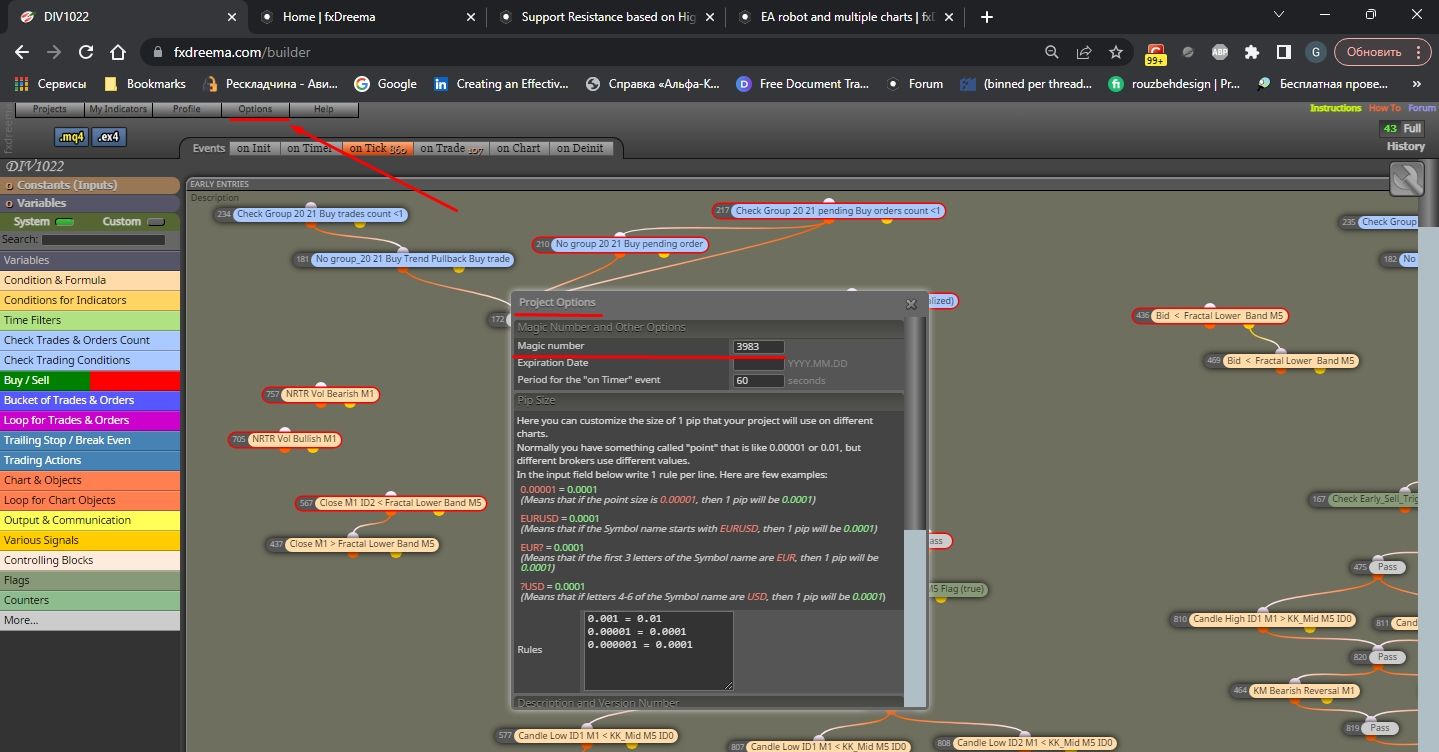
                            • @HDPaul Hey mate. It's likely you will need a different Magic number assigned for each EA you attach to each chart. That entails the MT platform will treat each EA separately.
                            • You can find the Magic Number setting in the Options->Project Options. Try it out to see if that works for you 🙏

                            Screenshot_1.jpg

                            1 Reply Last reply Reply Quote 0
                            • H
                              HDPaul last edited by

                              Hi mate @GeoFX ,

                              Thank you for helping. I assume it will solve an issue. Thanks mates for help.

                              1 Reply Last reply Reply Quote 0
                              • 1 / 1
                              • First post
                                Last post

                              Online Users

                              A
                              S
                              B
                              A

                              23
                              Online

                              146.7k
                              Users

                              22.4k
                              Topics

                              122.6k
                              Posts

                              Powered by NodeBB Forums | Contributors